Company-locked cart
The selected company's pricing and rules are applied to the cart, and the cart cannot be paid for under another company.
Corporate sale block
Company to invoice, billing profile, employee match and invoice note are entered at checkout.
Quote PDF
Outbound and return flights are listed in separate sections; with up to five options per direction a combination table is added.
One record, one set of reports
A panel sale lands in the company's file, sales report and policy compliance report under its own channel label.
Not every request from a corporate client comes through the portal. A manager phones about a last-minute flight, an assistant emails a group stay, an employee asks for help with a complicated route. Kurumsal.pro, built on DIJI.TECH infrastructure, lets agency staff handle these requests from the B2B panel with the company's own pricing and rules. Bookings made in the portal and agent-assisted sales therefore come together in the same company record, the same invoicing line and the same reports.
What is agent-assisted corporate booking and who uses it?
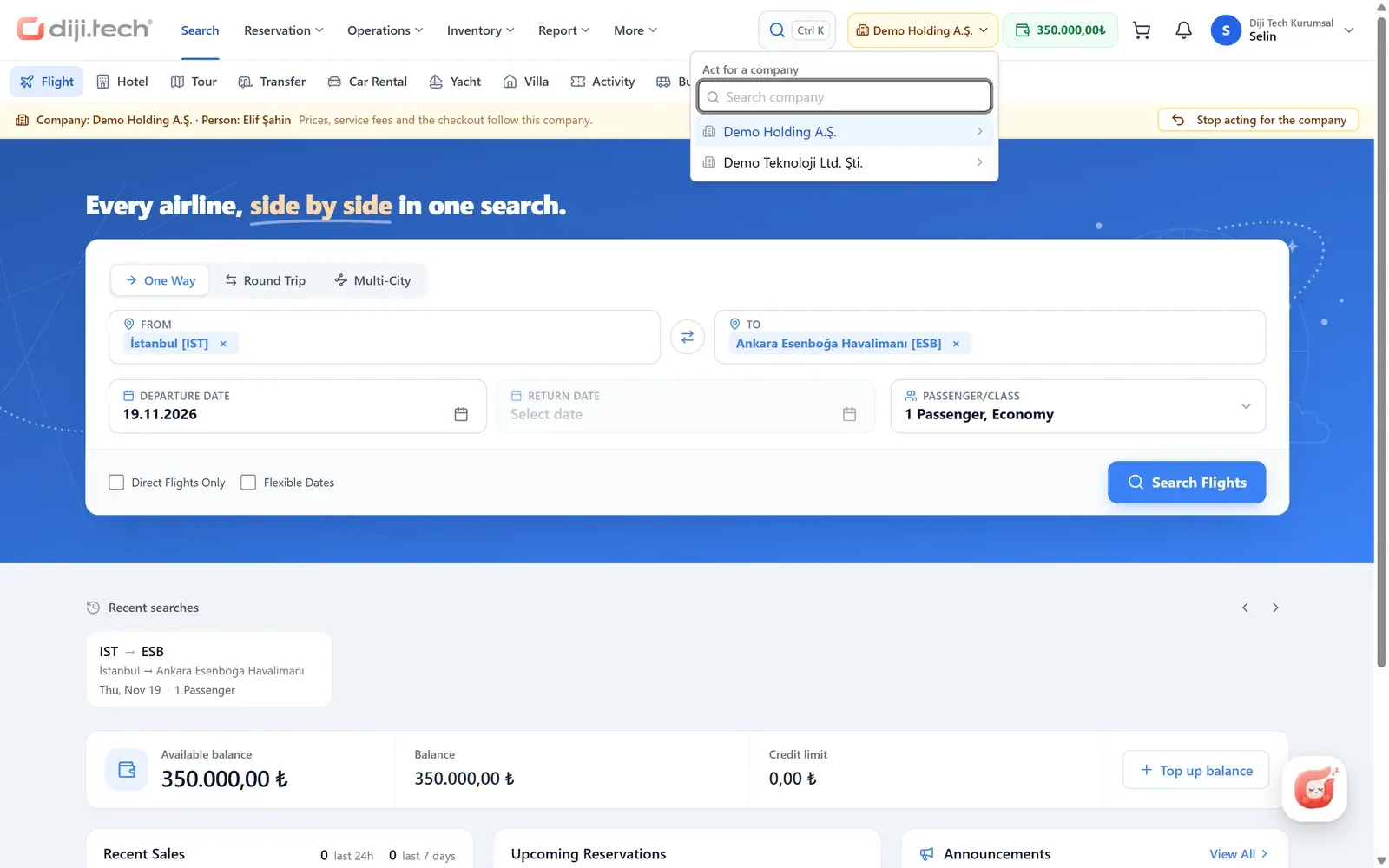
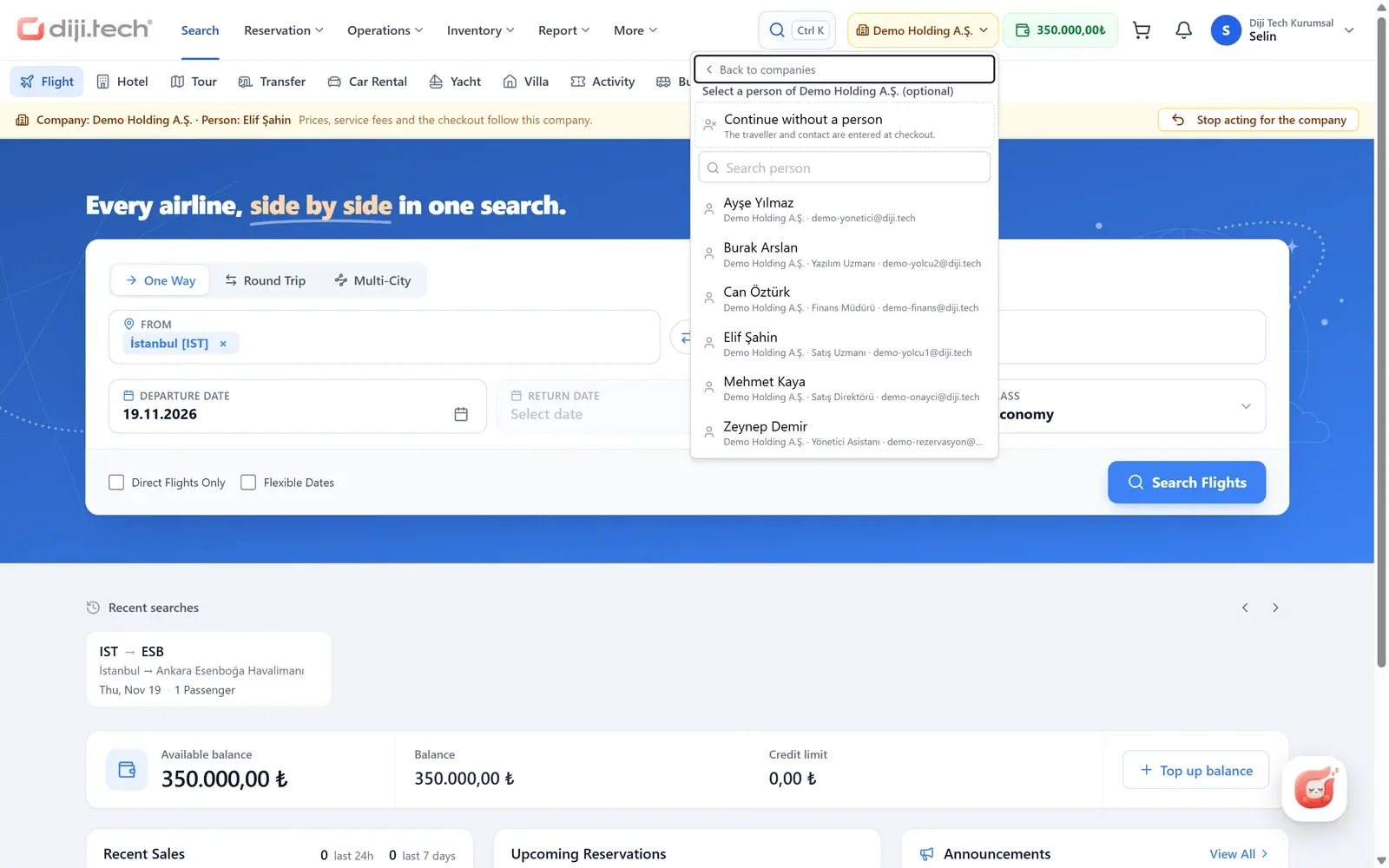
Agent-assisted corporate booking means an agency user selects a company in the panel and then searches, builds a cart and pays on that company's behalf. The screens are the agency's everyday panel screens; the difference is that pricing, rules and billing details come from the selected company. Corporate requests that arrive by phone, email or in person are handled through this channel.
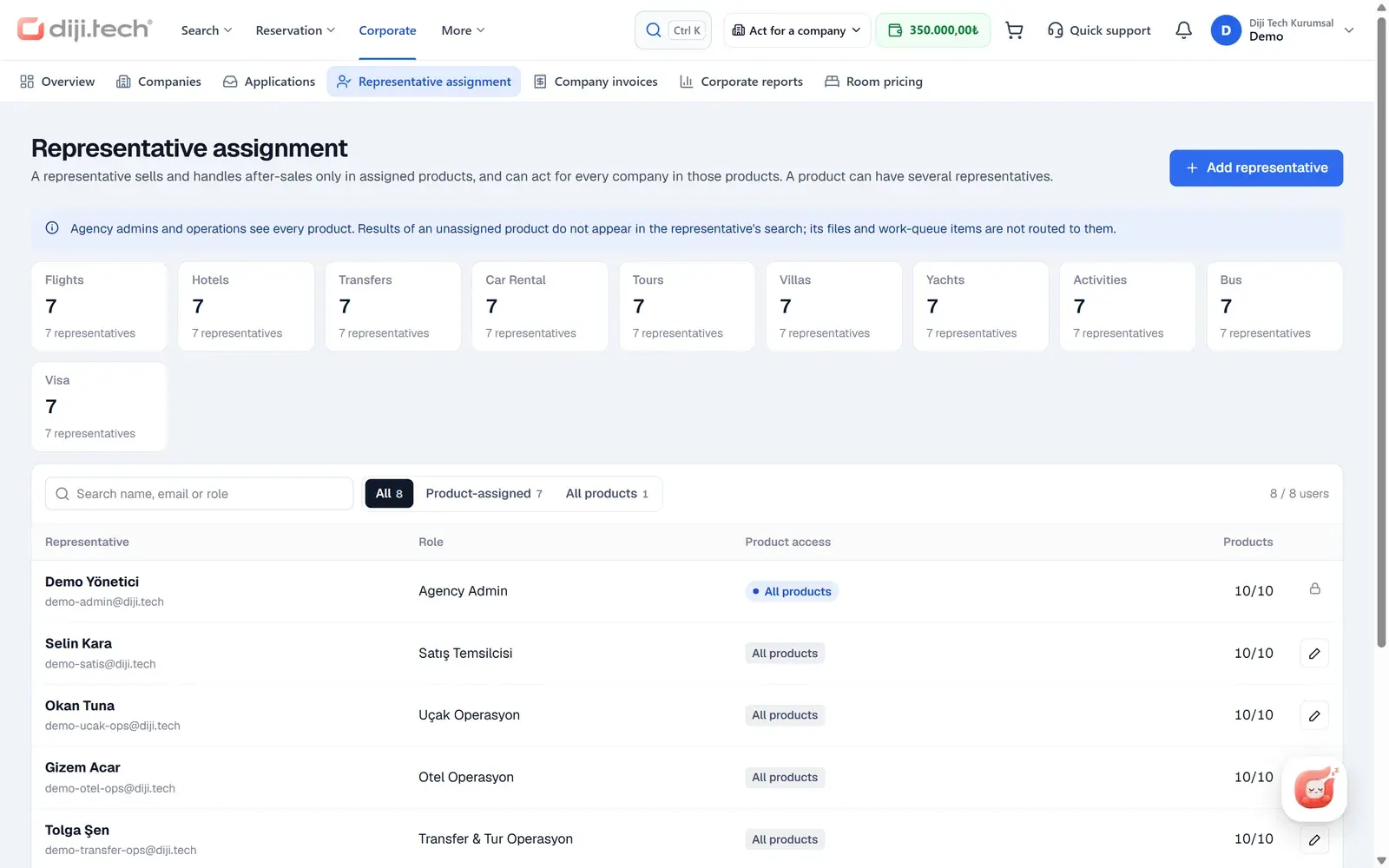
The channel is used by the panel users of a corporate agency and by the users of a group agency that manages corporate agencies. The agency admin can assign representatives per product: a representative is assigned to a product, not to a company, and works on behalf of all companies within that product. Operations queues also narrow to the user's product assignments. Representative assignment and company management are covered on the corporate travel agency software page.
In reports this channel appears under the label "Call center". That label does not mean a switchboard, IVR or CRM product; it only shows that the sale was made from the panel by agency staff.
How does selecting a company and a person change the search?
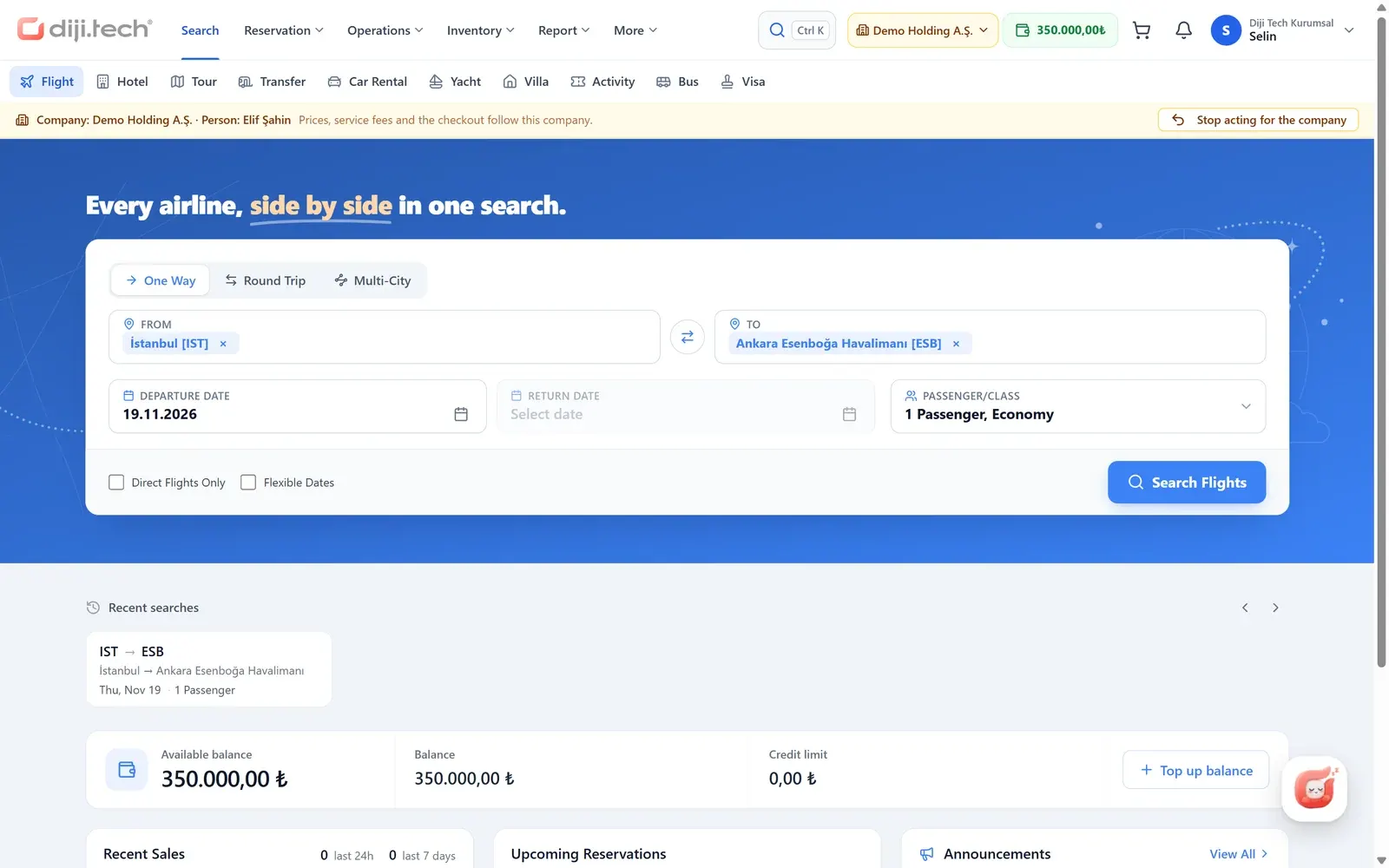
Agency staff find the company in the top bar by name, code, accounting code or tax number and can optionally select an employee of that company. From then on every search screen works with that company: prices are calculated with the company's tier, its fee rules are applied and the checkout details are pre-filled.
The selection has these concrete effects:
- Company pricing: the service fee, hidden markup and commission rules the agency has defined for the company flow into search. Subsidiaries and branches inherit the corporate rules of their parent company.
- Turkish Airlines corporate code: the corporate code defined for the company is added to the flight search; branches use the parent's code. Details are on the Turkish Airlines NDC integration page.
- Representative price tier: this is the tier that prices panel sales made by agency staff for a corporate client, and it is the only tier that can also be defined as a discount.
- Company-locked cart: the cart is bound to the company it was opened for. If payment is attempted under another company the operation is rejected, so a cart priced for one company is never invoiced to another.
Which products can be sold on behalf of a company?
Agency staff sell on behalf of a company using the modules that are enabled for the agency. The table below summarizes the products that stand out in the corporate channel.
| Product | In agent-assisted booking |
|---|---|
| Flights | Search at the company rate, fare packages (branded fares), Turkish Airlines corporate code; ancillary services offered by the airline: seat selection from the seat map, extra baggage, meal selection |
| Hotels | Search and sale with the company's price tier |
| Transfers, car rental | Search and sale; for cars, selection of the coverage packages the supplier offers |
| Bus | Trip search, seat selection and purchase |
| Tours, villas, yachts, activities | Search and sale where enabled for the agency |
| Visa | Visa sales; an authorized user can correct the agency commission on a visa line |
For product detail see the corporate flight booking and corporate bus tickets pages.
What is entered in the "Corporate sale" block at checkout?
The Corporate sale block at checkout records which company the sale is for, under which billing details and for which employee. It has four steps, and the record marks the panel channel as the source of the sale. This information carries over to both the travel file and the accounting document.
- Company to invoice: the company the sale will be invoiced to is selected.
- Billing profile: one of the company's billing profiles, defined per company or branch, is selected.
- Employee match: the traveler is matched to the company's employee record; matching is optional.
- Invoice note: a note for the sale is entered; it is sent with the pre-booking and appears as the invoice note on the accounting document. If the tenant's payment setting hides the invoice note, this step is not shown.
On the accounting side the recipient is always the company's billing profile, that is, the legal entity with its trade name, tax number and address, and the invoice note is carried onto that document. If the SYS feed is used, a sale with corporate context is invoiced to the company as a legal entity, with the company's accounting code used as the account code. Details are on the SYS accounting integration page, and the concept is explained in the billing profile entry.
How do travel policy and approval work in agent-assisted booking?
In agent-assisted booking the company's travel policy is evaluated, but the request does not enter the company's approval flow. Any policy violation is recorded and appears in the company's policy compliance report under the "Call center" channel, separate from portal sales. This lets the company track out-of-policy sales made through the agency as well.
This channel suits requests passed to the agency on the instruction of a company authorized person. Bookings that must go through the company's approval flow are made by employees in the portal, where a cart with an out-of-policy item or a budget overrun is sent to approval automatically. Policy rules are covered under travel policy software and approval steps under travel approval workflow.
What does the hidden markup box do?
The hidden markup box lets agency staff enter a percentage or fixed-amount markup specific to that corporate sale. The value replaces the company's defined hidden markup and does not appear on any document that goes to the company. The box locks once pre-booking or payment has started.
No role-based limit, ceiling or separate audit record is defined for the box. The agency therefore has to decide, in its own internal rules, when and at what rates it may be used. The difference between markup types is explained in the markup and service fee entries.
How is a quote PDF prepared?
A quote PDF gathers the options agency staff pick from search results into one document, priced at the company's working rate. Staff tick the options, generate the document and send it to the company contact. The document carries the seller's logo. The company contact reviews the options in it, and once a decision is made the sale is completed in the same panel.
For flights, outbound and return options are listed in separate sections. When there are up to five options per direction, a combination table showing outbound and return pairings is added. The selected fare package, that is, the branded fares bundle with its baggage and rules, is written into the quote. The same quote flow is used for transfers, car rental, tours, yachts, villas, activities, bus and visa.
Which payment routes are available?
The payment route in agent-assisted booking is determined by the combination of agency, company and platform settings. The agency's own B2B wallet can always be used. The company wallet and card payment open up when the relevant settings allow them. The table below summarizes the options in this channel.
| Payment route | When it applies |
|---|---|
| Agency B2B wallet | Always |
| Company prepaid wallet | A company is selected in the sale and the agency allows wallet payment in the company setting |
| Card payment (3D Secure) | The platform has enabled the card route for panel sales, and either no company is selected or the company setting allows another card |
The agency distributes balance into a company wallet from its own B2B wallet; there is no credit limit or deferred open-account arrangement for corporate clients. The wallet and invoicing structure is described on the corporate travel payments and invoicing page and the wallet concept in the prepaid company wallet entry.
What appears in the file and documents after the sale?
Every agent-assisted sale is recorded in the travel file with a corporate block. This block shows for whom, by whom and through which channel the sale was made, so agency operations, the company admin and accounting all look at the same information. The documents sent to hotels also carry the company details.
- Travel file: company, department, traveler, requester, representative, billing profile, source (Portal or Call center), policy evaluation and approval history.
- Hotel letter: a block with the company, requester and department on the copy sent to the hotel.
- Agency reports: the sales and tiered profit reports by company separate the channel into Corporate portal and Call center; the policy compliance report shows portal and panel violations separately.
How do post-sale requests reach agency staff?
Cancellation and change requests that corporate employees open in the portal drop into the agency's operations queues as "requests", and each request creates a request record and a file note. Direct changes on the agency's own hotels go to the hotel change queue. The actual cancellation or change is carried out by agency staff in the panel.
The work queues are split into options, payment, airline, reconciliation, partial processing, requests, and visa documents, appointments and decisions; records are assigned and closed as resolved. The queue summary and lists narrow to the user's product assignment: a representative sees the records of the products they are assigned to. Payment and request items not tied to a product are open to the whole team, and a user with no product assignment sees all queues.
How do the portal and agent-assisted booking work together?
For a corporate client the healthiest setup is routine trips booked by employees in the portal and complex or urgent requests handled by agency staff in the panel. Both channels use the same company record, the same billing profiles and the same reports, so the company admin sees all travel in one place.
The screens where employees book for themselves are described on the self booking tool page. How the hybrid model works is covered in the post on managing online and offline reservations on a single screen, and whether a company should build its travel team in-house or outsource it is discussed in in-house travel department vs TMC.
How do you roll out agent-assisted booking at your agency?
Agent-assisted booking is part of the agency panel when DIJI.TECH's corporate travel management software is set up; you do not need to build a separate sales screen for corporate clients. According to DIJI.TECH, setup takes about one week on average and activating an additional module takes one business day. To sell in Turkey, the agency must hold a TÜRSAB (Association of Turkish Travel Agencies) licence.
After setup the agency admin creates the companies, defines the pricing rules and assigns products to the team; agency staff then select a company in the top bar and start selling. To see the screens with your own scenario you can request a demo.
Screens
1 / 4
2 / 4
3 / 4
4 / 4
Screens are taken from the DIJI.TECH corporate portal and agency panel and show sample data.
Frequently asked questions
What is agent-assisted corporate booking?
It is the way agency staff book on behalf of a company: they select a company in the panel's top bar, optionally pick one of its employees, and search, build the cart and pay as that company. After the selection, every search screen works with the company's price tier, fee rules and Turkish Airlines corporate code.
Is agent-assisted booking a call center product?
No. The product does not include a switchboard, IVR or CRM. In reports this channel carries the label Call center, but it simply means a sale made by agency staff from the panel on behalf of a company. The calls themselves run on the agency's own communication tools.
Does an agent-assisted booking go to approval?
No. The company's travel policy is still evaluated and any violation is recorded, but the request is not sent into the company's approval flow. Violations show up in the company's policy compliance report as a channel separate from portal sales.
Which prices apply to an agent-assisted sale?
When a company is selected, search prices come with the company's price tier, its company-specific service fee rules and, where one exists, its Turkish Airlines corporate code. The representative (agency staff) price tier prices only panel sales made for a corporate client and can also be defined as a discount.
Can items from different companies go in one cart?
No. The cart locks to the company it was opened for. If payment is attempted under a different company the system rejects it, so a cart priced for one company is never invoiced to another.
Can flight ancillaries be sold in agent-assisted booking?
Yes. The ancillary services the airline offers, meaning seat selection from the seat map, extra baggage and meal selection, are available both in agent-assisted booking and in the corporate portal. The scope of what is offered varies by airline.
What does the quote PDF contain?
The quote is built from the options agency staff pick in search, priced at the company's working rate, and carries the seller's logo. Outbound and return flights sit in separate sections, a combination table is added when there are up to five options per direction, and the selected fare package is written into the quote.
How is payment taken in agent-assisted booking?
The agency's own B2B wallet can always be used. If a company is selected and the agency allows it, the company's prepaid wallet pays. Where the platform has enabled the card route for this channel, and either no company is selected or the company setting allows another card, payment by card with 3D Secure is also available.
Who can use the hidden markup box?
The hidden markup box lets staff enter a percentage or fixed amount per sale in a corporate sale, and it never appears on documents. There is no role-based limit, ceiling or separate audit record for the box, so the agency has to set its own internal rules for its use.
Related pages
Last updated: