Sequential or parallel
Levels run one after another or at the same time; in parallel you choose all or any one.
Levels by amount
High-value requests climb to an extra level, low-value ones skip it.
Approval by email
A single-use link, stored only as a hash, approves or rejects without signing in.
Price tolerance
The price is fetched again at the final approval; a difference beyond tolerance goes back for approval.
A travel approval workflow decides who must approve a business trip before it is purchased, in which order and within what time. In the corporate portal every item in the cart goes as a single request, the approver decides by email or in the portal, and the price is fetched again at the final approval. Within DIJI.TECH's corporate travel management software, the flow handles every request that the policy sends for approval.
The flow screen sits under company management in the portal, and the company administrator builds the levels. In the company detail of your agency panel the active flows and the number of requests awaiting a decision are shown read-only.
How does a travel approval workflow work?
At every submission the portal evaluates the policy and the budget. If there is an out-of-policy item or a budget overrun that requires approval, the portal chooses the "Send for approval" path; otherwise it chooses "Buy". The employee does not pick the path, which keeps the rules applied the same way on every request.
The flow runs in four steps:
- Selection: The employee adds flights, hotels, transfers and other products to the same trip cart.
- Trip details: Passenger details, the invoice profile, the justification for out-of-policy items and a note to the approver are entered.
- Approval or payment: The cart goes for approval as one request, or is purchased directly.
- Result: The request status is followed in the trip file; the final approval moves the trip to the purchase step.
The "one trip, one approval" principle avoids separate approvals for the flight and the hotel. The rules that decide which trip goes for approval are described in travel policy software.
How is an approval flow defined?
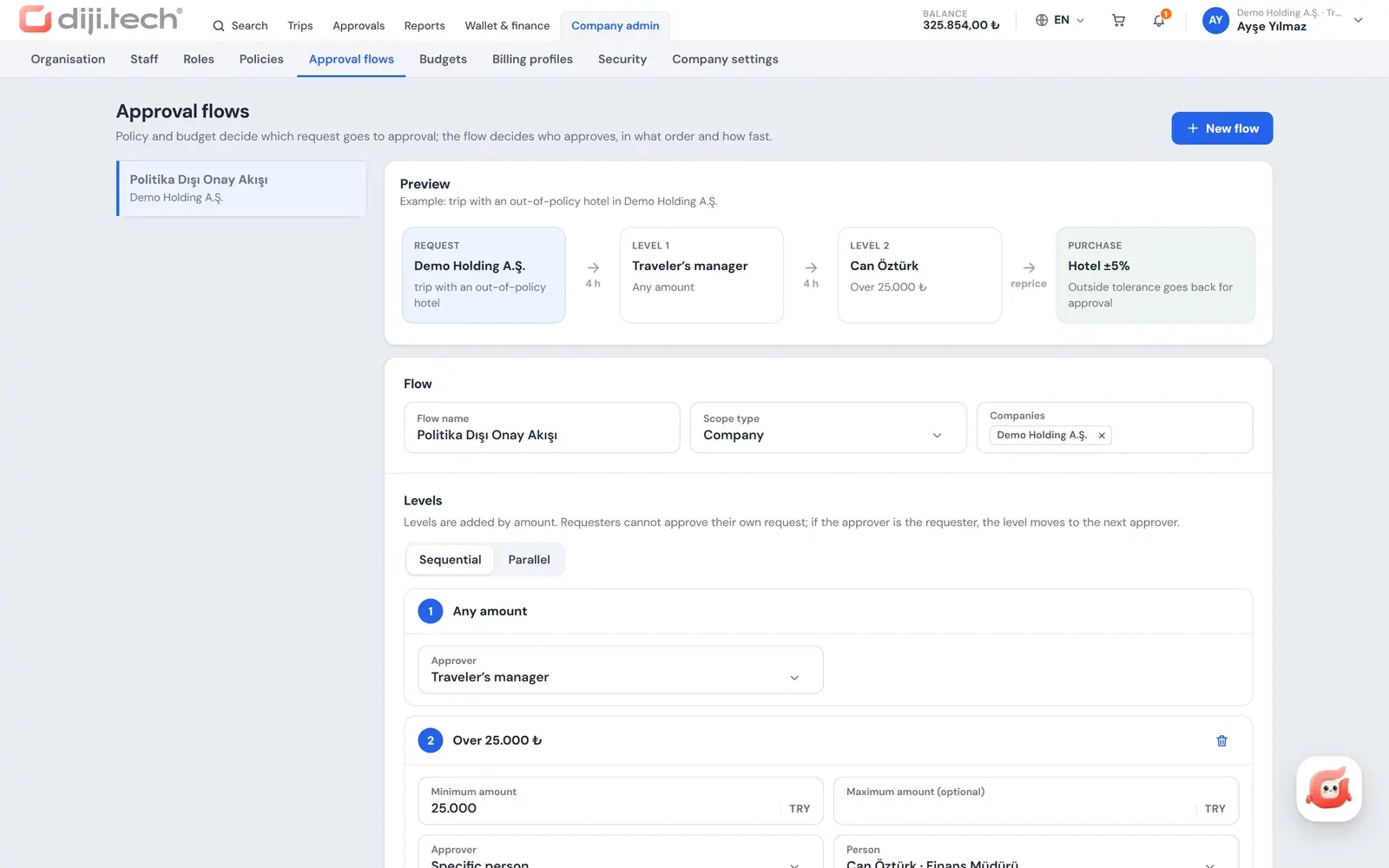
An approval flow is bound to a scope and applies to the requests of travellers in that scope. The scope is a company, branch, department or individual. Each flow consists of one or more levels, and levels run sequentially or in parallel.
| Setting | Options | Effect |
|---|---|---|
| Level order | Sequential / Parallel | In sequential, levels open one after another; in parallel, all wait at the same time |
| Level approver | Traveller's manager, department manager, named person, role | The approver is resolved from the company tree and role assignments |
| Decision rule | All must approve / Any one is enough | Chosen in parallel flows; in sequential flows everyone at a level approves |
| Amount band | Lower and upper amount | From the second level in a sequential flow; a request outside the band skips the level |
| Level time limit | 4, 8 or 24 hours (default 4 hours) | If the cart's option period is shorter, the approval time is capped by it |
| On expiry | Escalate to the next level, escalate to the company administrator, reject the request | The rule applied at a level where no decision was made |
| Price tolerance | By product group, +/- % (0-50) | The accepted limit of the price difference at the final approval |
| Alternative selection | On / Off (default on) | Lets the approver choose another option per item |
If no flow is defined for the company, the request goes as a single level to the traveller's manager, or to the department manager if there is no manager. The manager and department manager information is read from the employee and department records in the company admin panel.
How do you add an approval level by amount?
From the second level of a sequential flow, each level can be given a lower and an upper amount limit. If the request amount is outside the band of a level, that level is skipped and the remaining levels are renumbered. The same flow therefore settles small requests with one approval and large ones with an extra level.
A sample setup: at the first level the traveller's manager approves at any amount; the second level opens to the Finance role only for requests above a certain amount.
What happens if the approver does not decide in time?
Each flow defines a time limit per level and the rule to apply when it expires. The options are to escalate to the next level, to escalate to the company administrator, or to reject the request. An expired level is processed when the Approvals screen, the pending request counter or the live approval feed is opened.
The approval time cannot exceed the option period of the cart. If the option is shorter than the level time limit, the level limit is capped by the end of the option. The option running out is also published as a notification.
What happens if the price changes during approval?
Submitting for approval does not make a pre-reservation with the supplier, which is why the price is fetched again at the final approval. The flow defines a price tolerance per product group; if the difference is within tolerance the purchase is made. If it is beyond tolerance, the request moves to the "re-approval" status and the approver decides with the new price.
The product groups with a separate tolerance are:
- Hotel
- Transfer
- Car rental
- Tour, villa, yacht and activity
A percentage between 0 and 50 is entered for each.
Can the approver suggest another option?
If alternative selection is enabled in the flow, the approver can approve with a different option per item instead of rejecting the request. When the approver chooses "select alternative", search switches to this mode; the approver marks a suitable flight or room and the request continues with that option.
When an alternative is selected, the requester is notified and the change is visible in the trip file.
Can an approver approve by email?
Yes. The link in the approval request email opens a decision page that does not require signing in. The approver sees a summary of the request and approves or rejects it; a rejection requires a reason and a comment.
The link has the following security properties:
- Single-use: Once a decision is made, the link cannot be used again.
- Stored as a hash: The system keeps only the hash value, not the link itself.
- Limited lifetime: It is valid for the option period of the cart, or for 72 hours if there is no option.
If you are moving from a paper or email-based travel request form to the portal, the travel request form template post provides example forms and approval request emails.
What happens to requests while the approver is away?
An approver assigns a delegate for a date range. During that time the delegate approves, rejects or chooses an alternative in the approver's place. In the approval history the delegate's decisions are marked "as delegate", so it can be traced afterwards who decided on whose behalf.
When the delegation period ends, decisions return to the original approver. A delegate also cannot decide, even as a delegate, on a request that they opened themselves.
What does the Approvals screen show?
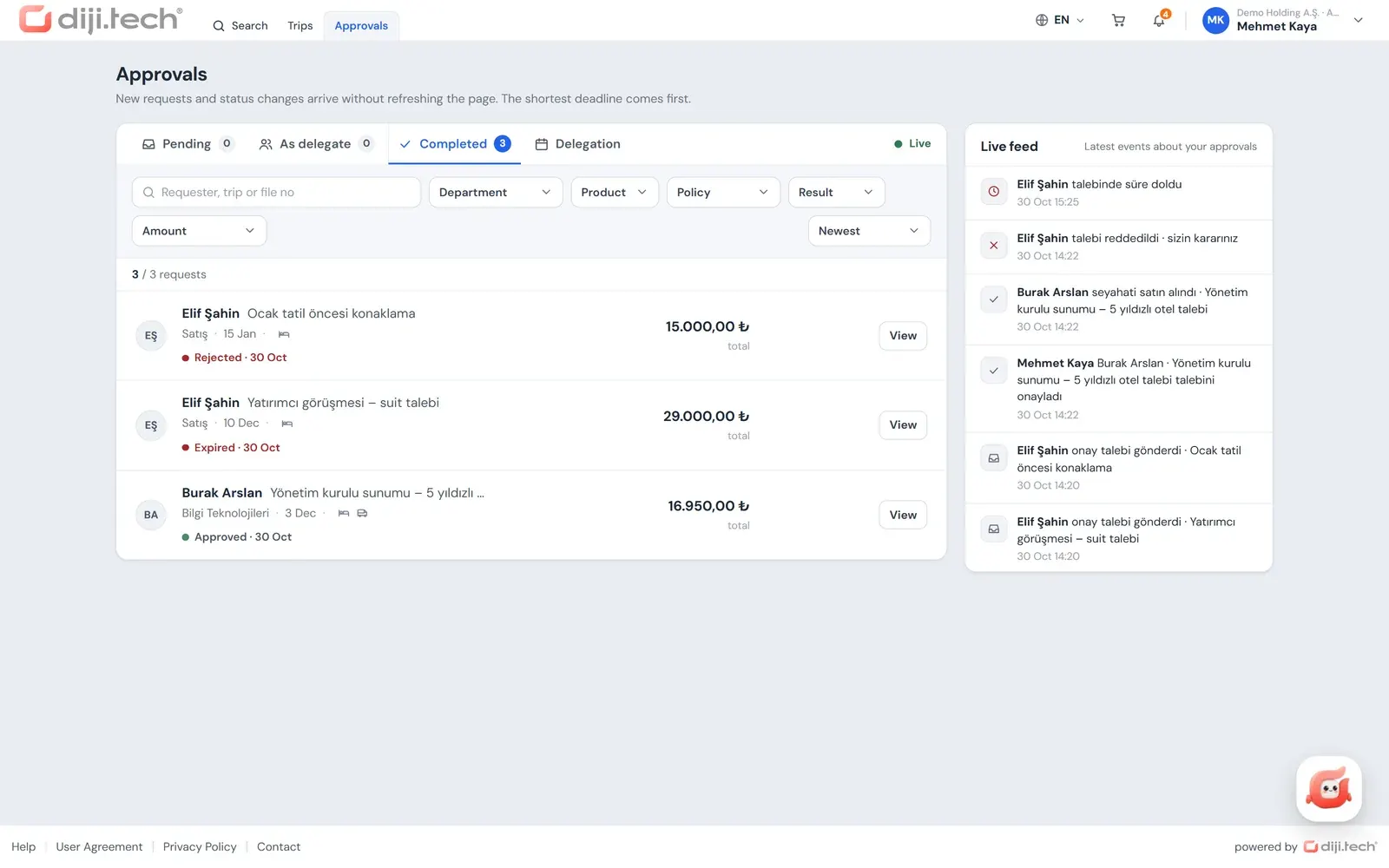
The Approvals screen gathers all of the approver's work in one place. Pending requests, requests pending as delegate, completed requests and delegations are in separate tabs. The list updates live: a new request appears without refreshing the page, and the latest approval movements are listed as a feed.
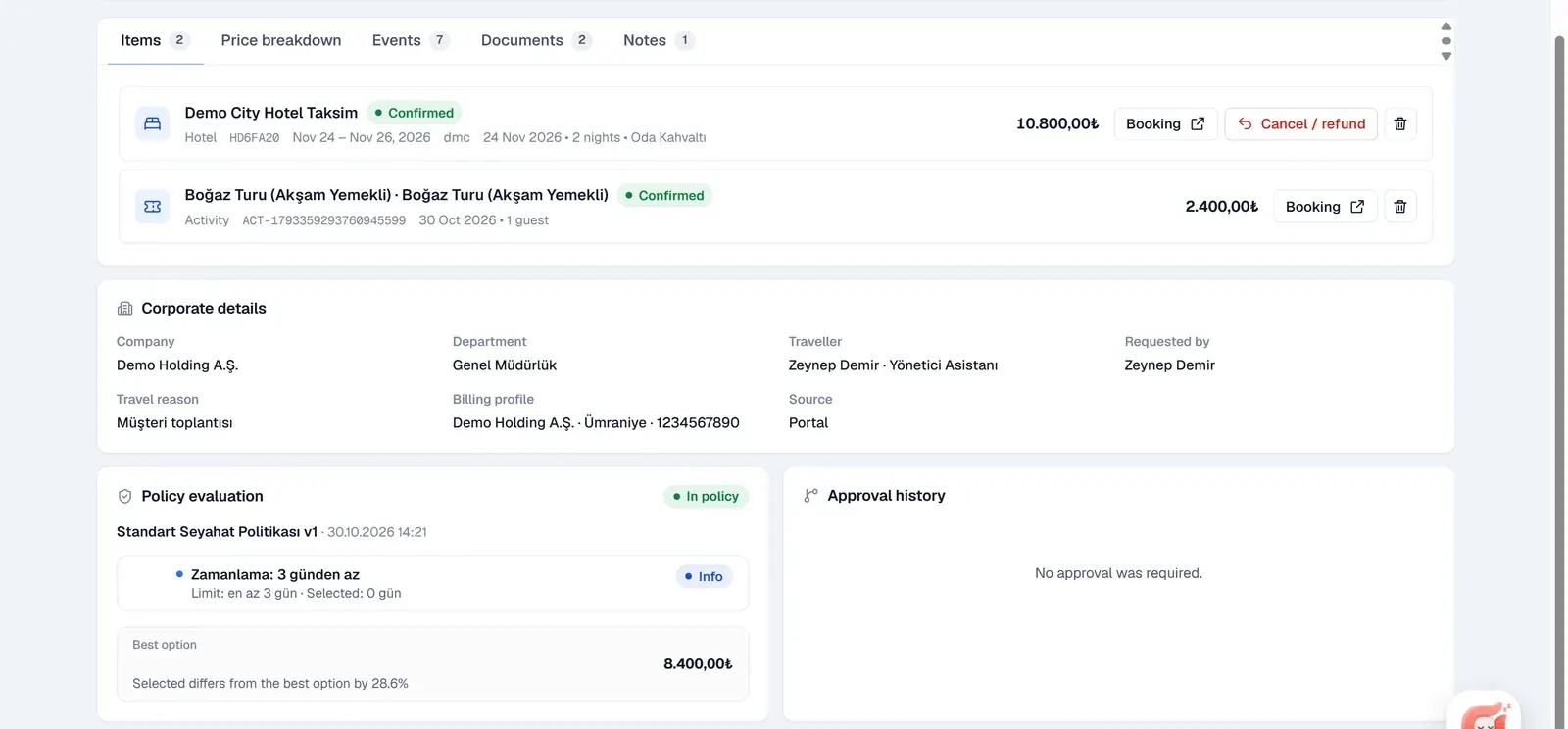
The approval detail contains the information the approver needs to decide:
- Items and price breakdown: All products in the trip and their amounts.
- Violations and justification: Which rule was violated and the traveller's explanation.
- Gap to the cheapest option: The difference between the chosen option and the best option.
- Levels: Which level approved and who is still waiting.
- Budget impact: The planned, actual, committed and remaining amounts of the relevant budget.
How the budget impact is calculated is described in travel budget control.
Can the requester approve their own request?
The person who opens a request cannot decide on it. If the requester resolves as the approver of a level, that level passes to their manager, and a level left without an approver is dropped. Only the approver or delegate of the next level decides, and the company administrator has no "force approve" authority.
When an assistant opens a request on behalf of an executive, the executive, as the traveller, can decide at a level where they are the approver. When setting up flows for the corporate clients of your agency, take this into account, for example by defining a separate individual-scope flow for senior executives.
How is the purchase completed after the final approval?
When the final approval is given, the price is fetched again and the purchase starts from the company wallet. If the purchase cannot be completed, a "Complete purchase" button appears in the approval detail. A cart sent for approval takes no payment at submission, and card payment is not used for the purchase after the final approval.
After a final approval given by email, an authorised approver or the company administrator completes the purchase. The company wallet balance is loaded by the agency; the payment routes are described in corporate travel payments and invoicing.
Where is the approval history kept?
Every approval movement is written to the approval events record, which is both the audit trail and the source of the live feed. In the trip file the employee sees the approval history, and on the request status screen the states: waiting, approved, rejected with its reason, alternative selected, price tolerance exceeded, time expired or availability lost.
On the company side, the approval process report shows the approval movements, and the summary screen shows the average approval time; the reports are covered in corporate travel reporting. Approval notifications (approval request, approved, rejected, alternative selected, option about to expire) are sent through the portal's notification bell and the corporate email templates.
In what order is the approval flow set up for a new company?
An approval flow works properly once the company tree and the policy are ready, because approvers are resolved from these records. A sequence that your agency can follow when onboarding a new corporate client is:
- Company tree and managers: Companies, branches and departments are opened; each employee's manager and the department managers are entered.
- Roles: Approver, Finance and other roles are assigned to people; if role levels will be used, role members are completed.
- Policy: The rules that decide which trip goes for approval are defined.
- Flows: Levels, amount bands, time limits and price tolerances are entered per scope.
- Pilot: The policy runs in "Inform only" mode and violations are monitored for a while.
- Live use: The policy is switched to "Enforce" mode, and requests that go for approval follow the flows.
What is missing from the approval workflow?
The approval workflow has no automatic reminder to approvers, no holding of seats or prices while waiting, no way for the requester to withdraw a request from the portal and no SMS notification.
- No automatic reminder is sent to approvers; the reminder option on the flow screen is saved but produces no notification.
- Seats and prices are not held while waiting for approval; this is why the price is fetched again at the final approval.
- There is no button for the requester to withdraw an approval request in the portal.
- There is no SMS notification for approvals; notifications are in-app and by email.
If you are designing the approval process in a company for the first time, the post on how to set up in-company travel approval suggests a step-by-step setup for the number of levels, amount thresholds and delegation rules. To see the approval flow with the structure of your own corporate clients, request a demo.
Screens
1 / 4

2 / 4
3 / 4
4 / 4
Screens are taken from the DIJI.TECH corporate portal and agency panel and show sample data.
Frequently asked questions
What is a travel approval workflow?
A travel approval workflow is the software flow in which authorised people approve a business trip before it is purchased. In the corporate portal, carts that are out of policy or over budget go for approval; the flow defines the levels, the approvers, the time limits and the price tolerance.
Which trips go for approval?
Policy and budget decide. If the cart contains an out-of-policy item and the rule outcome is approval, if a rule asks for approval in every case, or if a budget overrun is set to send for approval, the portal chooses the Send for approval path. Otherwise the employee buys directly.
Where do requests go if no approval flow is defined?
If no flow is defined for the company, a request that needs approval goes to the traveller's manager as a single level, or to the department manager if there is no manager. Once the company administrator defines a flow for a scope, requests of travellers in that scope follow its levels.
Can an approver approve by email?
Yes. The link in the approval request email opens an approve or reject screen without signing in. The link is single-use, only its hash value is stored in the system, and it is valid for the cart's option period or, if there is no option, for 72 hours.
What happens to requests when the approver is away?
The approver assigns a delegate for a date range. The delegate approves, rejects or chooses an alternative during that time, and these decisions are marked as made by a delegate in the history. Requests that fall to the delegate are listed separately in the As delegate tab of the Approvals screen.
What happens if the approver does not decide in time?
Each flow defines a level time limit and the rule to apply when it expires: escalate to the next level, escalate to the company administrator, or reject the request. An expired level is processed when the approval screens or the pending request counter are opened.
What happens if the price changes during approval?
Submitting for approval does not make a pre-reservation with the supplier, so the price is fetched again at the final approval. A percentage price tolerance is set for hotels, transfers, car rental and tours, villas, yachts and activities; if the difference is within tolerance the purchase is made, otherwise the request returns for approval.
Can the approver suggest another option?
Yes. If alternative selection is enabled in the flow, the approver can approve with a different option per item. Search switches to select-alternative mode, the approver marks a suitable option, and the requester is notified; the change is visible in the trip file.
Can the requester approve their own request?
The person who opens a request cannot decide on it. If the requester is the approver of a level, that level passes to their manager, and a level left without an approver is dropped. The rule works on the person who opened the request; when someone books on behalf of an executive, the executive can decide if they are an approver at that level, so flows should be designed with this in mind.
How is the purchase made after the final approval?
When the final approval is given the price is fetched again and the purchase starts from the company wallet. If the purchase cannot be completed, a Complete purchase button appears in the approval detail. After a final approval given by email, an authorised approver or the company administrator completes this step.
Related pages
Last updated: