Four roles, two screens
The company side uses the branded portal and the agency side uses the corporate section of the panel; each role sees only the data it is authorised for.
13 rule types
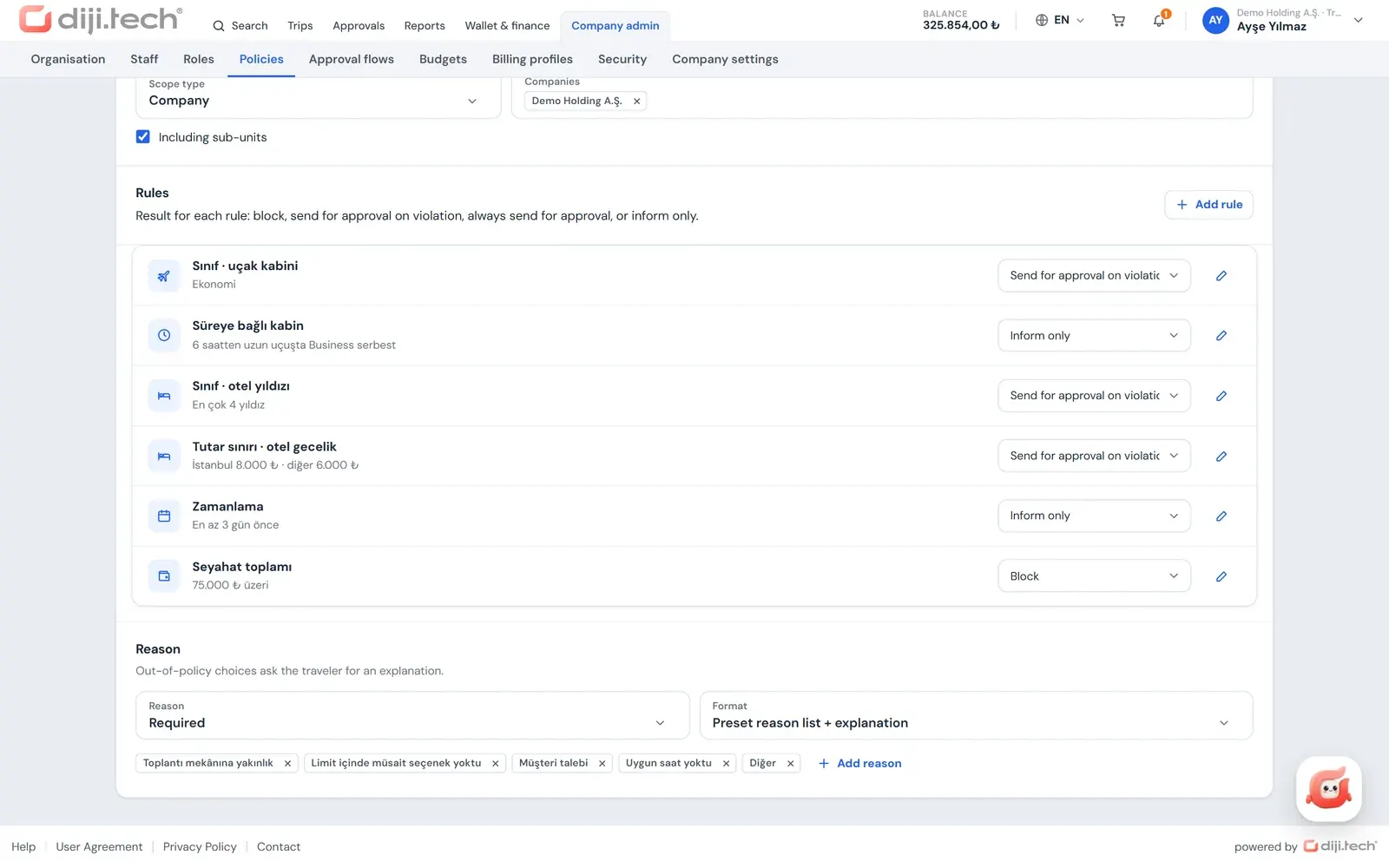
Cabin class, hotel star rating, per-city nightly limits, advance purchase days, banned airlines and risk-country rules in a single policy.
10 products, one cart
Flights, hotels, buses, cars, transfers and the rest go into the same trip; if approval is needed, it travels as a single request.
11 reports
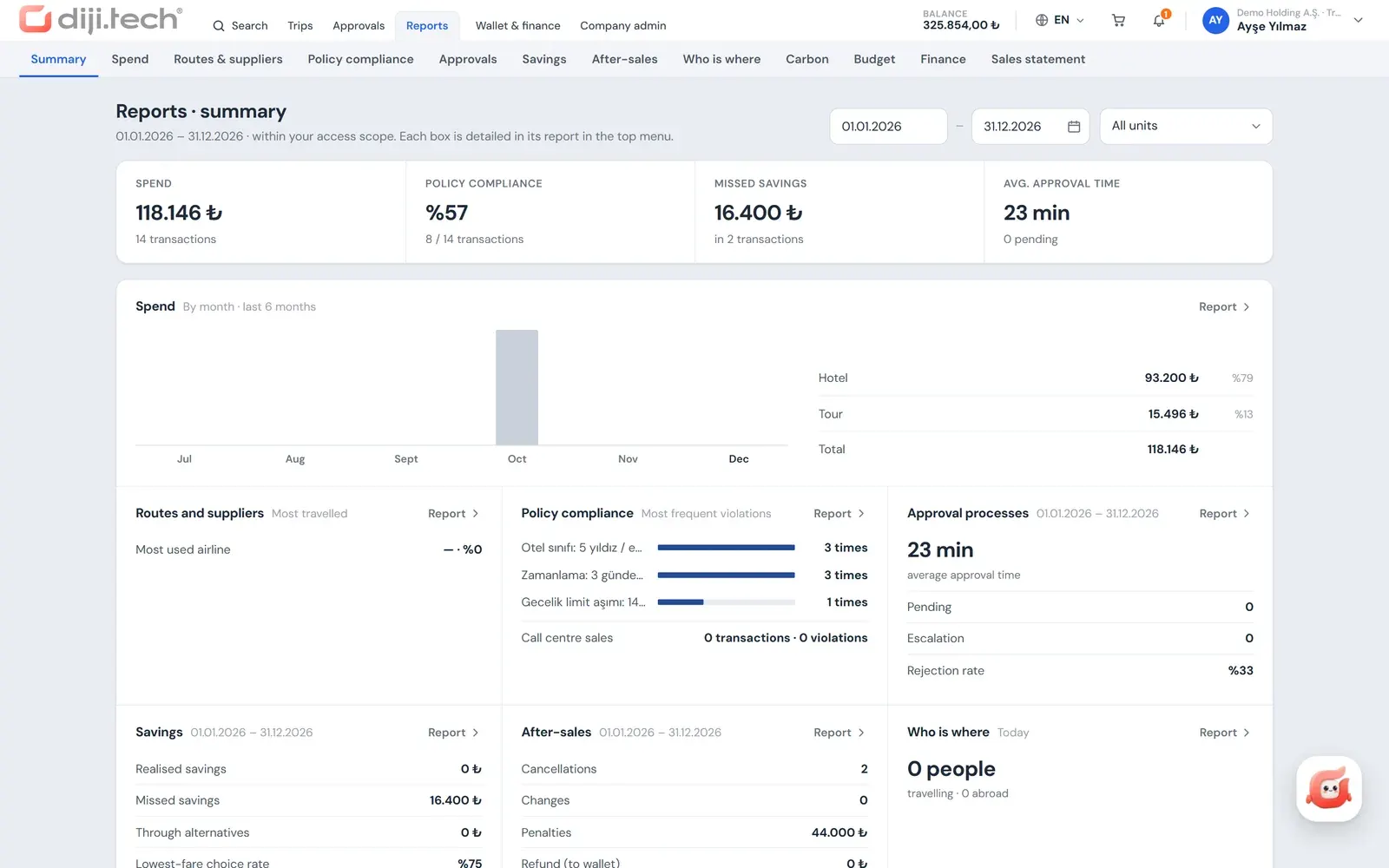
From spend to carbon, savings to the traveler locator report, narrowed by role scope, with scheduled email delivery.
A corporate travel management system lets a company run its business trips through one portal with policy, approval, budget and invoicing rules. In Kurumsal.pro, the agency gives that portal to the company: travelers search and build carts, the company admin sets the rules, and the agency manages pricing, balances and operations. The features below describe what the corporate travel management software from DIJI.TECH covers today.
Which roles does the system have, and what does each do?
Kurumsal.pro works with four roles. Two are on the company side (company admin and traveler) and use the agency's branded corporate portal. The other two are on the agency side (agency admin and agency staff) and work in the corporate section of the agency panel. Each role is described in detail on its own page.
| Role | Screen | Main tasks | Details |
|---|---|---|---|
| Company admin | Corporate portal | Organization, staff, roles, policy, approval flow, budget, reports | Company admin panel |
| Company traveler | Corporate portal | Search, cart, submit for approval or buy, trip file, cancellation request | Self-booking tool |
| Agency admin | Agency panel | Create clients, client-specific pricing, company wallet, representatives, invoices, reports | Corporate travel agency software |
| Agency staff | Agency panel | Search and sell on behalf of a client, quote PDF | Agent-assisted booking |
What does the company admin manage in the portal?
Your client's company admin defines the company structure, who can do what, and the travel rules from the portal's management screens. The role model combines 9 action keys ("what they can do") with 7 data scopes ("whose data they can do it on"). Every company receives 7 ready-made roles automatically: Passenger, Booker, Approver, Company manager, Branch manager, Finance and Report viewer. If needed, a custom role is created from a ready-made one as a template.
- Organization: a holding, company and branch tree, a department tree, billing profiles per company and branch (e-Fatura or e-Arşiv type, the Turkish e-invoice formats), and job grade levels.
- Staff: invitation by work email, creating a traveler profile without an account, bulk upload of up to 5,000 rows from Excel in one go, and a validation report before anything is written.
- Travel policy: 13 rule types; scope by company, branch, department, grade level or individual; "Enforce" or "Inform only" mode; version history and comparison of two versions. Details: travel policy software.
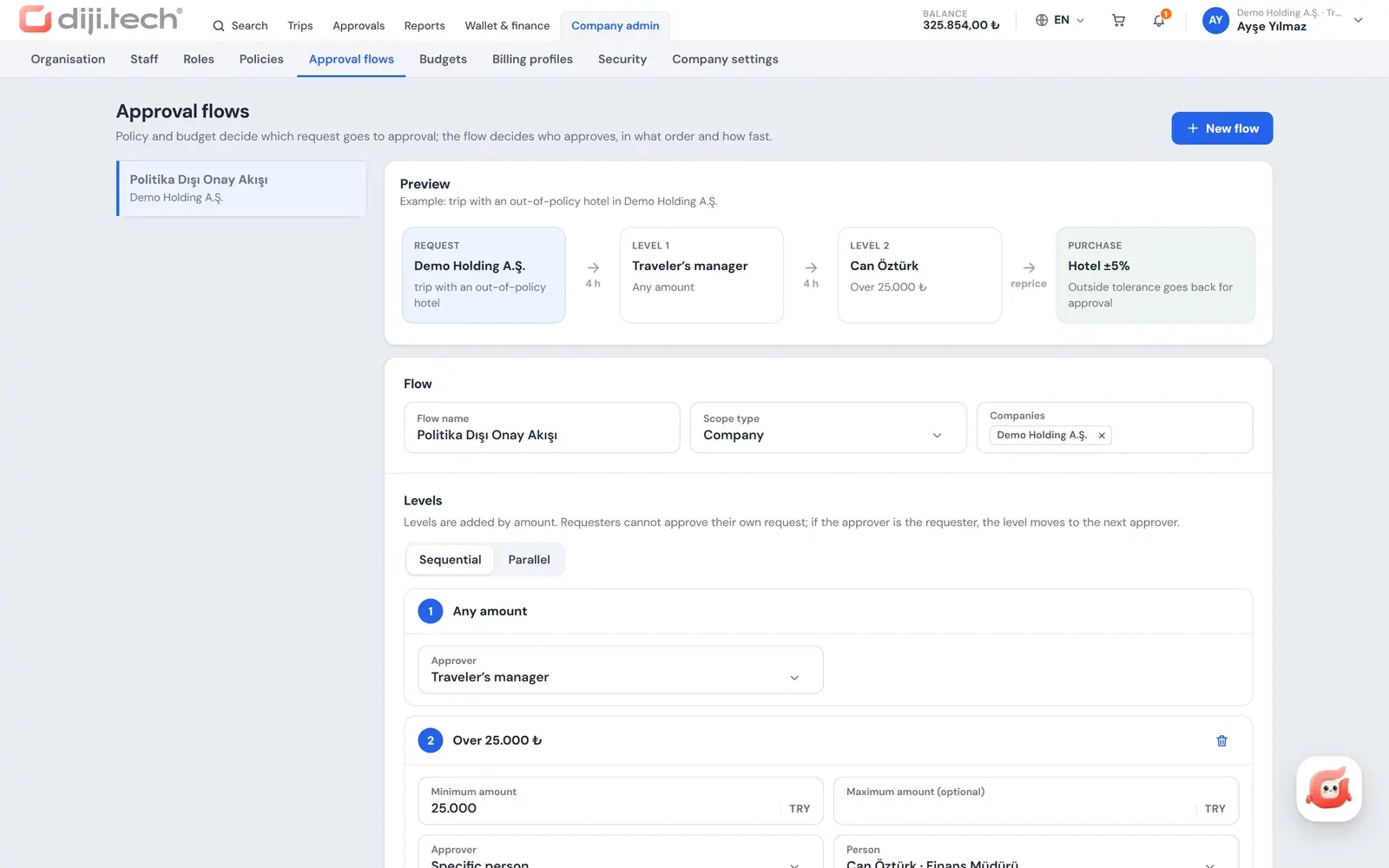
- Approval flow: sequential or parallel stages, amount bands, price tolerance, delegation, and one-click approve or reject from email. Details: travel approval workflow.
- Budget: a monthly, quarterly or fiscal-year ceiling for a department, company or branch; on overrun the system can inform, ask for justification, send for approval or block. Details: corporate travel budget control.
- Security settings: mandatory two-factor authentication for the ready-made roles and an idle timeout of 15, 30 or 60 minutes.
The admin's home dashboard shows spend, the policy compliance percentage, pending approvals and average approval time, the wallet balance and budget usage bars together.
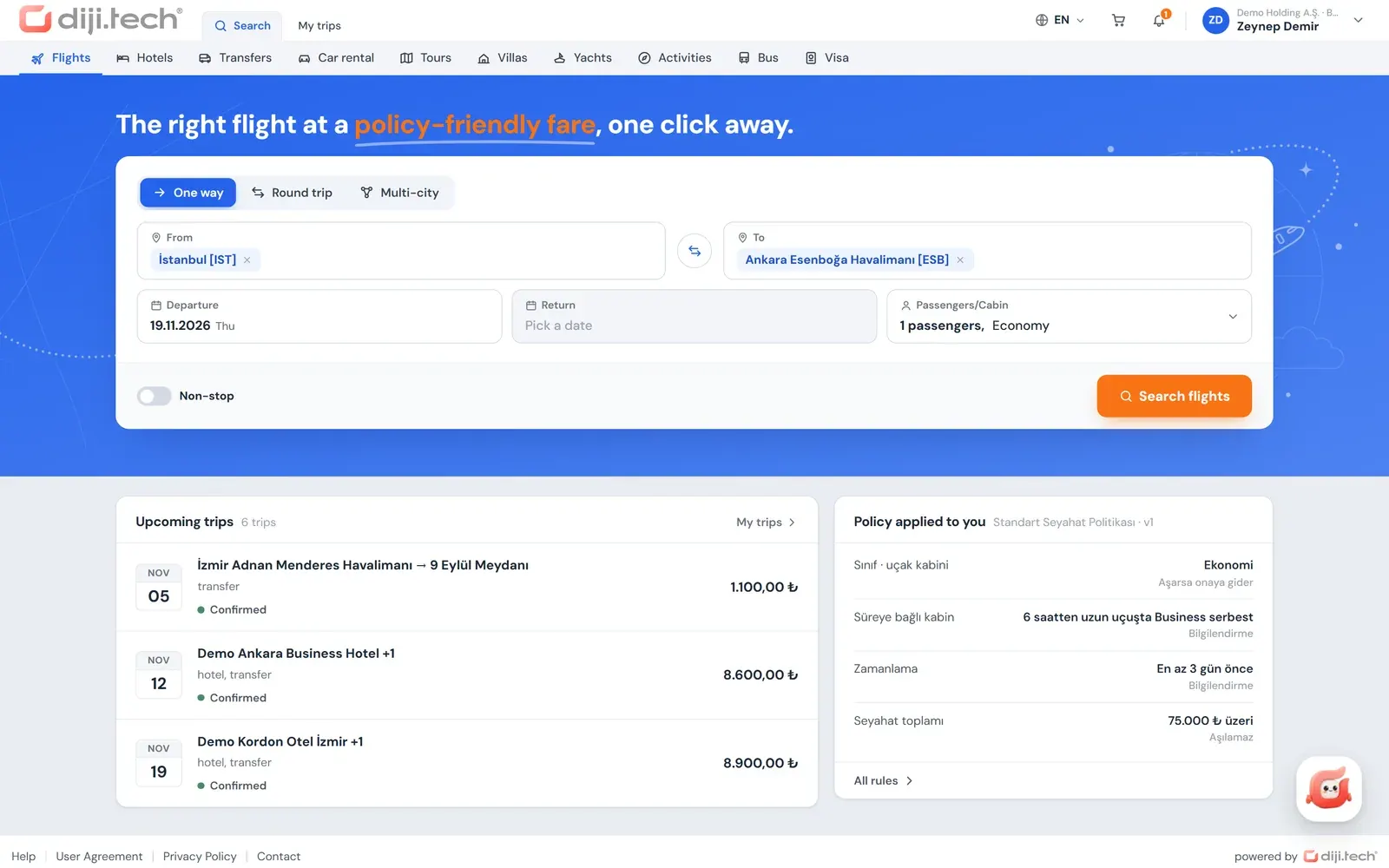
How does a traveler book in the portal?
Travelers create their account from the invitation link sent by their company or agency and give their consent to the personal-data notice required under Turkish data protection law (KVKK). They sign in with email and password (plus a TOTP code from an authenticator app when two-factor authentication is on) or with a passkey. Booking follows four steps, and the policy pre-check is refreshed on every cart change:
- Selection: every row in the search results carries a badge: "In policy", "Out of policy · reason" or "Blocked". Flights, hotels, buses and other products are collected in the same trip cart.
- Trip details: the passenger card is filled from the profile; for an out-of-policy item the traveler enters a justification, a billing profile and a note for the approver. An authorised person can book for an employee within their scope, or with up to 9 guest passengers.
- Approval or payment: if an item is out of policy or the budget is exceeded, the cart follows the "Submit for approval" path; otherwise it follows "Buy". If the price changes, the purchase does not go through until the traveler explicitly accepts the new price.
- Result: a trip file is created; the traveler downloads the itinerary, e-ticket, voucher and invoice as PDFs carrying the agency's logo.
Cancellations and changes on a confirmed trip go to the agency as requests from the portal. The portal shows a penalty and refund preview based on the stored cancellation terms, and the agency's operations team finalises the cancellation. The portal is a responsive web application and works in a mobile browser.
How does the agency admin manage corporate clients?
The agency admin creates, prices and funds each client in the corporate section of the agency panel. A new client is set up in a single three-step wizard: the root organization, the default billing profile, the client admin invitation and the default policy are created together, and if the tax number is already registered the system rejects the second record.
- Client-specific pricing: a form with Service Fee, Hidden markup and Commission sections, and copying the settings to other companies with a preview.
- Prepaid company wallet: distributing balance, taking it back, a warning threshold and an unalterable transaction ledger.
- Team and finance: representative assignment by product, client invoices, a sales breakdown and a scheduled breakdown email.
- Control: a sales and profit report, a policy compliance report and operations queues.
The portal's brand, domain and setup steps are described on the white label corporate booking tool page.
How does agency staff sell on behalf of a client?
Agency staff pick a client, and optionally a person, from the top bar of the panel; from then on, searches run with that client's price tier and its Turkish Airlines (THY) corporate code. The cart is locked to the selected client. In the "Corporate sale" section of the payment step, the client to invoice, the billing profile, the traveler matching and sales notes are entered.
In this kind of sale the policy is evaluated but the request does not go to approval; a violation is recorded and appears as a separate channel in the client's policy compliance report. Staff can also produce a quote PDF with the seller's logo for the options they selected.
Which products are sold in the portal?
The portal's product bar holds 10 products: flights, hotels, transfers, car rental, tours, villas, yachts, activities, buses and visas. For a product to appear in a client's portal it must be enabled on three layers: the platform module opened for the tenant, the module list of the corporate site, and the product ticked in the agency's client settings.
| Product | In the portal | Note |
|---|---|---|
| Flights | One-way, round trip, 2 to 6 leg multi-city; fare bundles; 6-month price calendar; THY corporate code; Miles&Smiles; seat selection on the seat map, extra baggage and meal selection | Ancillaries within what the airline offers; corporate flight booking |
| Hotels | 1 to 6 rooms, instant confirmation / on-request filter, map, policy decision per room | Corporate hotel booking |
| Buses | Trip search, trip details, seat selection on the seat map, cart and purchase | Corporate bus ticket booking |
| Car rental | Pick-up and return office, driver age, class, transmission and fuel filters; coverage package selection and package comparison | Corporate car rental |
| Transfers | One-way or round trip, place selection by coordinates, vehicle class, luggage | Corporate airport transfers |
| Tours, villas, yachts, activities | Search, detail and cart | Tours are only the agency's own tours; details |
| Visas | Country visa regime table, package, document upload, application tracking | Off by default for a company, the agency turns it on; corporate visa management |
All products go through the same cart and the same policy and approval rules. A cart with a flight ancillary or a bus ticket is sent to the approver as a single request if it falls into approval, and is bought directly if it is within policy.
How do payment and invoicing work?
The corporate portal has two payment paths: the prepaid company wallet topped up by the agency, and, where the agency allows it, card payment with 3D Secure. Payment authority narrows across the platform, agency and company admin layers; a layer cannot open a path that the layer above has closed.
- With card payment, card details are not stored and the charge is a single payment.
- A cart that falls into approval does not take payment; on final approval the purchase is made from the company wallet.
- The portal's wallet screen shows the balance, a transaction ledger exportable to Excel, a monthly PDF statement and invoices. The agency tops up the balance. If the platform's "hide wallet" mode is on, these screens are closed and the payment option is renamed "Post to account".
- The invoice recipient is the billing profile chosen at booking, and it is always a legal entity.
Details: corporate travel payments and invoicing.
Which reports come ready-made?
The portal has a summary page and 11 reports: Spend, Route and supplier, Policy compliance, Approval processes, Savings, After-sales, Traveler locator, Carbon, Budget, Finance and Sales breakdown. Each report narrows to the user's role scope, works with a period of up to 370 days, and exports to Excel, CSV or PDF.
Reports can be scheduled by email, monthly or weekly, and each recipient receives the report within their own scope. The Savings report shows the missed saving between the option chosen and the best available one; the Carbon report shows estimated emissions using the DEFRA business travel bands. The traveler locator report relies on confirmed trip records and does not track location. Details: corporate travel reporting.
How are security and data privacy handled?
Tenant data sits in separate databases; the browser does not talk to the API directly but through the portal's own server, and never sees service keys. Sign-in uses a password rule of at least 10 characters, by default a 15-minute account lock after 5 failed attempts, two-factor authentication and passkeys.
- Supplier, net price, markup and commission fields are stripped from portal responses; a response that cannot be parsed is never sent to the portal.
- ID numbers come back in responses only in masked form.
- Every opening of a visa document is written to an access log.
- DIJI.TECH states that the payment infrastructure is PCI DSS compliant and that the platform runs on AWS and Cloudflare.
Details: security.
What does the Diji AI assistant do?
Diji is the AI assistant inside the portal; it works with the traveler's own permissions and does not apply changes without your approval. It cannot reach data outside the traveler's authority, sees no agency, tenant or profit margin data, sensitive data is masked, and conversations are deleted after 12 months. Details: AI corporate travel assistant.
How should corporate travel software be evaluated?
When you evaluate corporate travel software, test the roles, the depth of policy and approval, the payment model and the reports against the real structure of your corporate clients. For selection criteria, see how to choose corporate travel management software, and to see the portal live you can request a demo. DIJI.TECH states setup takes one week on average and module activation one business day; pricing is given through a tailored quote.
What is not in the portal?
The following features are not in the corporate portal today. Knowing the scope up front lets you make accurate promises to your client.
- Single sign-on (SSO): there is no sign-in with SAML, OIDC, Entra ID or Okta; sign-in is by password, two-factor authentication and passkey.
- Expense, receipt and per diem management: there is no receipt capture, expense report or per diem calculation module. The difference between travel management and expense management is explained in this article.
- Native mobile app: there is no iOS or Android app; the portal works in a mobile browser.
- SMS notifications: notifications arrive in the app and by email; no SMS is sent.
- Trains and ferries: there is no module for these products.
Screens
1 / 4
2 / 4
3 / 4
4 / 4
Screens are taken from the DIJI.TECH corporate portal and agency panel and show sample data.
Frequently asked questions
What are the core features of corporate travel management software?
The core features are travel policy, approval workflows, budget control, multi-product booking, central payment and invoicing, reporting and role-based permissions. In Kurumsal.pro these are spread across the screens of four roles: company admin, traveler, agency admin and agency staff.
Who uses Kurumsal.pro?
Kurumsal.pro is built for travel agencies and travel management companies (TMCs). The agency gives the portal to its corporate clients under its own brand and domain; the client company's admins and employees use that portal under their agency's account.
Can travelers select seats, extra baggage and meals in the portal?
Yes. When booking a flight, travelers choose the ancillary services the airline offers: a seat from the seat map, extra baggage and a meal. These services travel in the same cart and through the same approval flow as the rest of the trip.
Can bus tickets be bought through the corporate portal?
Yes. Travelers search for a bus trip, pick a seat on the seat map in the trip details, add the ticket to the cart and buy it. The bus item also goes through the policy decision, justification and approval rules.
Can an insurance or coverage package be selected for car rental?
Yes. A car rental offer lists the insurance and coverage packages the supplier provides, shows them side by side in a comparison table, and adds the selected package to the reservation.
Does the corporate portal have a mobile app?
No, there is no iOS or Android app. Travelers open the portal in the browser of their phone or tablet, and the menus and screens are rearranged for small screens.
Can users sign in with SSO?
No, the portal has no SAML or OIDC single sign-on. Sign-in uses email and password, two-factor authentication with an authenticator app, or a passkey.
Which languages does the portal support?
The corporate portal interface is available in Turkish and English, and the corporate email templates are sent in these two languages under the agency's site brand.
Is there expense and receipt management in the portal?
No. Kurumsal.pro is a travel management system; it has no receipt capture, expense report or per diem calculation module. Travel spend is tracked through reservations, the wallet, invoices and reports.
How long does setup take?
According to DIJI.TECH, the portal is delivered in one week on average, and a module requested later is activated in one business day. Pricing is set through a tailored quote.
Related pages
Last updated: