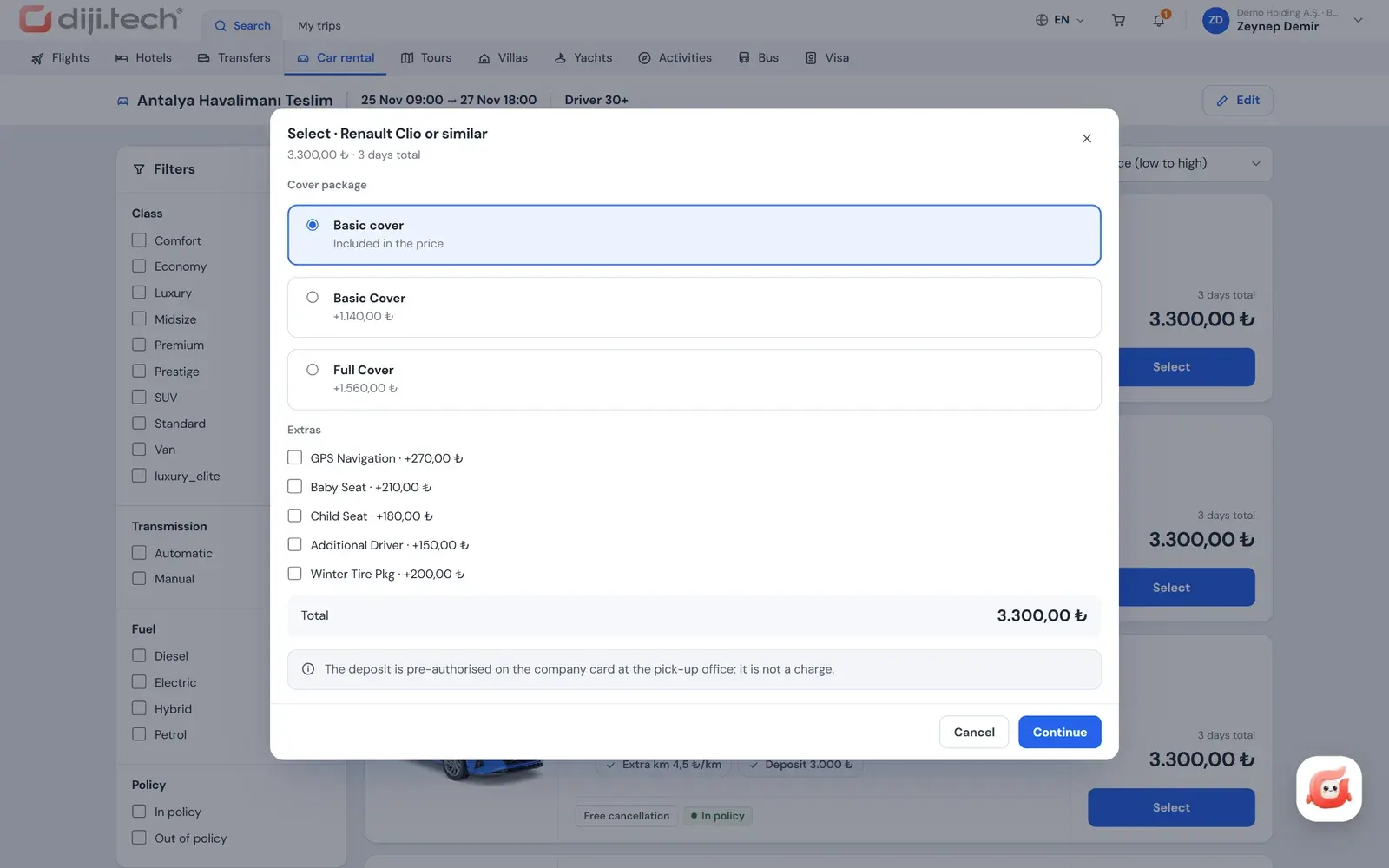
Coverage package comparison
The supplier's packages priced for the rental period; covers shown as included, excluded or as a value in one table.
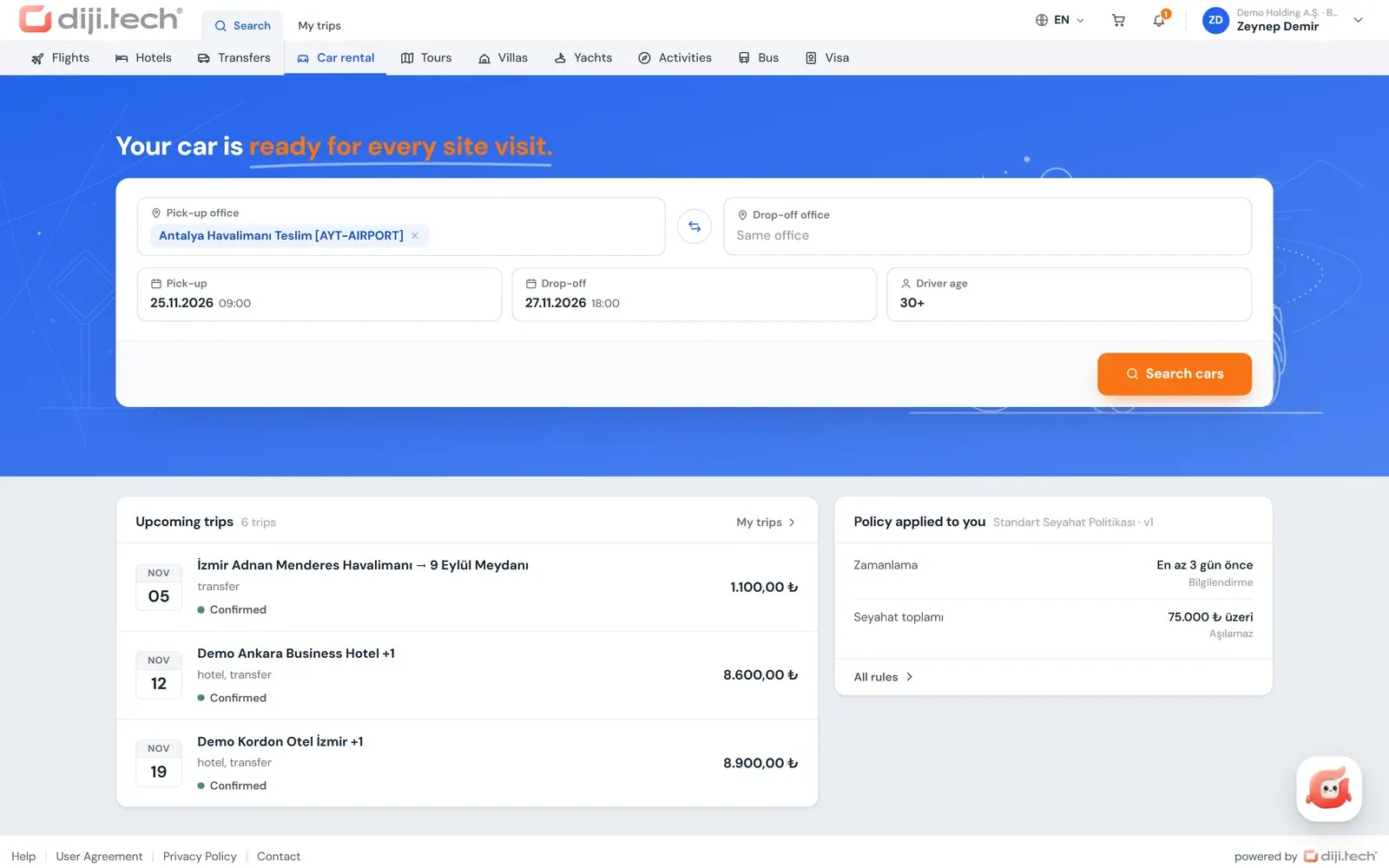
Office and driver selection
Different drop-off office, driver age, and offers for the same car at other offices.
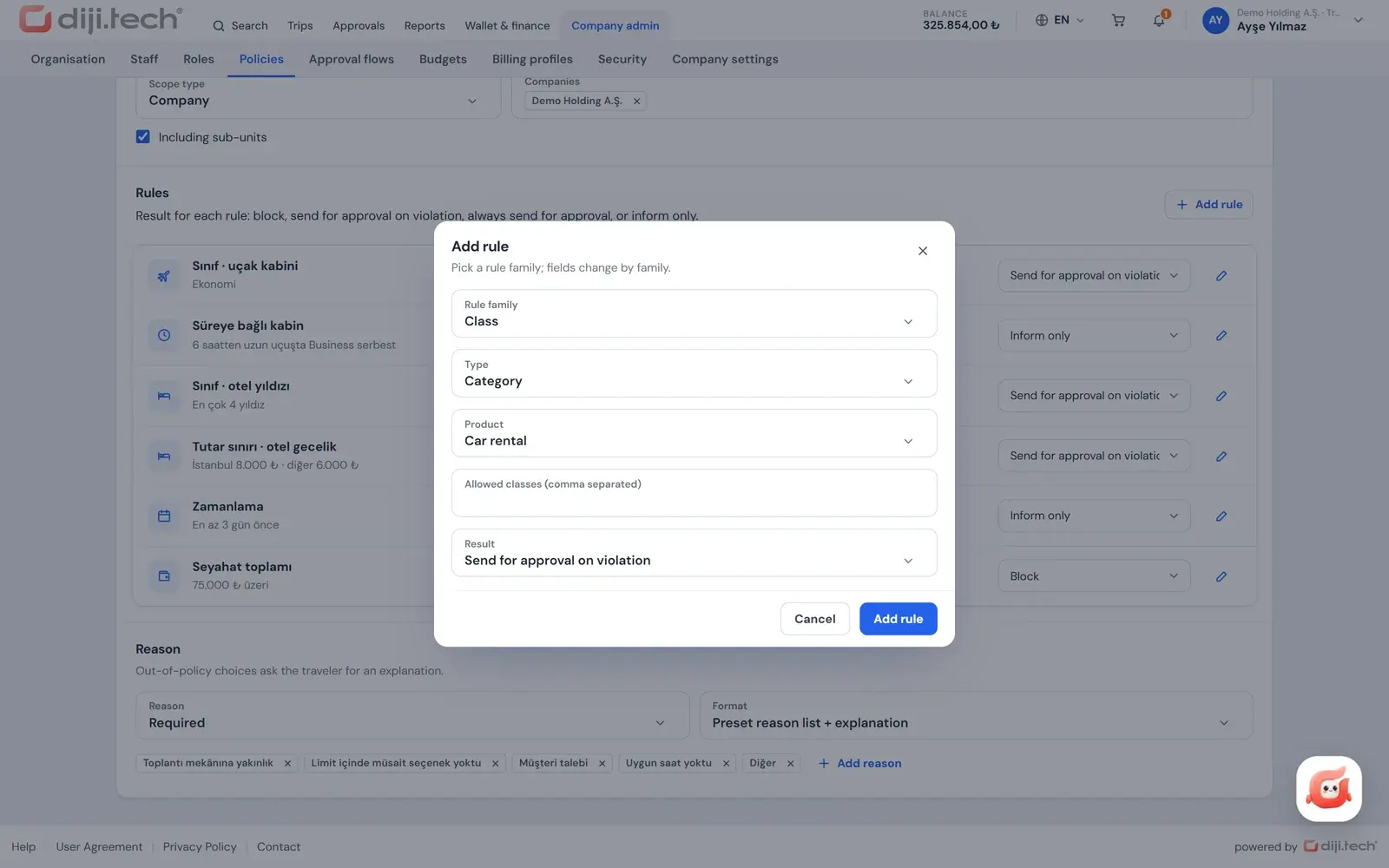
Car policy
Daily price limit, city-based limits and permitted car classes; the decision on every result.
One trip cart
Flight, hotel and car go to approval in one request; at final approval the purchase starts from the company wallet.
Car rental for business travel is the process of booking a daily rental car that an employee uses during a trip, together with the company's policy, approval and invoice rules. In Kurumsal.pro this is the car rental module of the portal your agency opens to its corporate clients under its own brand. The employee selects the car and the coverage package, the rules run at each step, and the operation stays with your agency.
In car rental the price is set not only by the car but also by the chosen coverage and office. DIJI.TECH's corporate travel management software therefore compares coverage packages next to the car and ties the car class to the company's policy; the sections below open this flow step by step.
What is the difference between business car rental and corporate fleet leasing?
Corporate fleet leasing is a long-term contract for vehicles a company uses for months or years. Car rental for business travel is a rental of a few days for a specific trip, planned together with other trip items such as flights and hotels. The Kurumsal.pro portal covers this second need.
The distinction matters because a search for "corporate car rental" often carries long-term leasing intent. The portal does not manage long-term rental, fleet contracts or monthly vehicle allocation. A daily rental, on the other hand, moves in the same cart as the flight with the same policy and approval rules, which gives teams in the field and out-of-town meetings a single flow.
What does the employee choose in car search?
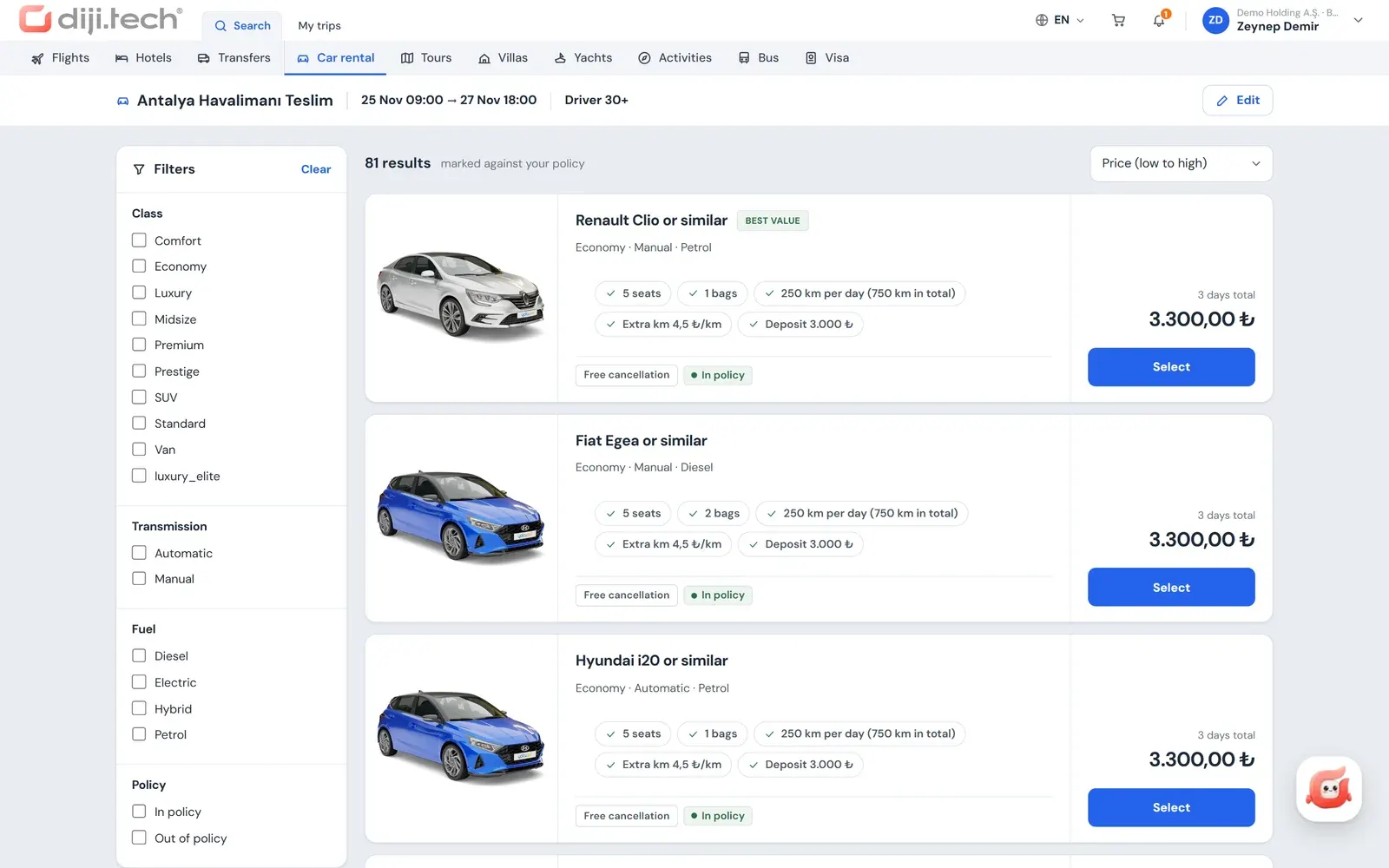
The employee enters the pick-up office, the drop-off office (a different office can be selected), the pick-up and drop-off date and time, and the driver's age. Results are listed as they arrive from suppliers and can be filtered by car class, gearbox type and fuel type. Offers for the same car at other offices are shown as well. Each offer shows car class, gearbox, fuel type and price together.
| Choice | What it does |
|---|---|
| Pick-up and drop-off office | Airport or city office; drop-off at a different office |
| Date and time | Sets the rental period and the total of the daily price |
| Driver age | Brings the offers that fit the supplier's age condition |
| Car class | Filters by categories such as economy, mid-size and premium |
| Gearbox and fuel | Filters by manual / automatic and fuel type |
| Other office offers | Compares the price of the same car at nearby offices |
Every result shows the policy decision that applies to the employee. The portal does not show the supplier name or the net price; the employee sees only the price sold to them.
How are insurance and coverage packages selected and compared?
When the employee selects a car, the insurance and coverage packages offered by the supplier are listed. The price of each package is calculated for the rental period: for packages priced per day it is multiplied by the number of days, and for packages priced as a total a single amount is shown. The covers appear line by line in a comparison table that puts the packages side by side.
The comparison table reads as follows:
| Table element | Meaning |
|---|---|
| Row | A cover heading (under the name the supplier gives it) |
| Column | A coverage package |
| Included mark | The cover is in this package |
| Excluded mark | The cover is not in this package |
| Value | The value or description the supplier gives for the cover |
If the supplier sends a description for a cover, it is also displayed on the heading and in the cell. The employee selects a package or continues without one; the selected package is added to the same cart line as the car with its price and enters the policy pre-evaluation.
With suppliers that offer an extras list, and in your agency's own fleet, extras come in alongside the packages; they are added by quantity and priced for the rental period. The approver therefore sees the price of the car together with the chosen coverage package and any extras, and can notice a "cheap car but no cover" situation on the request.
How is travel policy applied to car rental?
Car rules are defined by the client administrator in the portal's policy screen and apply to the traveler who will use the car. Two rules are specific to rentals: the daily unit price limit and the permitted car classes. The decision is calculated in the search results, in the cart and again at submission, and the outcome is to block, to send to approval or only to inform.
| Rule | Use for car rental |
|---|---|
| Unit price limit | Daily amount; city-based rows and an "other cities" row |
| Category | The car classes the company permits |
| Maximum % difference from the best option | Allowed gap to the cheapest car in the same search |
General rules such as amount ceilings, minimum days before purchase, risky country and approval on every request also work for cars; they are all described on the travel policy software page. If the policy makes a justification mandatory, an out-of-policy rental cannot be submitted without one.
The category rule is the one asked about most in the field, because employees often lean towards "one class up". If the company permits only economy and mid-size classes, for example, a premium offer shows in the result list with an "Out of policy" badge and its reason, and if the rule blocks, it reads "Blocked". Employees can use the policy filter to list only the permitted classes. If they add an out-of-policy car to the cart anyway, the same decision reappears on the cart line through the pre-evaluation and the justification field opens. The approver reads the car class, the reason for the violation and the employee's justification together, so the question "why this car?" is already answered on the request.
How do delivery to an address and a different drop-off office work?
A different drop-off office is chosen by selecting the pick-up and drop-off offices separately in the search; the conditions depend on the supplier's offer, and the employee sees the offer's price before selecting it. Delivery to and return from an address can be selected only with suppliers that offer this service in their extras list and in your agency's own fleet. When the service is selected, the address becomes a mandatory field.
For offers without this service, the car is collected from the selected office and returned to the office. If a transfer suits better than a car for getting from the airport to the city, the employee can add a corporate airport transfer to the same cart.
How does car rental enter the approval and cart flow?
A rental does not go to approval on its own; it becomes a single request with the flight and hotel in the cart. Because car offers can change during approval, the car line of the flow has a separate percentage tolerance (5 percent by default, adjustable between 0 and 50). The final approval starts the purchase from the company wallet and asks the supplier for the price again; if the difference is above this limit, the request goes back to the approver.
- Justification and note: a justification for an out-of-policy item; a note to the approver can be written as well.
- On behalf of others: a booker or administrator can rent a car on behalf of employees within their scope.
- Budget: the budget check is made at submission, and the amount sent to approval is deducted from the budget as a commitment.
- Approver alternative: when enabled in the flow, the approver can approve per item with a different option.
No provisional booking is made with the supplier when a request is submitted for approval; the car and price are therefore not guaranteed during the approval period, and the tolerance rule exists to manage this gap. For approval levels, see the travel approval workflow page.
How do payment, invoicing and documents work?
For a rental that needs no approval, payment is made from the company wallet; if your agency has opened the card route, the employee can also choose a single-installment card payment with 3D Secure, and card data is not stored. The invoice is issued to the legal entity on the company invoice profile selected in the cart. A confirmed car line appears in the trip file with its status and price breakdown; the car voucher, trip plan and invoice are downloaded as PDFs from there, and the documents carry your agency's branding.
When a cancellation or change is needed, the employee opens a request from the trip file and sees a penalty and refund preview based on the stored cancellation conditions. The request drops into the agency's operations desk, and the agency carries out the actual operation. On the accounting side of corporate sales, car rental is among the products that go into the SYS accounting feed.
For which clients is car rental opened in the portal?
Car rental is one of the products visible in a client's portal, and your agency manages it per client. The modules a portal shows are the intersection of the modules active on your corporate site and the products visible to the client. In the settings tab of the client record, the agency keeps car rental on or off for that client. Where it is off, employees never see the car search.
This flexibility lets the same agency offer different product sets to different corporate clients. The client's administrator defines the policy, budget and approval rules on the open products.
A client budget can be set up by product: in a department budget that includes car rental, the amount of a rental sent to approval is deducted as a commitment, returns to the actual amount when purchased, and goes back to the budget on cancellation or refund. Details are on the travel budget control page.
How does car rental appear in reports?
Rental spend is tracked in the client's portal reports as a product line separate from flights and hotels and can be read by unit, department or person. The client also sees car spend in the policy compliance, savings and budget reports. The carbon report shows a value calculated from estimated kilometres and a car-class factor, and the screen states that the figures are estimates.
Report details and export options are on the corporate travel reporting page. The company-side planning of car and transfer processes is covered in the post on managing car rental and transfers for business travel.
Which car rental suppliers can be connected?
Car search combines the rental suppliers open in your tenant with your agency's own fleet; no separate connection is needed for the portal. The code has Yolcu360, Avis, YesCar and Booking Agora. Your agency's own vehicle fleet appears in the same search and comes with its own coverage packages and extras catalog.
Which supplier is open in your tenant is decided at setup, and employees do not see the supplier name in the results. The full supplier list is on the integrations page.
How does your agency earn from car rental?
You set your own margin per client. In the client price form you define separate domestic and international service fees, hidden markup and commission for car rental. In the detailed rule engine the service fee can work per day or per booking, as a fixed amount or a percentage; client rules are inherited by subsidiaries and branches.
For requests that arrive by phone, your agency staff use "Work on behalf of a company" in the panel to rent a car at the same client price and to prepare a quote PDF that includes car options. The net cost of the rental and your share are never carried to the client's screen; the client sees the rental only at the selling price.
To see the coverage package comparison and car policy on your own corporate client scenario, you can request a demo. The car module can be opened on an existing setup as an add-on module within 1 business day.
Screens
1 / 4
2 / 4
3 / 4
4 / 4
Screens are taken from the DIJI.TECH corporate portal and agency panel and show sample data.
Frequently asked questions
Is business car rental the same as corporate fleet leasing?
No. Corporate fleet leasing is a long-term contract for vehicles a company uses for months or years. Business car rental is a daily rental for a specific trip. The Kurumsal.pro portal manages the second type: the employee searches for a car for the trip, selects it, and buys it under policy or sends it for approval.
Can rental insurance and coverage packages be selected in the portal?
Yes. When a car is selected, the insurance and coverage packages offered by the supplier are listed. The price of each package is shown for the rental period, and the covers appear line by line in a comparison table. The employee selects a package or continues without one, and the chosen package is added to the same cart line as the car.
How are coverage packages compared?
In the comparison table each cover is a row and each package is a column. A cell shows whether the cover is included in the package, not included, or the value given by the supplier; if the supplier sends a description, it is also shown on the cover heading and in the cell. The difference between packages is therefore visible next to the price at a glance.
Which policy rules can be defined for car rental?
For cars you can use a daily unit price limit, city-based limits with an other-cities row, permitted car classes, per-person or total amounts, a minimum number of days before purchase, a maximum percentage difference from the best option, risky countries and approval on every request. Each rule can block, send to approval or only inform.
Can the car be returned at a different office?
Yes. The pick-up and drop-off office can be selected separately in the search. The results also show offers for the same car at other offices, so the employee compares prices at different pick-up points. The conditions for a different drop-off office depend on the supplier's offer, and the employee sees the price of the offer before selecting it.
Can the car be delivered to an address?
Delivery to and return from an address can be selected only with suppliers that offer this service in their extras list and in the agency's own fleet. When the service is selected, the delivery or return address becomes a mandatory field. For offers without this service, the car is collected from and returned to the selected office.
Who is the car rental invoiced to?
The invoice is issued to the legal entity on the company invoice profile the employee selects in the cart. The profile holds the company name, tax number and office, address, invoice e-mail and the e-invoice or e-archive type used in Turkey. The voucher and invoice PDFs are downloaded from the trip file and carry the agency's branding.
What happens if the car price changes during approval?
The approval flow defines a percentage price tolerance for car rental. At final approval the price is fetched again; if the change is within tolerance the purchase proceeds, and if it is outside, the request returns to approval. Because no provisional booking is made with the supplier when a request is submitted, price and car are not guaranteed during approval.
Related pages
Last updated: