Policy decision on every row
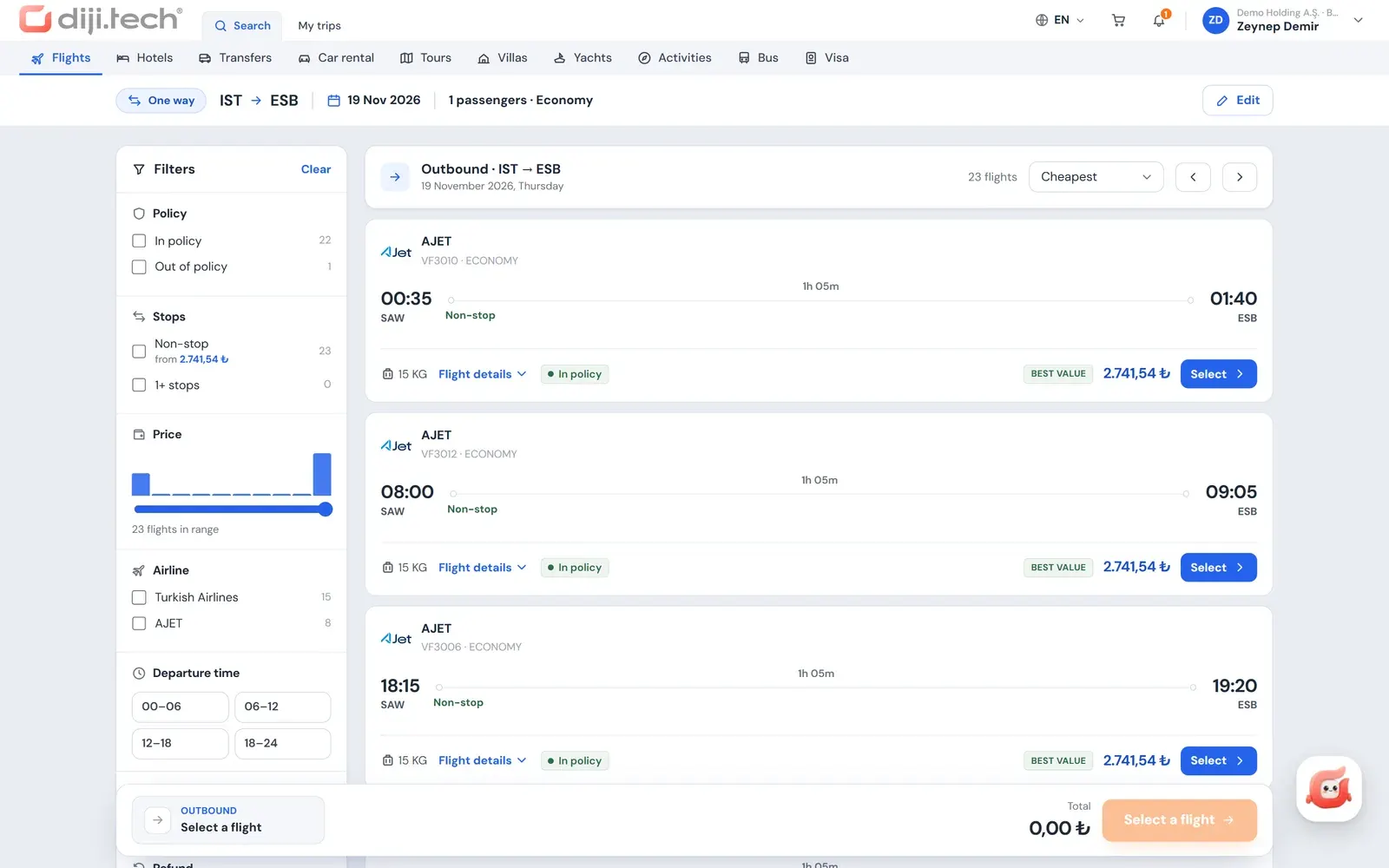
An In policy, Out of policy or Blocked badge on each flight result, plus a policy filter.
Fare families and ancillaries
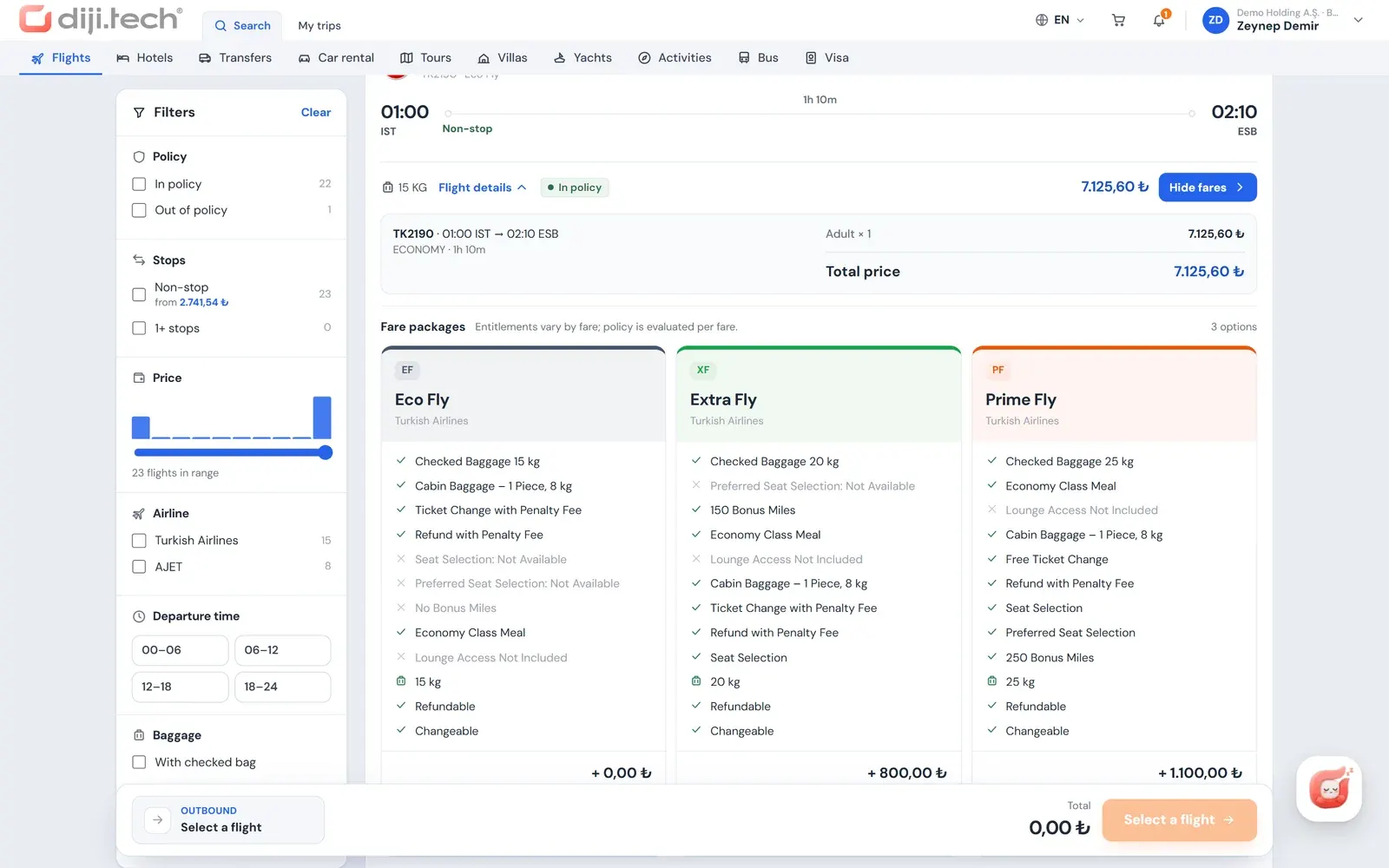
Branded fare comparison; seat map, extra baggage and meal selection in the same cart.
Turkish Airlines corporate code
A company-specific code is added to the search, branches inherit it, and the Miles&Smiles number is sent automatically.
One trip, one approval
Flight, hotel and other items reach the approver as a single request; at final approval the purchase starts from the company wallet.
A corporate flight booking system is the environment in which company employees buy a business flight together with the company's travel policy, approval flow and invoice details. In Kurumsal.pro this environment is the flight module of the portal that your agency opens to its corporate clients under its own brand. The employee chooses the flight; your agency manages the ticket, the invoice and after-sales service.
Flights are where the most rules meet in corporate travel management software: cabin, airline, purchase timing and price difference are all evaluated in the same search.
How does a corporate flight booking system work?
The flow has four steps, and each one runs against the company's rules. The employee searches and selects a flight, completes the trip details in the cart, the system routes the cart to approval or purchase, and the result screen shows the ticket and documents. The policy decision is recalculated in the search results, on every cart change and at submission; the budget check is made at submission.
- Selection: flight search, fare family and ancillary selection.
- Trip details: the passenger card comes from the profile; a justification is written if an item is out of policy, the invoice profile is selected, and a note to the approver can be added.
- Approval or payment: if an item is out of policy or the budget is exceeded the button reads "Send for approval"; otherwise it reads "Buy".
- Result: sent for approval, processing, confirmed or partial result; the e-ticket and the trip plan are available as PDFs in the trip file.
A flight can travel alone or in the same trip cart as a hotel, a transfer and a car rental. The approver therefore sees a whole business trip in a single request.
Which flights can employees search for?
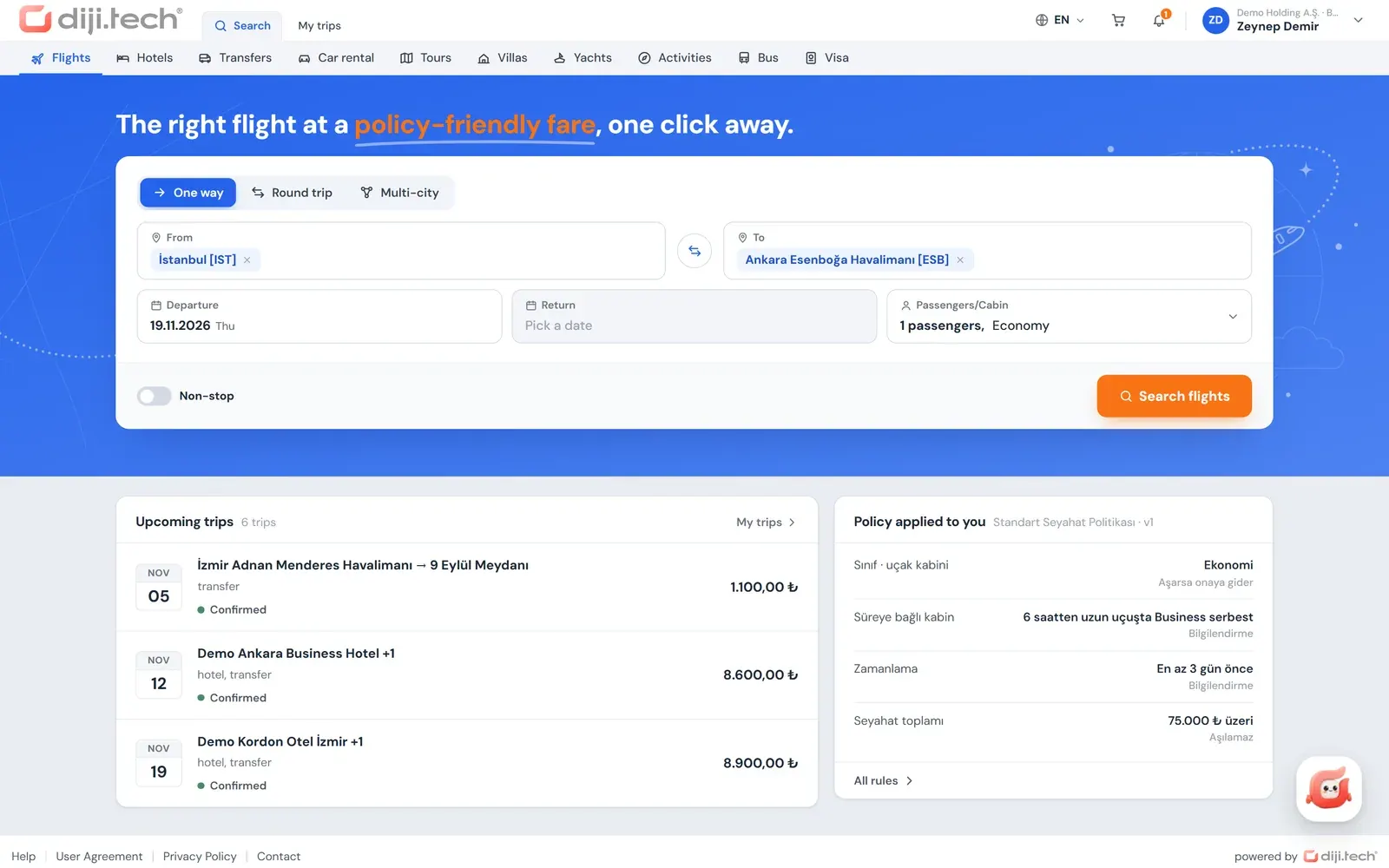
Employees can search one-way, round-trip or multi-city flights with 2 to 6 legs. The search takes 1 to 9 adult, child and infant passengers, a cabin class and a non-stop preference. Airport and city fields autocomplete, and the search goes to several suppliers at the same time using the company's price.
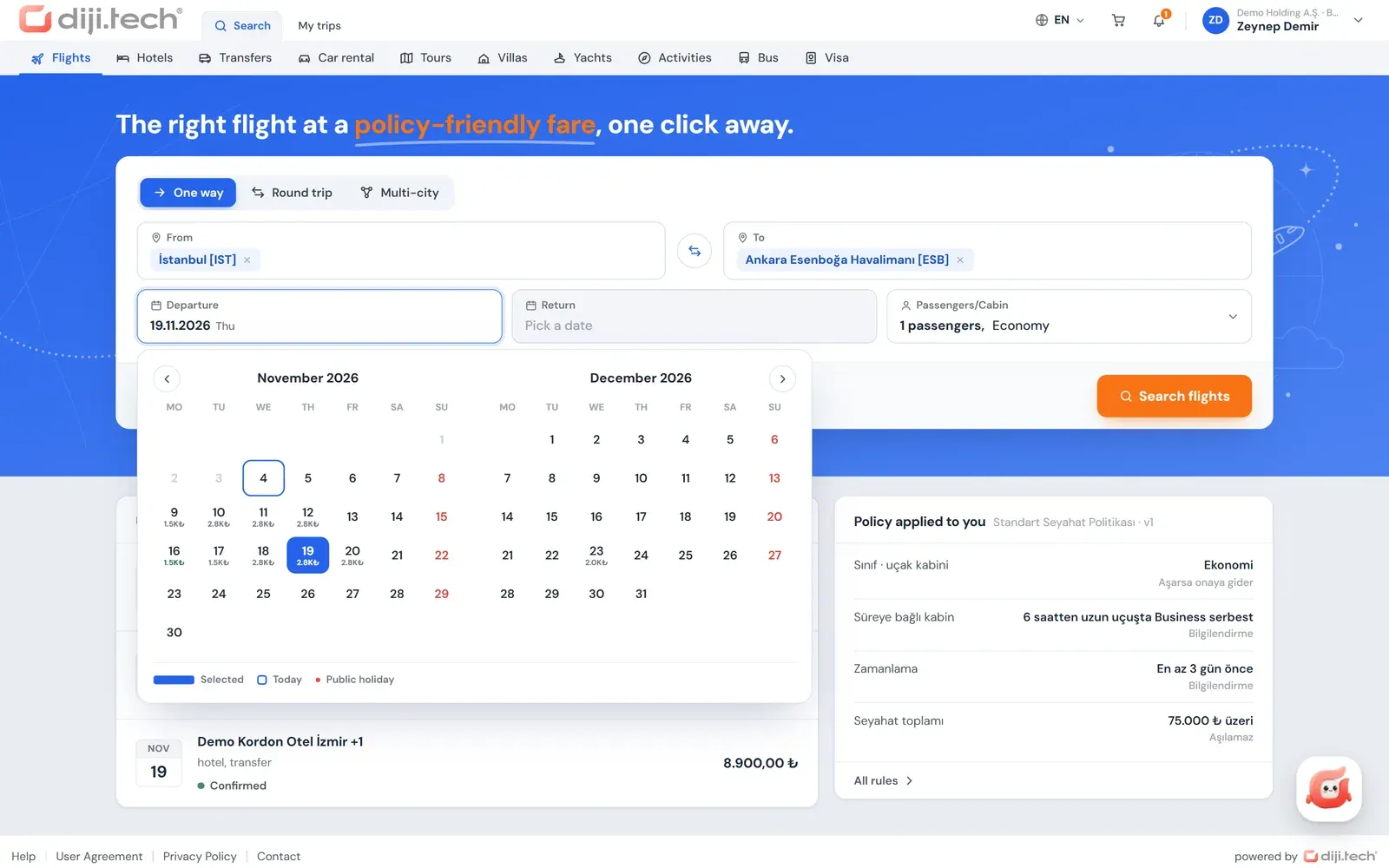
The search screen includes a six-month price calendar built from the tenant's own search data, so the employee sees date flexibility at a glance. Results are listed as they arrive and can be narrowed with these tools:
| Tool | What it does |
|---|---|
| Policy filter | Shows only in-policy or only out-of-policy flights |
| Stops and departure time | Filters by number of stops and departure window |
| Price histogram | Narrows the price range visually |
| Airline | Selects specific airlines |
| With baggage / refundable | Filters by baggage allowance and refund rule |
| Sorting | Sorts by price, duration or departure time |
| Previous / next day | Shifts the search by one day |
The portal does not show the supplier name to the employee; the employee sees the price, the flight details and the policy decision.
How is travel policy applied in flight search?
Policy applies to the traveler, not to the person who makes the booking, and it appears as a decision on every row of the results: In policy, Out of policy (with the reason) or Blocked. The client administrator defines the rules in the portal's management screen; the same rules run again in the cart pre-evaluation and at submission. The company also decides what a decision leads to: the flight can be blocked, sent to approval, or only flagged for information.
The rule types that apply to flights are:
| Rule | Example use |
|---|---|
| Highest cabin | Economy at most on all flights |
| Permitted cabin on long flights | Business above a set flight duration |
| Banned airline | An airline the company does not want to use |
| Minimum days before purchase | Purchase at least a set number of days before departure |
| Maximum % difference from the best option | Allowed gap to the cheapest comparable option |
| Risky country | Approval or block for trips to selected countries |
| Per person, per item or per trip total | Amount limits |
| Approval on every request | No rule needed, every flight needs approval |
The definition of the "best option" is also in the company's hands: the departure window (±2 hours, ±4 hours or the same day), the maximum number of stops, the same cabin and whether baggage must be included. The default definition is ±2 hours, non-stop, same cabin and with baggage. If the policy runs in "inform only" mode, no rule blocks anything; violations are only displayed. All rules are described on the travel policy software page.
What do fare families (branded fares) show?
A fare family is a version of the same flight sold with different baggage, refund and change rules. For the selected flight the portal places the fares side by side: each fare's baggage allowance, refund and change rule, and the price difference compared with the base fare are on separate lines. The baggage rights of the selected fare are also written on the cart line.
Fare selection lets the employee see the gap between "cheapest" and "flexible" in actual money. If the company has a maximum-percentage-difference rule, adding a more expensive fare to the cart triggers the pre-evaluation again; if the fare falls out of policy the employee sees it in the cart. For a short definition of the term, see the glossary entry on branded fares.
Can seats, extra baggage and meals be added?
Yes. After choosing the flight, the employee can add the ancillary services the airline offers: seat selection from the seat map, extra baggage and meal selection. The selected ancillaries appear with their price on the same cart line as the flight, enter the policy pre-evaluation and are included in the request sent for approval. The approver therefore sees the cost of seats and baggage next to the ticket in the same request.
Airline connections with ancillary services include Turkish Airlines (NDC), Pegasus, AJet, SunExpress and the airlines reached through TravelFusion. Which services can be selected on a given flight depends on what the airline offers for that flight, and the seat map follows the aircraft layout the airline publishes.
Ancillaries are separate from the fare family: the fare defines the ticket, while an ancillary is the seat, baggage or meal added to that ticket. Employees can store seat and meal preferences in their profile, but the choice is made in the ancillary step of each flight; the preference is not passed to the supplier automatically.
What does the Turkish Airlines corporate code do?
The Turkish Airlines corporate code is the agreement code that the airline assigns to a company, added to the flight search. In Kurumsal.pro the agency enters this code in the client's record; when that company's employees search for flights, the code is added automatically to the search on the Turkish Airlines integration. Branches and subsidiaries inherit the parent company's code.
This way the client's agreement with Turkish Airlines is reflected in portal searches without the employee entering a separate code. The code field is used today only for Turkish Airlines (TK); no other airline code can be defined. Technical details are on the Turkish Airlines NDC integration page.
Turkish Airlines offers corporate benefits through its own programs such as Corporate Club, and Turkish Airlines alone decides who can join and which benefits apply. For current terms, rely on the Turkish Airlines Corporate Club official page (Turkish-language page, accessed on 4 November 2026). Kurumsal.pro is not part of that program; it only carries the code the client already holds into the search.
The employee's Miles&Smiles number, the airline's loyalty program number, is kept in the loyalty cards tab of the profile or in the employee record maintained by the agency, and it is sent automatically with the flight booking.
What happens with itineraries on different airlines?
When the legs of a round trip or multi-city itinerary are selected from different airlines, the portal marks them as separate tickets. The warning appears in the search results and in the cart, and it explains that if one ticket is cancelled or changed the other is not affected, and that refund and change rules apply to each ticket on its own.
How do approval, payment and invoicing proceed?
A cart with an out-of-policy item or a budget overrun goes to approval; the others go to direct purchase. In the approval flow the flight moves as a single request together with the other cart items, and the approval period cannot exceed the fare's option expiry. At final approval the purchase starts from the company wallet; if it cannot be completed, a "Complete the purchase" step appears in the file.
- Justification: if the policy makes it mandatory, an out-of-policy cart cannot be submitted without a written reason.
- Price change: in a direct purchase, nothing is processed unless the employee explicitly accepts a changed price; on an approved request the default flight tolerance is zero, so a higher price sends the request back to approval.
- Payment: in a direct purchase, the company wallet, or a single-installment card payment with 3D Secure if the agency allows it; card data is not stored.
- Invoice: issued to the legal entity on the invoice profile selected in the cart.
- Documents: the trip plan, e-ticket and invoice are downloaded as PDFs from the trip file, and they carry your agency's branding.
For approval levels, deputy approvers and one-click approval by e-mail, see the travel approval workflow page. The informational side of corporate invoices for flight tickets, including how Turkish e-invoice rules work, is covered in the post on invoice processes in corporate travel.
How are cancellations and changes managed after ticketing?
The portal opens post-ticketing operations as requests, and the agency carries them out. From the trip file the employee selects the items to cancel and sees a penalty and refund preview based on the stored cancellation conditions, together with the agency's cancellation service fee where one is set. A change request, for a date, time or passenger-name correction, is opened with a typed description.
Requests drop into the agency's operations queue as "requests". The actual cancellation, refund and reissue are performed in the agency's panel, which is why the portal makes no "instant cancellation" promise. The My Trips screen can be searched by file number, title or PNR, and when an airline changes a flight time an info banner appears in the file.
Which flight suppliers can be connected?
The portal uses the flight suppliers that are open in your agency's panel, with the same search and purchase infrastructure; there is no restriction specific to the corporate channel. The code has GDS systems such as Amadeus, Sabre and Travelport, airline connections such as Turkish Airlines (NDC), Pegasus, AJet, SunExpress and Corendon, as well as consolidators and TravelFusion.
Which supplier is open in your tenant is decided at setup. The 100+ API integrations and 7 billion+ daily queries are DIJI.TECH company statements. The full supplier list is on the integrations page.
How does your agency earn from the flight module?
In corporate flight sales you set your own margin per client. In the client's price form you define separate service fees for domestic and international air tickets, a hidden markup and commission; after-sales fees for flight changes, flight cancellations and seat reservations are entered separately. Client rules are inherited by subsidiaries and branches.
The net amount, markup and commission breakdown in the ticket price never reaches the client's screen; employees and approvers work only with the selling price. For requests that arrive by phone, agency staff use "Work on behalf of a company" in the panel to sell with the same client price and Turkish Airlines corporate code, sell ancillaries and prepare a quote PDF with the selected flights; details are on the agent-assisted corporate booking page.
To see the flight module with the Turkish Airlines corporate code and fare families on your own corporate client scenario, you can request a demo. Setup takes one week on average, and quotes are tailored to each customer.
Screens
1 / 4
2 / 4
3 / 4
4 / 4
Screens are taken from the DIJI.TECH corporate portal and agency panel and show sample data.
Frequently asked questions
How do employees book a corporate flight?
In the Kurumsal.pro portal the employee searches for a flight, picks the flight and fare family after checking the policy decision on the result row, and can add a seat, extra baggage and a meal. In the cart they complete the trip details and choose the invoice profile. If the cart is within policy and the budget is not exceeded it is purchased; otherwise it goes to approval with a justification.
Can seats, extra baggage and meals be selected in the portal?
Yes. Within the ancillary services the airline offers, the employee can choose a seat from the seat map, add extra baggage and select a meal. The chosen ancillaries appear on the same cart line as the flight and are included in the approval request. Airlines with ancillary services include Turkish Airlines, Pegasus, AJet, SunExpress and the airlines reached through TravelFusion.
How is the Turkish Airlines corporate code used in the portal?
The agency enters the company's Turkish Airlines corporate code in the client's record. When that company's employees search for flights, the code is added automatically to the search on the Turkish Airlines integration, and branches and subsidiaries inherit the parent company's code. Today the corporate code field is used only for Turkish Airlines (TK).
Is the Miles&Smiles number added to the booking automatically?
Yes. The employee saves the Miles&Smiles number in the loyalty cards tab of their profile, or the agency keeps it in the employee record. The number is sent automatically when the flight is booked, so the traveler does not have to type it again for each reservation.
Which flight policy rules can be defined?
For flights you can define the highest allowed cabin, the permitted cabin on long flights above a set duration, banned airlines, a minimum number of days before purchase, a maximum percentage difference from the best option, risky countries, and per-person or total amount limits. The outcome of a rule can be to block, to require approval on violation, to require approval every time, or to inform only.
What happens if the flight price changes while approval is pending?
No provisional booking is made with the supplier when a request is sent for approval, so price and seat availability are not guaranteed during approval. On an approved request the purchase is made at final approval and the price is fetched again; because flights have no default price tolerance, a higher price returns the request to approval. In a direct purchase without approval, nothing is processed unless the employee explicitly accepts the new price. The approval period is also limited by the fare's option expiry.
How is a corporate invoice issued for a flight ticket?
In the cart the employee selects one of their company's invoice profiles, and the invoice is issued to the legal entity with the profile's company name, tax number and tax office, address and invoice e-mail. Corporate sales go through the accounting document line the agency is connected to; the transmission of e-invoices and e-archive invoices (Turkey's electronic invoicing formats) depends on the agency's document provider. The invoice PDF can be downloaded from the trip file.
Can a ticket be cancelled or changed from the portal?
The portal opens a request for cancellation and change. The employee selects the items to cancel and sees a preview of the penalty and refund based on the stored cancellation conditions; the request lands in the agency's operations desk. The agency carries out the actual cancellation, refund and reissue from its own panel.
What should travelers know about itineraries built from different airlines?
If the selected legs are on different airlines, the portal shows a separate-tickets warning both in the search results and in the cart. The warning explains that if one ticket is cancelled or changed the other is not affected, and that refund and change rules apply to each ticket separately.
Related pages
Last updated: