Prepaid company wallet
The agency loads the balance; every sale, refund and correction is written to an immutable ledger.
Layered payment permission
The platform, the agency and the company administrator can only narrow payment methods.
Billing profiles
A separate profile with e-Invoice or e-Archive type for each company and branch; staff pick one when booking.
Reconciliation-ready exports
Client invoices, the sales breakdown and the wallet statement come from the same records on both sides.
In a corporate account, how the money is collected and to whom the invoice is issued matter as much as the sale itself. Kurumsal.pro, running on DIJI.TECH infrastructure, manages payment in the portal your agency gives its corporate clients through a prepaid company wallet and a controlled card path, and manages invoicing through billing profiles defined per company and branch. The payment rules stay in your hands; the client uses only the paths you open.
How does corporate travel payment and invoicing work?
In the corporate portal, payment and invoicing are two separate questions. Payment decides which source the amount of the purchased trip is taken from: the company wallet or a card with 3D Secure. Invoicing decides which legal entity the sale is documented to: the billing profile that staff select at booking. The two decisions are independent: even when the amount leaves the company wallet, the invoice is issued to the legal entity on the profile the traveller picked, from the active billing profiles of their own company, in the cart.
The flow is simple for staff. A traveller adds the trip to the cart, chooses the billing profile in the trip details step and, if the cart is within policy and within budget, buys directly. If an item is out of policy or the budget is exceeded, the cart goes for approval and payment is not taken at that stage; at final approval the purchase is made from the company wallet. The approval side is described on the travel approval workflow page.
Who decides the payment methods?
Three layers decide the payment paths together: the platform, the agency and the company administrator. Each layer can only narrow; a lower layer cannot open a path that an upper layer has closed. This keeps it in your agency's control which client is allowed to pay by card or from the company wallet. The order is:
- Platform: The card settings of the tenant decide whether card payment is open in the corporate portal and in the agency panel.
- Agency: For each client company the agency chooses the payment paths: the company wallet, payment by another card, or both.
- Company administrator: Opens or closes card payment in the portal as long as the upper layers keep the card path open. If an upper layer closed it, it cannot be opened.
This order gives your agency risk control. For a client where you do not want card payment, you close the path and the company administrator cannot reopen it from the portal.
| Sales channel | Agency wallet | Company wallet | Card payment (3D Secure) |
|---|---|---|---|
| Corporate portal (purchase made in the portal) | None | If the agency opened this path | If the platform, the agency and the company administrator all allow it |
| Agency panel (booking on behalf of the client) | Always | If the company is selected and permitted | If the platform allows it and the card path is open for the company |
The flow of bookings that agency staff make from the panel on behalf of a client is on the agent-assisted corporate booking page.
What is a prepaid company wallet?
A prepaid company wallet is the balance an agency sets aside for its corporate client and from which trip payments are deducted. The agency distributes balance from its own wallet to the company wallet and takes it back when needed. The portal has no top-up screen; for balance, the client works with its agency.
The wallet has an immutable ledger. Each movement is recorded with its type: allocation, take-back, sale, refund and correction. A record is never changed afterwards; if a correction is needed, a new correction entry is written. Even if an allocation request is submitted twice, no double loading occurs, and in a take-back, if the credit cannot be written on the agency side, the movement on the company side is reversed as well.
For every client company the agency defines an alert threshold. When the balance falls below it, the people in the company's finance role get one notification, and an alert also appears on the portal home page. The agency-side management of the wallet is on the corporate travel agency software page, and a short definition of the concept is in the prepaid company wallet glossary entry.
Which finance screens does the client see in the portal?
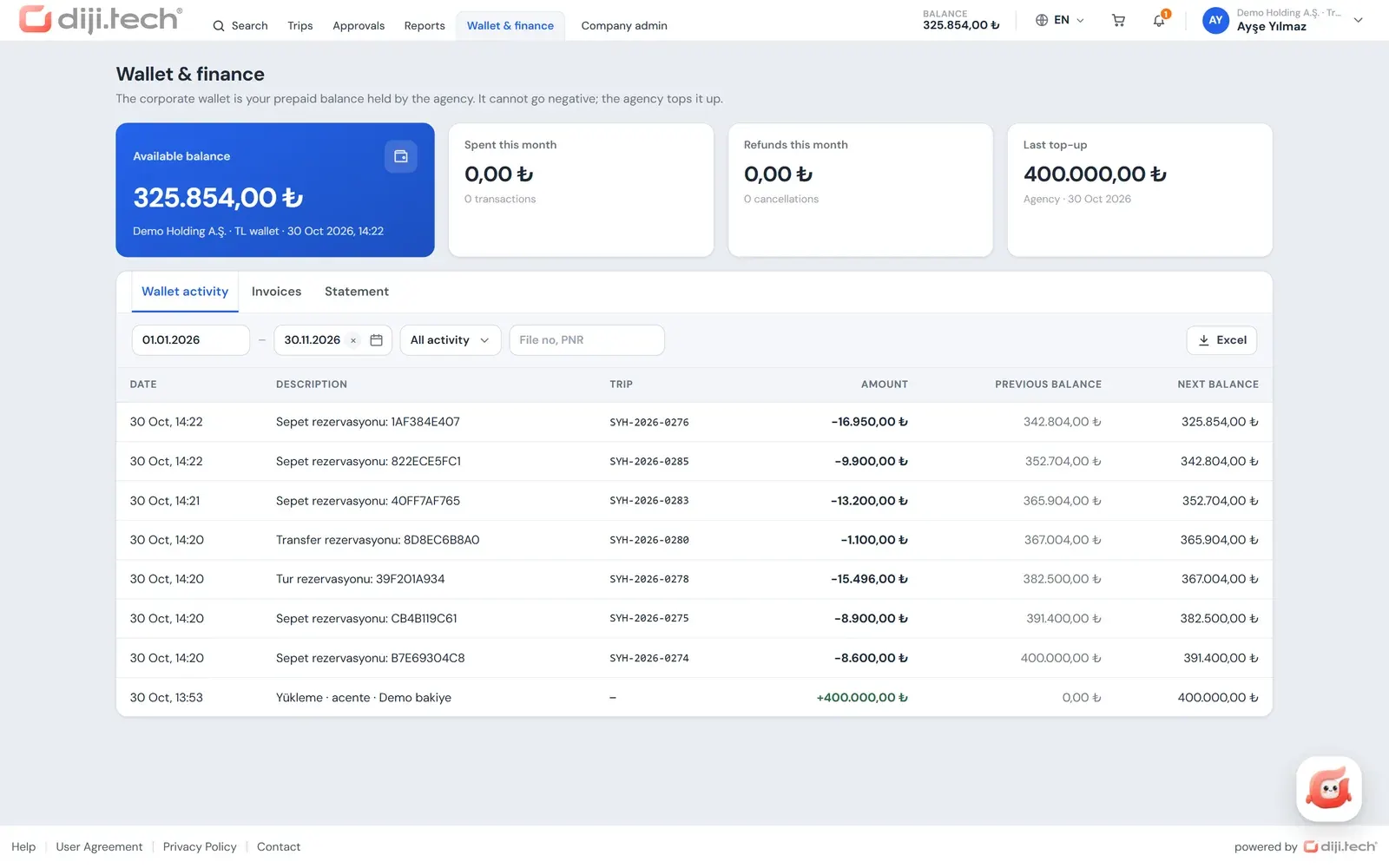
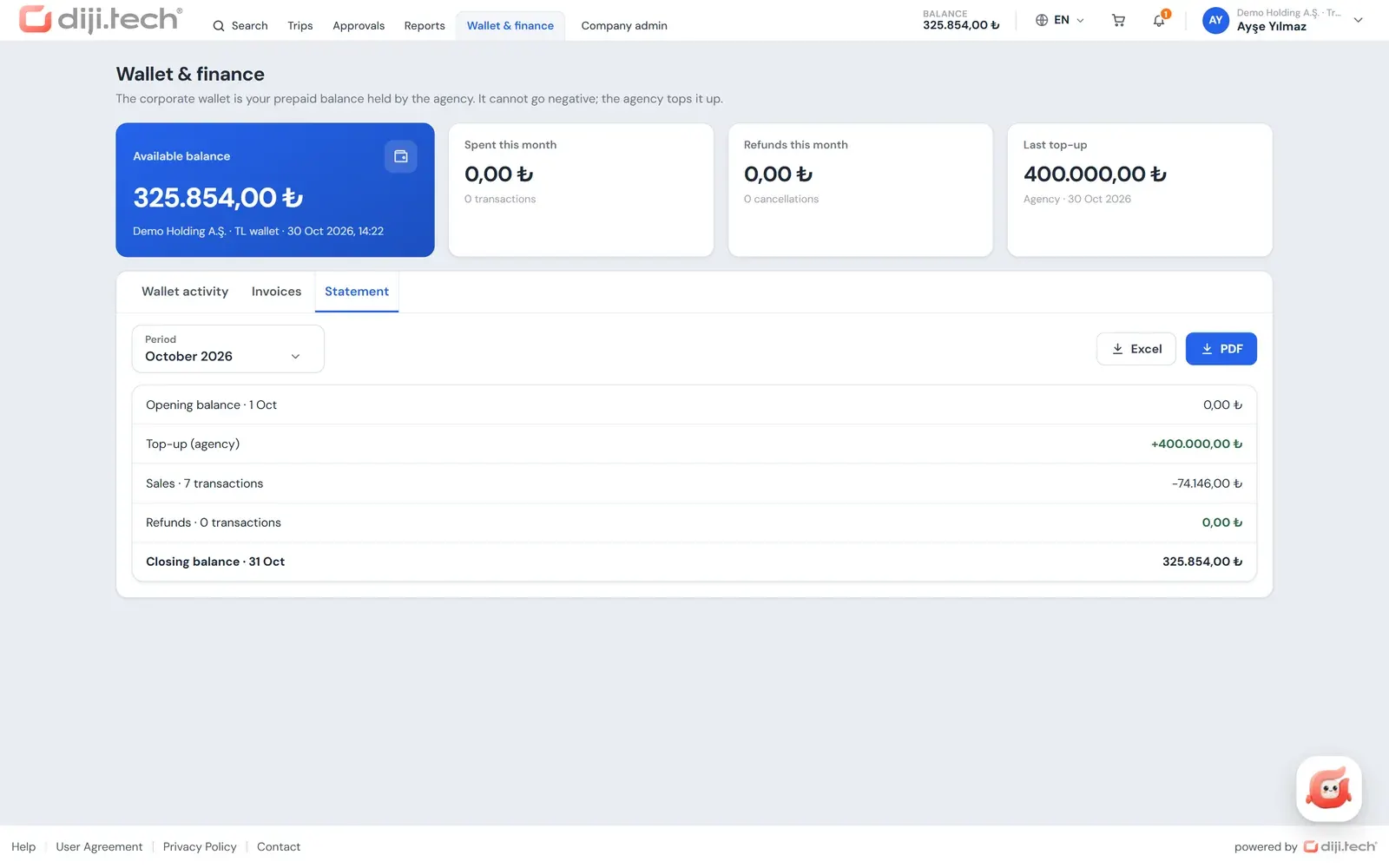
Users with the finance permission open the Wallet and finance screen. The balance and transactions of the company wallet, the monthly statement and the invoices issued to the company are gathered in one place; each booking is invoiced separately. The screen has three tabs:
- Wallet transactions: available balance, last top-up, this month's outflow and refunds; a transaction list searchable by date, trip number or PNR, and an Excel export.
- Statement: a monthly PDF statement showing opening balance, top-ups, sales, refunds, corrections and closing balance.
- Invoices: an invoice list searchable by invoice number, passenger, PNR or trip number, filterable by billing profile, with the invoice PDF.
Each trip file also holds the price breakdown, the payment note (card or wallet), the selected billing profile and the invoice PDF. The Finance report summarises the same data by billing profile; its details are on the corporate travel reporting page.
How does card payment work?
Card payment is made with the 3D Secure verification of the cardholder's bank. Card details are not stored in the portal and every payment is taken as a single charge; there are no instalments. Card collection runs through the payment line your travel agency already uses in the panel; no separate virtual POS is set up for the corporate channel. DIJI.TECH states that its payment infrastructure is PCI DSS compliant.
In the portal the card path opens to the extent the three layers above allow it. Card payment is therefore a path available in each client company only as far as the agency permits. The supported virtual POS connections are listed on the payment integrations page. For general information on paying for travel with a company card, see paying for business travel with a company card.
What is a billing profile and how is it defined?
A billing profile holds the details of the legal entity the invoice is issued to: company name, tax ID, tax office, address and invoice email. The company administrator defines profiles per company or branch from the portal, and the agency can also add and edit them from the company detail.
A document type is chosen on every profile: e-Invoice or e-Archive. In Turkey, according to the Revenue Administration (GİB), sales to taxpayers registered in the e-Invoice system are issued as e-Invoices, while sales to unregistered taxpayers and to non-taxpayers are issued as e-Archive invoices (GİB, about e-Archive Invoice, page in Turkish, accessed 4 November 2026).
One profile in a unit is set as the default; it comes up automatically for that unit's staff at booking. A profile that is no longer used is not deleted but made inactive. For short definitions see the billing profile and e-Invoice and e-Archive in Turkey glossary entries.
To whom, and how, is the invoice issued?
A corporate sale runs through the agency's accounting document line. The recipient of the invoice is always a legal entity and is determined in this order: the billing profile selected at booking; if there is none, the default profile of the traveller's unit; if that is missing too, the default profile of the root company. The sales note on the booking is carried over to the invoice note. As the cart also tells the traveller, every booking is invoiced separately and issued to the selected profile; for a trip with several items, the invoice list contains a separate document for each booking.
The contract model decides how the invoice looks:
- Transparent model: The agency's service fee appears as a separate "Service Fee" line on the invoice.
- Hidden margin model: The service fee is folded into the line price and the invoice shows a single line.
Documents are generated per line and the same document is never created twice; on a temporary error the system retries automatically up to 8 times, and a check scans for missing documents. e-Invoice and e-Archive documents are produced at the accounting provider the agency is connected to (Paraşüt, Luca, Logo Netsis), and delivery to GİB is carried out through that provider; the platform itself is not an integrator. For agencies using SYS, a corporate sale is invoiced to that company, with the company's accounting code as the account code. The details are on the accounting integrations page.
For the questions travellers ask when they want a flight or hotel invoice issued to their company, we prepared VAT and invoice processes in corporate travel.
How does reconciliation between the agency and the client work?
Reconciliation gets easier when the agency and the client look at the same sales and wallet records. In Kurumsal.pro the agency sees client invoices and the sales breakdown in the panel, and the client sees wallet transactions, the statement and invoices in the portal; both views are fed by the same records:
| Side | Source | Content |
|---|---|---|
| Agency | Client invoices | Filter by period, company, billing profile and status (Issued, Pending, Failed to send, Cancellation invoice); Excel of up to 10,000 rows; invoice PDF with a selectable language and the corporate site branding |
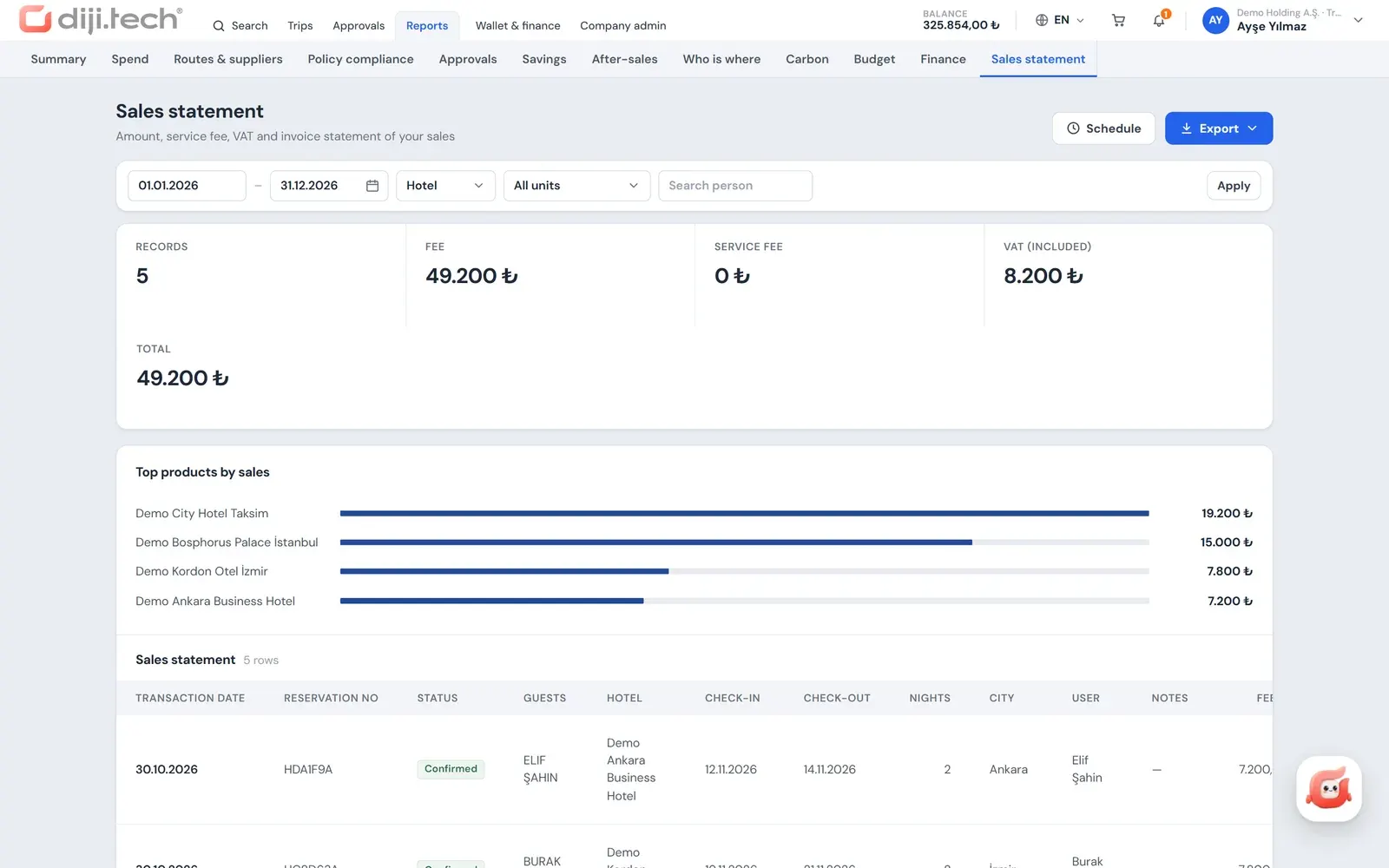
| Agency | Client sales breakdown | The company and its sub-companies, up to 370 days; product, unit and user filter; xlsx, csv, pdf; markup and commission are not visible |
| Client | Wallet and finance | Transaction list (Excel), monthly statement (PDF), invoices |
| Client | Finance and Sales breakdown reports | Invoice and wallet summary; fare, service fee, VAT and total |
The agency can schedule the client sales breakdown weekly or monthly as an attachment to the client's accounting contact email. Instead of the month-end exchange of "your list does not match ours", both sides compare the same breakdown. The problems that often come up in reconciliation are covered in reconciliation between a travel agency and a company.
Is there a credit account, a credit limit or bank transfer?
No. The payment model of the corporate portal is prepaid. There is no credit limit, deferred-payment account or payment reminder for the company; bank transfer or EFT payment and balance top-up from the portal do not exist either. Card payment is only made as a single charge with 3D Secure verification.
The only exception is the platform-level hide-wallet mode. On installations where this mode is on, the payment option in the portal is named "Post to account" and the wallet pages of the portal (balance, ledger, Excel and statement) are closed. This mode is switched on per tenant by the platform, not by the agency or the client.
What happens to the payment if the purchase has a problem?
If the price changes at the payment step, the traveller is warned, and the purchase is not made until the traveller explicitly accepts the new price. In a cart with several items, if some items cannot be purchased, the result screen shows "partial" and the amount of the item that could not be bought is refunded. When the agency processes a cancellation request and a refund is created, on a sale paid from the wallet the amount returns to the company wallet, and this movement shows up in both the ledger and the After-sales report. On the budget side, the refund amount is written back to the budget as well.
To show your corporate clients this payment and invoicing setup in a live environment, you can request a demo.
Screens
1 / 3
2 / 3
3 / 3
Screens are taken from the DIJI.TECH corporate portal and agency panel and show sample data.
Frequently asked questions
Which payment methods does the corporate portal offer?
There are two: the prepaid company wallet that the agency allocates to the client, and card payment with 3D Secure. Card payment is available as long as the agency and the platform keep that path open. There is no bank transfer or EFT payment, no instalments and no balance top-up from the portal.
Who loads balance into the company wallet?
The agency does. The agency distributes balance from its own wallet to the company wallet and can take it back if needed. The portal has no top-up screen; when the balance drops below the threshold, a notification goes to the people in the company's finance role.
Are card details stored when paying by card?
No. Card payment goes through a 3D Secure redirect, card details are not stored in the portal and the payment is taken as a single charge. DIJI.TECH states that its payment infrastructure is PCI DSS compliant.
What is a billing profile?
A billing profile holds the details of the legal entity the invoice is issued to: company name, tax ID, tax office, address and invoice email. It is defined per company or branch, an e-Invoice or e-Archive type is chosen, and one profile can be set as the default. Staff choose the suitable profile while booking.
Who is the invoice issued to?
The invoice is always issued to a legal entity. The recipient is, in order, the billing profile selected at booking; if none, the default profile of the person's unit; and if that is missing too, the default profile of the root company. The sales note is carried over to the invoice note.
When is payment taken for a trip that goes to approval?
A cart sent for approval does not take payment at that moment. When the final approval is given, the purchase is started from the company wallet. If the purchase cannot be completed, a person with approval authority or the company administrator finishes the transaction with the Complete purchase step.
Is there a credit account in the corporate portal?
There is no credit limit or deferred-payment account for the company; the model is prepaid. On installations where the platform's hide-wallet mode is on, the payment option in the portal is named Post to account and the wallet pages of the portal are closed.
How does reconciliation between the agency and the client work?
The agency panel has client invoices and the client sales breakdown; the portal has wallet transactions, the monthly statement and the invoice list. The sales breakdown can be emailed weekly or monthly to the client's accounting contact address, so both sides compare the same records.
Related pages
Last updated: