New client in 3 steps
The company, billing profile, admin invitation and default policy open in one operation; a second client with the same tax number cannot be created.
Client-specific profit model
Service Fee, Hidden markup and Commission; Hidden margin or Transparent contract model; copying with a preview.
Prepaid company wallet
Distribute, take back, warning threshold and an unalterable transaction ledger.
Representatives by product
Agency users are assigned by product and scope; work queues narrow with that assignment.
Corporate travel agency software is the back office where an agency creates its corporate clients, defines pricing and balance for each, and invoices and reports their sales. In Kurumsal.pro this back office is the "Corporate" section of the agency panel, and the branded portal you give your clients is fed by the same infrastructure. The screens the agency admin uses are described below. In this text, "client" means a client company, which the panel calls an organization.
What is in the corporate section of the agency panel?
The corporate section gathers all of the agency's corporate clients on one screen. The overview shows the number of active, in-setup and inactive clients, the balance available for distribution, pending work (pending approvals and new applications), staff count, wallets that need attention and the most recently added clients.
The pages of the section are opened by role permission: overview, clients, client management, applications, representatives, invoices, reports and client-specific room pricing are separate page permissions. The default admin role sees all of them; the default agency user role sees the overview, clients and applications pages. The client list is searched by name or tax number and filtered by status tabs, a contract model filter and a below-threshold wallet flag.
How is a new corporate client created?
A new client is created in a single operation with a three-step wizard. When the wizard finishes, the root company, the default billing profile, the invitation email to the client admin and the client's default travel policy are created together:
- Company details: trade name, tax number and tax office, address, accounting contact person.
- Contract model and domains: the Hidden margin or Transparent model, and the allowed email domains from which staff can be invited.
- Client admin: the name, surname and work email of the first person who will manage the client in the portal.
A second client cannot be created with the same tax number; the system rejects the duplicate. To move many clients at once there is bulk client import with an Excel or CSV template. The template takes company name, tax office and number, accounting code, person type, contact, accounting officer and invoice details. The file is first previewed without writing anything, then records are matched by tax number or accounting code and created or updated. An imported client does not automatically get an admin invitation or a default policy: the client admin is invited from the staff tab of the client detail, and the policy is defined by the company admin in the portal.
Requests coming from the application form on the portal's landing page are tracked in the "Applications" list with the statuses New, Converted to client and Rejected. The conversion wizard opens pre-filled with the application details; a reason is mandatory for a rejection.
Which tabs does the client detail have?
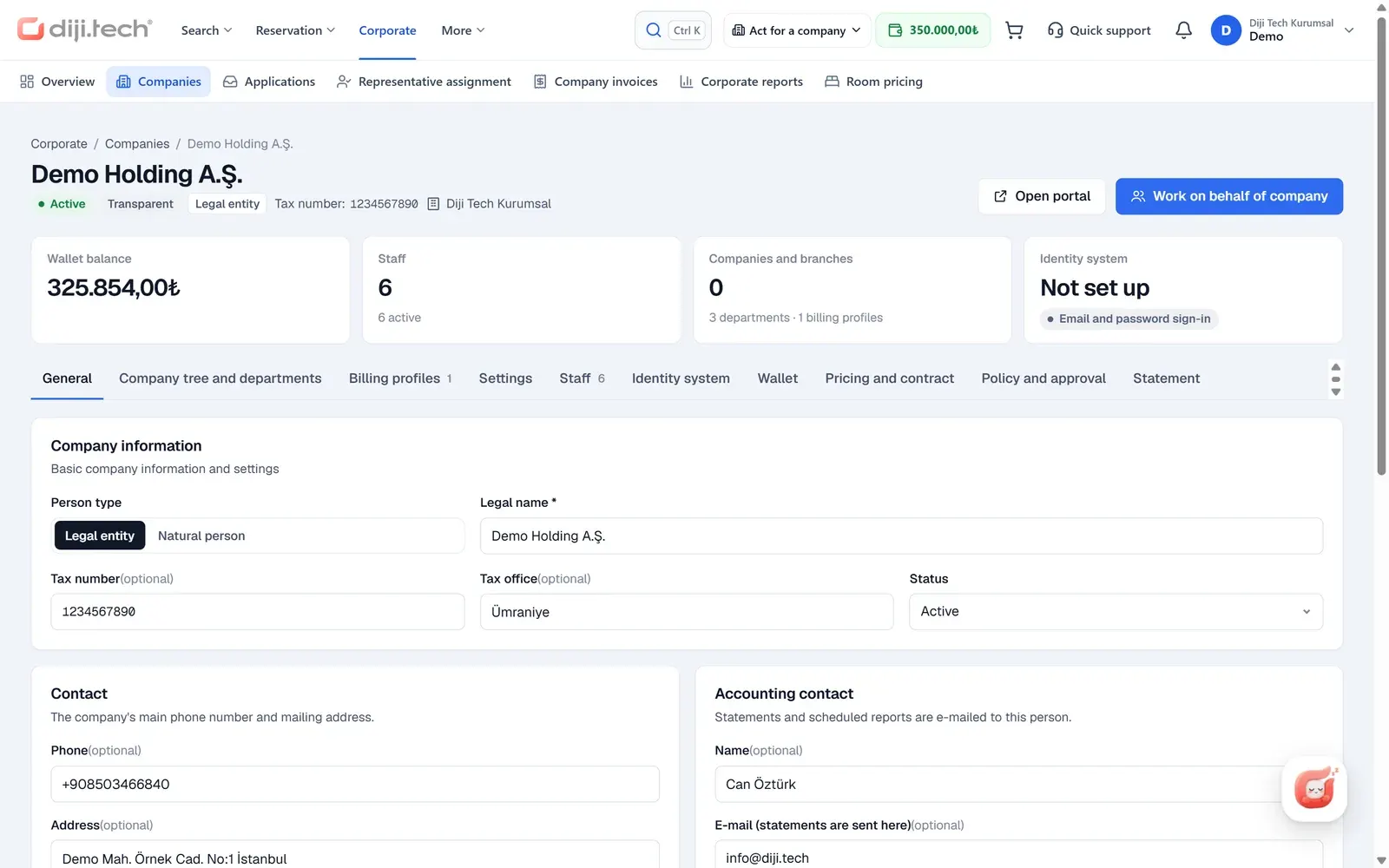
Each client's detail page has 10 tabs and a 6-step setup progress (general details, contract, client tree, billing profile, staff, wallet). From the page, "Open portal" jumps to the client's portal, and "Work on behalf" switches to selling on behalf of that client.
| Tab | Content |
|---|---|
| General | Trade name, person type, tax details, status, contact, accounting contact, THY corporate code, portal address, allowed domains |
| Tree | Adding companies, subsidiaries and branches (departments are edited by the client in the portal) |
| Billing profiles | Adding, editing, choosing the default profile |
| Settings | Products visible in the portal (10 products), payment paths: company wallet and card payment |
| Staff | Invitation with a portal account or as a traveler-only record, 7 ready-made roles, deactivation, Miles&Smiles and other loyalty cards |
| SSO | Identity provider details are stored as a draft only; there is no SSO sign-in in the portal |
| Wallet | Balance, distribute, take back, warning threshold, transaction ledger |
| Pricing | Client-specific pricing form and rules |
| Policy | Summary of the client's policy, approval flow and budget (read-only; the company admin defines them in the portal) |
| Breakdown | Client sales breakdown and scheduled delivery |
When a THY (Turkish Airlines) corporate code is entered for a client, it is added to that client's flight searches, and branches inherit the parent company's code; today only the THY code is supported.
How is client-specific pricing defined?
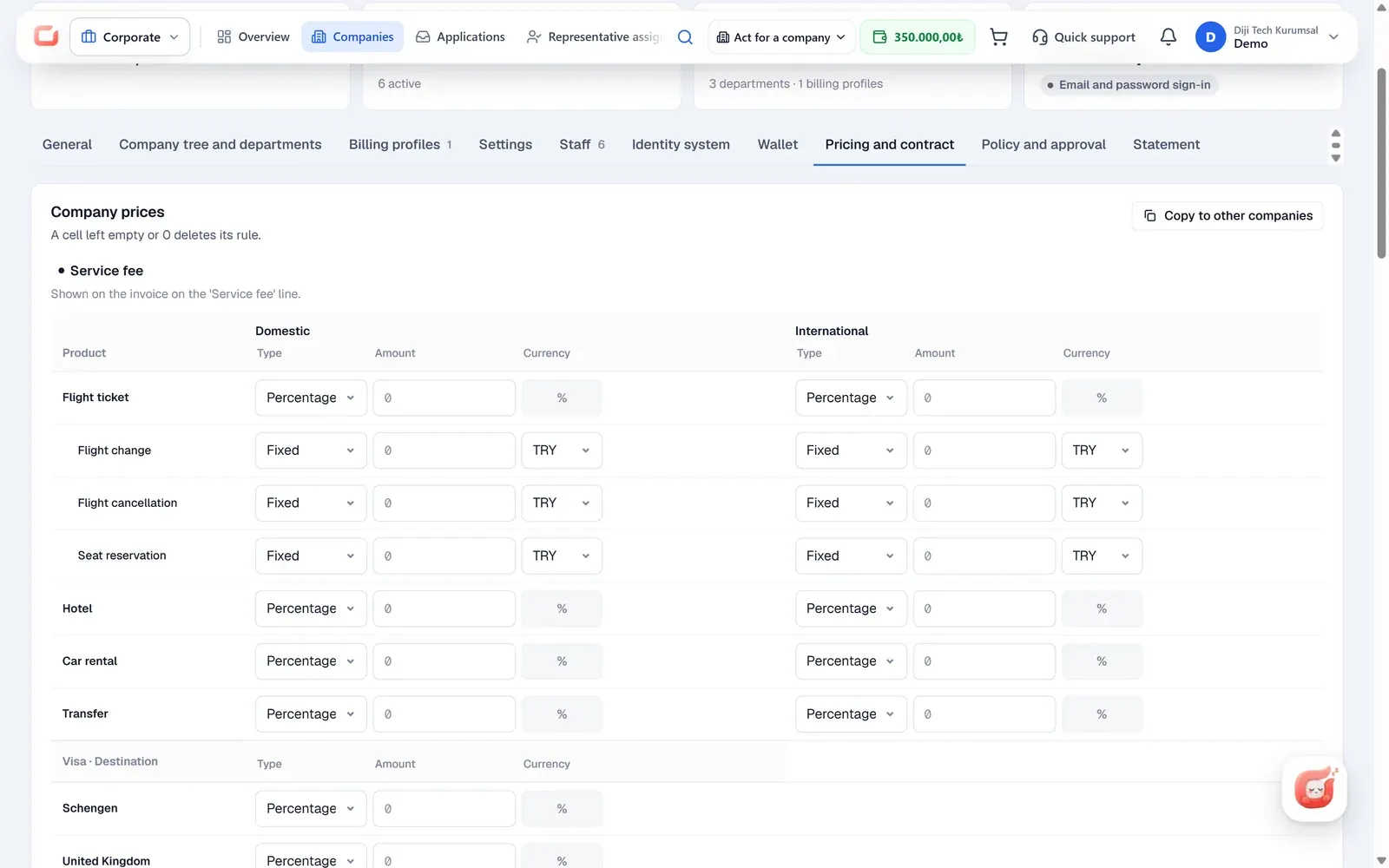
Each client's pricing form has three sections and sets up the agency's profit model for that client. A setting in the form replaces the agency's general rule; subsidiaries and branches inherit the client's rule. Portal sales are priced in a separate sales channel.
| Section | Tier | On the invoice |
|---|---|---|
| Service Fee | Customer tier | A separate "Service Fee" line in the Transparent model |
| Hidden markup | Customer tier | Embedded in the price, not visible on the document |
| Commission | Commission tier | Embedded in the price |
The form rows come split into domestic and international for flights, hotels, car rental and transfers; for visas there are rows for Schengen, the UK, the USA, Australia, Canada, India and others. For flights, after-sales fees for changes, cancellations and seat reservations are also defined separately. Each cell takes a percentage or a fixed amount (with a currency); a cell that carries several rules is locked and edited from the rule engine.
In the rule engine, a client-specific service fee is written as fixed or percentage, per unit, once or capped. The unit can be reservation, passenger, ticket, leg, night, day or room, and the rule applies to flight, hotel, transfer, tour, car, yacht, activity, villa, bus and visa products.
Copy to other companies transfers the selected sections to other clients in one operation. A preview first shows, per company, what will "Change", be "Overwritten" and be "Skipped (locked)"; locked cells are not touched and the operation cannot be undone. Client-specific room pricing can also be defined for hotels in the agency's own inventory.
How does the company wallet work?
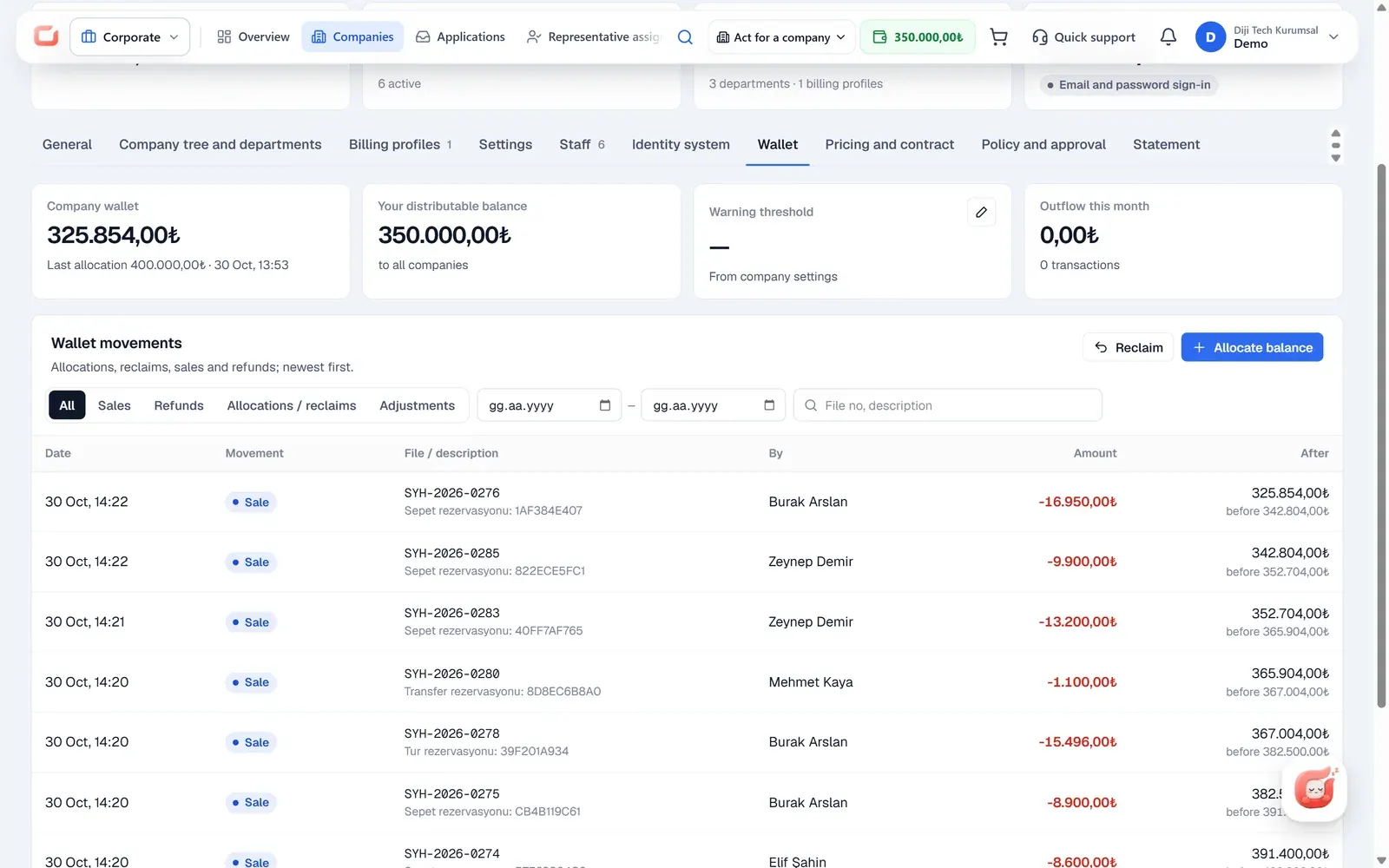
The company wallet is a prepaid account, and purchases made in the portal are deducted from this balance. The agency distributes balance to the client from its own B2B wallet; if the balance is insufficient the operation is rejected, and sending the same operation again does not create a duplicate record. If needed, balance is taken back from the client to the agency.
- Warning threshold: when the balance falls below the threshold, a notification goes once to the client's Finance role.
- Ledger: distribution, take-back, sale, refund and correction movements are written to an unalterable ledger and can be filtered in the panel; unless the platform's "hide wallet" mode is on, they also appear on the finance screen of the client's portal, with Excel export and a monthly statement.
- Credit: no credit limit or deferred-payment account is defined for a client; the model is prepaid.
The client's payment paths (company wallet, card payment) are switched on and off from the client settings. The whole payment and invoice flow is on the corporate travel payments and invoicing page, and the logic of balance tracking is in the post on prepaid corporate account tracking for travel agencies.
How are representatives assigned?
Users of the corporate agency are assigned as representatives by product and scope; the scope is All, Domestic or International. A representative is assigned to a product, not to a client, and works for all clients on the product they are assigned to. A counter shows how many representatives there are for each product, and "New user" creates a representative account from the panel.
The product assignment also decides the visibility of the operations queues: a representative sees only the queue of their own products, while payment and request items that have no product are open to everyone. The domestic and international scope is used for representative matching by the hotel's country in portal hotel sales. The representative's flow for selling on behalf of a client is described on the agent-assisted booking page.
How do invoicing, breakdowns and accounting work?
Client invoices are listed with period, client, billing profile and status (Issued, Pending, Failed to send, Cancellation invoice) filters. The list exports to Excel for up to 10,000 rows, optionally with English headers; the invoice PDF is downloaded in a chosen language under the corporate site's brand.
The client sales breakdown covers the client and its subsidiaries for periods of up to 370 days, filterable by product, unit and user, as xlsx, csv or pdf. The breakdown does not show markup or commission. It can be scheduled weekly or monthly and attached to an email to the client's accounting contact.
A corporate sale goes through the agency's accounting document pipeline, and the invoice recipient is the client's billing profile. In the SYS feed, a corporate sale is invoiced to that client, with the client's accounting code as the account code (see the SYS accounting integration). Other accounting and e-document connections are on the accounting integrations page.
Which reports and queues does the agency use?
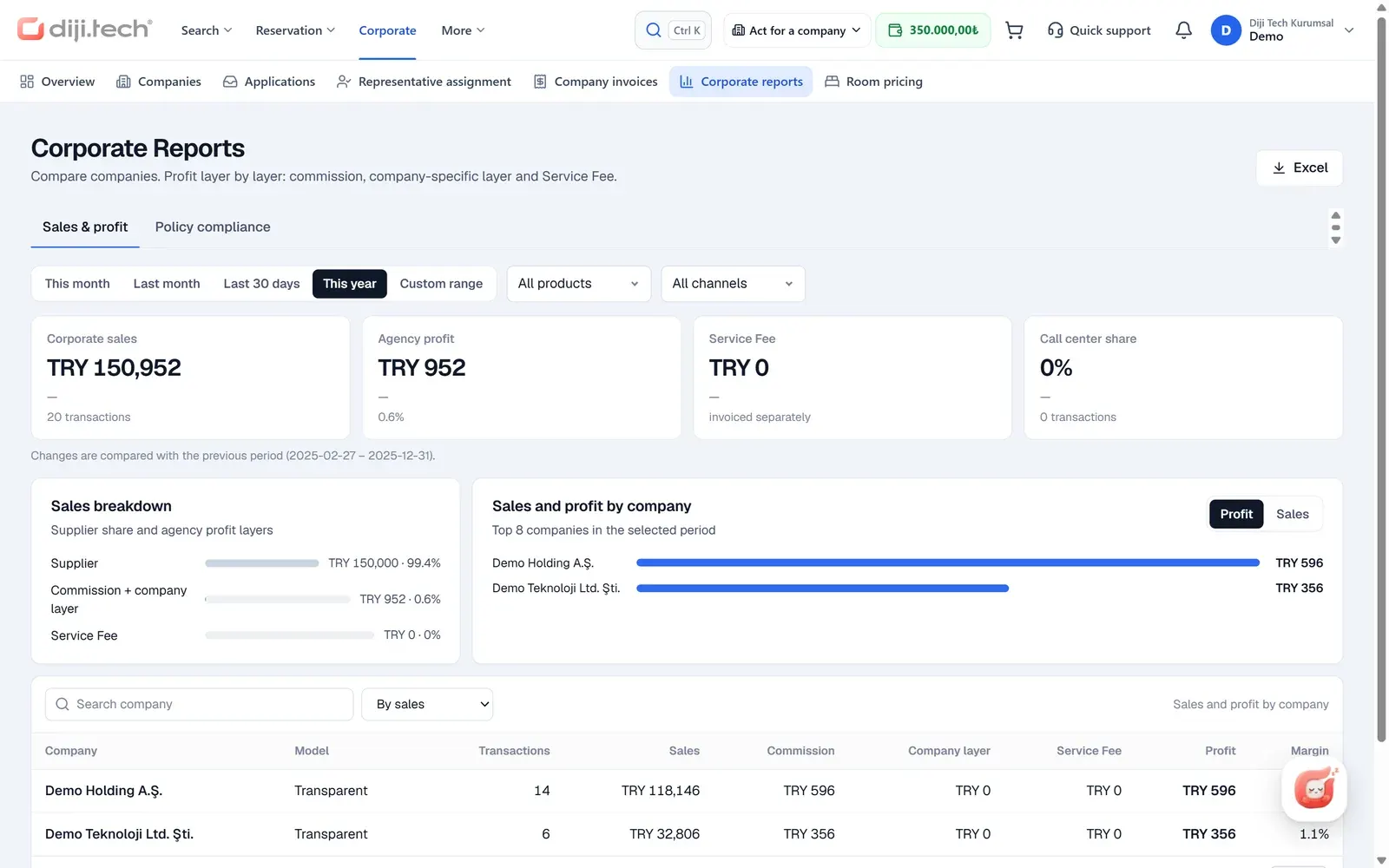
The agency's corporate reports focus on profit and compliance. The sales and profit report shows per-client sales, tiered profit (commission, client tier, Service Fee) and the sales channel; portal sales and sales made from the panel on a client's behalf are tracked separately. The policy compliance report lists violations from the two channels separately and is available as xlsx, csv or pdf; the clients' own portal reports are described on the corporate travel reporting page.
On the operations side there are queues for ticketing time limits, payments, airline, reconciliation, partial, requests and visas (documents, appointment, decision); items are assigned to a user and resolved. Cancellation and change requests coming from the portal arrive as a request record, a file note and an item in the "requests" queue. In the trip file, the client, department, passenger, requester, representative, billing profile, source, policy evaluation and approval history appear in a separate corporate section.
In which languages do the panel and the portal work?
The agency panel offers Turkish and English plus Russian, Arabic (right to left), Uzbek and Azerbaijani interfaces; the list is narrowed by the tenant's language setting. The portal given to corporate clients works in Turkish and English.
Who is it for?
This agency software is for travel agencies and travel management companies (TMCs) that provide business travel services to companies and want to run each client with its own pricing, balance and invoice rules. The TMC concept is covered in TMC vs travel agency, and the practical side of moving from Excel to a panel in managing corporate travel clients without spreadsheets. To make corporate sales, your agency must hold a TÜRSAB licence (the Turkish travel agency association's licence).
The daily routine can be thought of as a loop. A new client is created through the wizard or converted from an application; the six-step setup progress on the client detail shows which of general details, contract, tree, billing profile, staff and wallet are still missing. Then that client's Service Fee, Hidden markup and Commission values are entered in the pricing form, balance is distributed to the company wallet, and wallets that fall below the threshold are watched on the overview. Because representatives are assigned by product, items in the operations queue land with the right person. At period end, the scheduled sales breakdown goes to the client's accounting email, client invoices are filtered and downloaded in the panel, and the sales and profit report shows how much each client earns.
The software is the agency side of the corporate travel management software infrastructure from DIJI.TECH, offered as a rental or a source code purchase; pricing is set through a tailored quote. To see the panel with your own client structure, you can request a demo.
Screens
1 / 4
2 / 4
3 / 4
4 / 4
Screens are taken from the DIJI.TECH corporate portal and agency panel and show sample data.
Frequently asked questions
What is corporate travel agency software?
Corporate travel agency software is the back-office software an agency uses to manage its corporate clients: client records, client-specific pricing, balances, representatives, invoices and reports. In Kurumsal.pro this work is done in the corporate section of the agency panel, on the same infrastructure as the branded portal given to the client.
How is a new corporate client created?
The new client wizard has three steps: company details, contract model and allowed email domains, and the client admin. When the wizard finishes, the root company, the default billing profile, the client admin invitation and the default policy are created in a single operation.
Can clients be imported in bulk from Excel?
Yes. Clients are imported in bulk with an Excel or CSV template; the file is first previewed without writing anything, and records are matched by tax number or accounting code and then created or updated. An imported client does not automatically get an admin invitation or a default policy; the admin is invited afterwards and the policy is defined in the portal.
Can a different price be applied to each client?
Yes. In each client's pricing form, Service Fee, Hidden markup and Commission are defined separately, and client-specific rules can also be written with the detailed rule engine. A client's rule replaces the agency's general rule, and subsidiaries and branches inherit it.
What is the difference between the Hidden margin and Transparent contract models?
In the Hidden margin model the service fee is folded into the line price and the invoice lines merge into one line. In the Transparent model the service fee appears on the invoice as a separate Service Fee line. The model is chosen at the root of the client and spreads through the client tree.
How does the company wallet work, and is there a credit limit?
The company wallet is prepaid. The agency distributes balance to the client from its own wallet, takes it back if needed and sets a warning threshold. No credit limit or deferred-payment account is defined for a client; sales and refunds are written to an unalterable ledger.
How are representatives assigned?
Agency users are assigned as representatives by product and scope (All, Domestic, International). A representative is assigned to a product, not a client, and works for all clients on that product; work queues also narrow according to this assignment.
How are client invoices and the sales breakdown obtained?
Client invoices are listed with period, client, billing profile and status filters, exported to Excel and downloaded as PDF. The sales breakdown covers a client and its subsidiaries for periods of up to 370 days as xlsx, csv or pdf, and can also be sent by weekly or monthly email.
Which languages does the agency panel support?
The agency panel offers Turkish and English plus Russian, Arabic, Uzbek and Azerbaijani interfaces. The portal given to corporate clients works in Turkish and English.
Which reports does the agency see?
The agency sees a sales and tiered profit report per client (commission, client tier, Service Fee) and a policy compliance report. Portal sales and sales made from the panel on a client's behalf are reported as separate channels; the policy compliance report is available as xlsx, csv or pdf.
Related pages
Last updated: