Periodic ceiling
A budget per department, company or branch by month, quarter or fiscal year.
Four overrun rules
Inform, ask for a justification, send for approval or block; the company chooses the rule.
Commitment ledger
Amounts awaiting approval are tracked separately, so the remaining amount shows the budget that is really available.
Budget impact in approval
The approver sees how the request affects the budget on the same screen before deciding.
Corporate travel budget control sets the ceiling a department, company or branch may spend on business travel in a period and evaluates every request against it at submission. The amount sent for approval is set aside as a commitment, becomes actual spend on purchase, and the rule chosen by the company applies when the ceiling is exceeded. Within DIJI.TECH's corporate travel management software, the budget ledger is a second check kept independently of the policy.
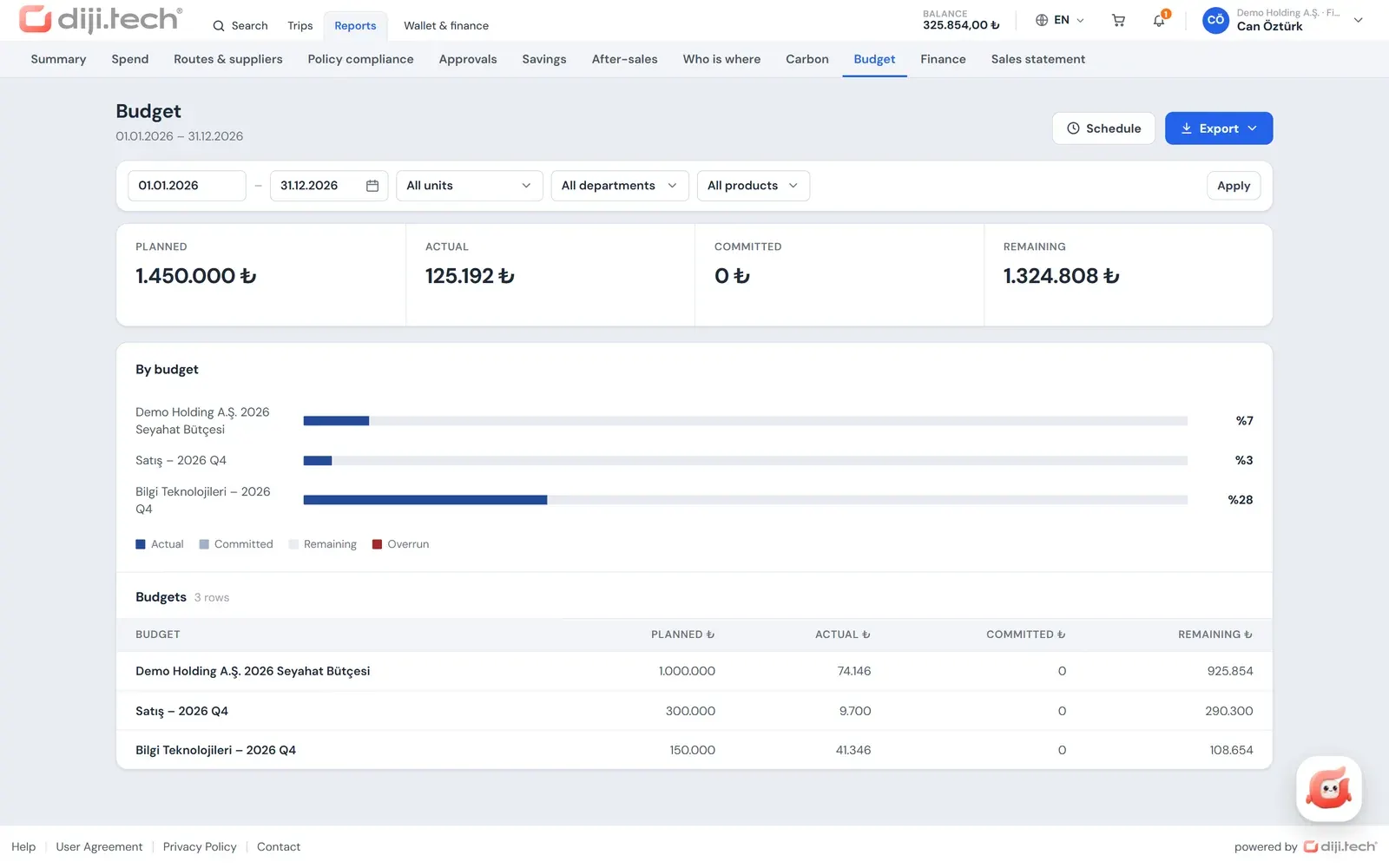
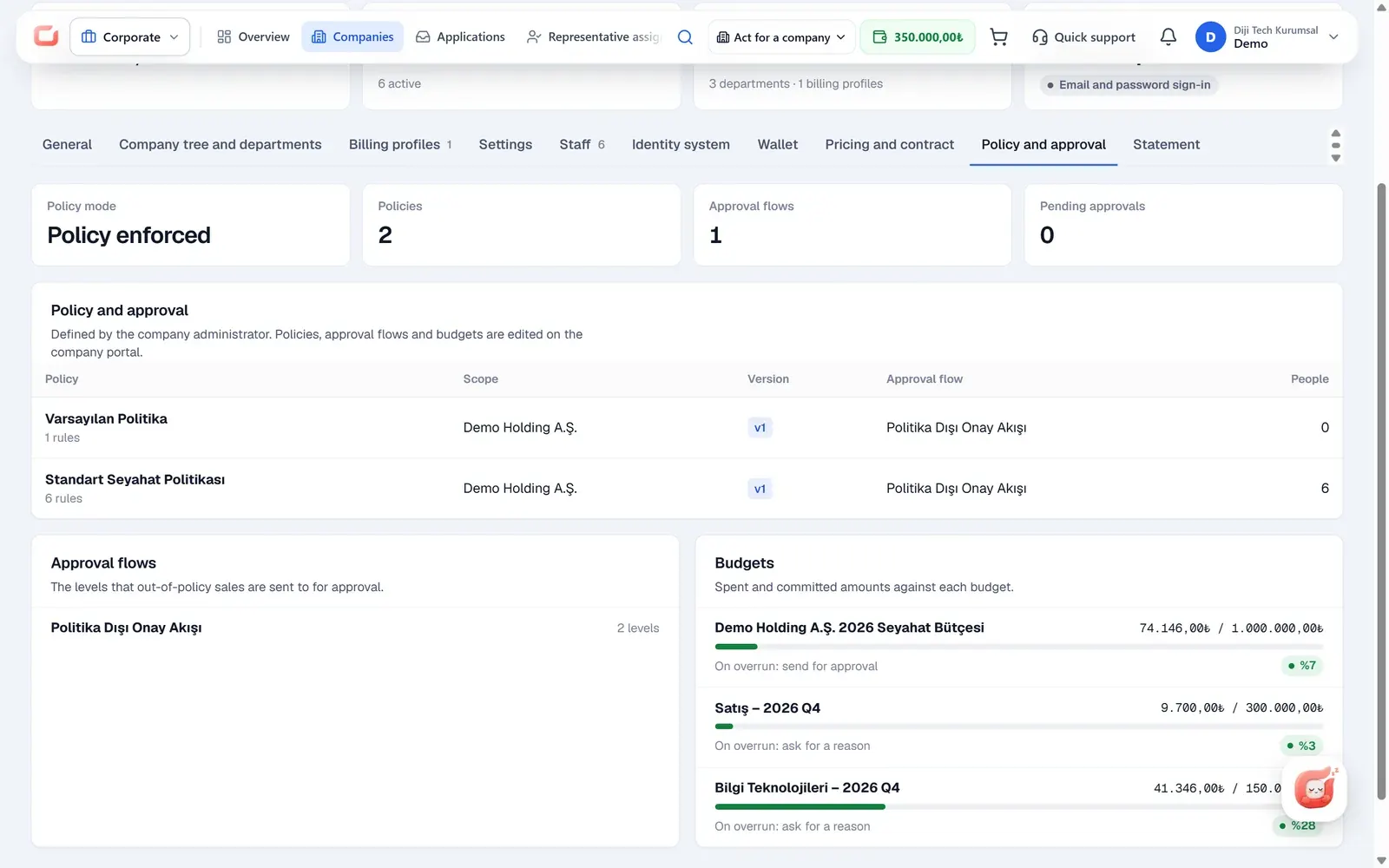
Budget definitions are on the "Budgets" screen of the portal and belong to the company's own administrator. In your agency panel, the company detail shows, read-only, the ceiling, actual spend and committed amount of the budgets whose period is open today.
What does a travel budget represent in the corporate portal?
In the portal a budget is not a money account but a periodic spending ceiling. No money is loaded onto a budget and no payment is made from it; payment is made from the company wallet or, where the agency allows it, by card. A budget only answers the question "how much may this unit spend in this period?".
This separation keeps payment and planning apart. The company wallet decides where the payment comes from; the budget shows which unit's share the spend is deducted from. So even when the wallet has a balance, the company's rule applies when a department exceeds its own periodic ceiling. For payment routes, see corporate travel payments and invoicing.
If a company defines no budget, trips are evaluated against the policy only. A budget does not replace the policy; it is a second control layer on top of it.
Who is a budget defined for, and for which period?
Every budget is bound to a unit, a period and a product scope. The company administrator opens the budget on the "Budgets" screen under company management and chooses the overrun rule on the same screen.
| Field | Options | Note |
|---|---|---|
| For | Department, company, branch | Department and company records come from the company tree |
| Period | Month, quarter, fiscal year | Budgets whose period is open at the time of the request are evaluated |
| Products | All products or selected products | Chosen from the products enabled in the portal: flight, hotel, transfer, car rental, tour, villa, yacht, activity, bus, visa |
| Amount | Periodic ceiling | Defined in Turkish lira |
| On overrun | Inform, ask for justification, send for approval, block | The rule applied to a request that exceeds the ceiling |
Because the department and branch structure is built in the company admin panel, the budget works on the same tree as the real organisation of the company. When an employee changes department, their later requests are deducted from the new department's budget.
What happens when a budget is exceeded?
If the request amount, together with the actual and committed amounts of the budget, exceeds the ceiling, the overrun rule of the budget applies. The company picks one of four rules and can change it later. The check runs when the cart is submitted.
| Overrun rule | From the traveller's side | What happens to the trip |
|---|---|---|
| Inform | The request continues | The overrun is recorded in the evaluation |
| Ask for justification | The traveller writes an explanation | The request continues once the explanation is written |
| Send for approval | Approval is required even if within policy | The cart goes to the approval flow |
| Block | The trip cannot be bought if the budget is not enough | Submission is stopped |
Overrun rules work when the policy is in "Enforce" mode. If the company runs the policy in "Inform only" (pilot) mode, a budget overrun does not stop the request or send it for approval. Sales made by your agency staff through agent-assisted corporate booking also do not go for approval because of a budget overrun; for these sales the policy evaluation is recorded.
How are committed, actual and remaining amounts calculated?
A budget works like a ledger, and every request leaves a trace in it. The remaining amount is the budget minus the actual spend and the committed amount. Tracking commitments separately prevents the budget from being silently exceeded by requests that are still waiting for approval.
The journey of a request through the budget runs in this order:
- Submission for approval: The request amount is set aside from the budget as a commitment.
- Rejection, expiry or cancellation: The commitment is released and the amount becomes available again.
- Purchase: The commitment becomes actual spend.
- Refund: The refunded amount is deducted from actual spend and returns to the budget.
Requests that are purchased directly without approval are also posted to the budget as actual spend. For a short definition, see the budget commitment glossary entry.
Can one trip affect several budgets?
Yes. The budget check follows the traveller's position in the company tree. Every budget defined for the traveller's department and its parent departments, and for the company and its parent companies, whose period is open and whose products match the request, is evaluated at the same time.
This structure matters for holdings and multi-company groups. For example, the monthly budget of a sales team and the annual budget of the company it belongs to are checked together on the same request. If several budgets are exceeded, the strongest of their overrun rules applies: blocking is stronger than approval, approval is stronger than justification, and justification is stronger than information.
The product scope also decides the match. A budget defined for flights only is not evaluated on a request that contains only a hotel.
Where does the approver see the budget impact?
In the approval detail the approver sees the relevant budget of the request as a card. The card shows the name and period of the budget, the planned amount, actual spend, commitment and remaining amount; the bar uses a different colour for the actual and committed portions.
This lets the approver decide not only on the policy violation but also on the periodic position of the unit. In a department with little remaining budget, the approver can approve the request by choosing an in-policy alternative. Approval levels and alternative selection are described in travel approval workflow.
How is budget use monitored?
Budget use is monitored in three places: the home page dashboard, the budget report and the approval detail. Company administrators and people in the finance role see budget usage bars on the home page, so it is clear on the first screen which unit is approaching its ceiling. Report viewers follow the same information in the budget report.
The budget report shows the planned, actual, committed and remaining amounts for each budget. It is one of the portal's 11 reports and, like the others, has these features:
- Export: Excel, CSV and PDF.
- Scheduled email: Monthly or weekly, each recipient receiving their own scope.
- Scope: The report is narrowed to the viewer's role scope; the period is at most 370 days.
- Permissions: People with the report permission see all 11 reports; people with only the finance permission see five finance-focused reports, including the budget report.
Because spend reports offer product, unit, department and person breakdowns, budget and actual spend can be read side by side as department-level cost analysis. All reports are in corporate travel reporting.
How should the budget period and scope be designed?
A budget works when it matches the unit and period in which the company really plans its spending. The product imposes no particular setup; the principles below guide the company administrator:
- Match the period to the planning rhythm: Month for teams that plan monthly, quarter for units whose budget is approved quarterly, fiscal year for companies with an annual ceiling.
- Layered setup: A short-period budget can be defined for a department and a long-period one for the company; both are checked on the same request.
- Product split: If most of the spend is on flights and hotels, a separate budget can be opened for them and a shared budget for the other products.
- Overrun rule by unit risk: "Ask for justification" suits frequently travelling sales teams, while "Send for approval" or "Block" suits units with a fixed ceiling.
In a new company, opening budgets in the first period with the "Inform" rule and watching overruns in the report makes it easier to set ceilings from real spend.
How does an agency offer budget control to its corporate clients?
An agency presents budget control to the client's finance team as the answer to "which department spent how much and how much is left": the company administrator enters the ceiling and the committed and remaining amounts are visible before the period closes. This is usually the finance manager's question in a sales conversation, and seeing commitments and remaining amounts separately answers it without waiting for the period to end.
Because the company administrator defines the budgets, your agency does not need to enter ceilings at the start of every period.
How does a budget differ from a travel policy?
A policy checks whether a single trip complies with the rules; a budget checks the total spend of a unit over the period. A trip within policy can still exceed the budget, and an out-of-policy trip can stay within the budget. The two controls work together in the same submission.
| Topic | Travel policy | Travel budget |
|---|---|---|
| What it checks | Compliance of a single trip with the rules | Total periodic spend of a unit |
| Bound to | Company, branch, department, grade, individual | Department, company, branch |
| When it runs | Search, cart and submission | Submission |
| Outcomes | Block, send for approval, always approve, inform | Inform, ask for justification, send for approval, block |
| Change trail | Version history and comparison | Archiving; commitment and actual ledger |
The full list of rule types is in the table on the travel policy software page.
Can budgets be tracked by cost centre or project code?
No. The portal has no cost centre or project code field and the reports have no such breakdown. Budgets are defined for departments, companies and branches. If your corporate client tracks spend by cost centre, the closest equivalent is to build the department tree according to the cost centres.
For the general definition, see the cost centre glossary entry; for a step-by-step method of deciding the amount and period of a budget, see the corporate travel budget template post.
What limits apply to budget management?
Budgets are defined only in Turkish lira, no email alert is sent for an overrun, a budget is not deleted and there is no cost centre breakdown.
- Currency: Budgets are defined in Turkish lira; there is no currency selection on the budget screen.
- Notification: No email or SMS alert is sent for a budget threshold or overrun; use is followed on the dashboard, in the report and in the approval detail.
- Deletion: A budget is archived, not deleted.
- Breakdown: There is no cost centre or project code; there are departments, companies and branches.
To see how budget, policy and approval work together on the structure of your own corporate clients, request a demo.
Screens
1 / 2
2 / 2
Screens are taken from the DIJI.TECH corporate portal and agency panel and show sample data.
Frequently asked questions
What is travel budget control?
Travel budget control defines the upper limit a unit can spend on business travel in a given period and checks every request against it. In the corporate portal a budget is defined for a department, company or branch, and the company's chosen rule applies when the ceiling is exceeded.
For which periods can a budget be defined?
The budget period is chosen as month, quarter or fiscal year. Budgets whose period is open at the time of the request are evaluated. Each budget can apply to all products or only to selected ones, for example only flights and hotels.
What happens when a budget is exceeded?
The overrun rule chosen by the company applies. With Inform, the request continues; with Ask for justification, the traveller writes an explanation; with Send for approval, the request goes for approval even if it is within policy; with Block, the trip cannot be bought if the budget is not enough.
What is a committed amount?
A commitment is the amount set aside from the budget for requests that are awaiting approval and have not yet been purchased. If the request is rejected, expires or is cancelled, the commitment is released; if it is purchased, it becomes actual spend. The remaining amount is the budget minus the actual and committed amounts.
Can one trip affect several budgets?
Yes. Every budget defined for the traveller's department and its parent departments, and for the company and its parent companies, whose period is open and whose products match, is evaluated. If several budgets are exceeded, the strongest of their overrun rules applies.
Is an email alert sent when a budget is exceeded?
No. No email or SMS notification is sent for a budget threshold or overrun. Budget use is followed from the budget bars on the home page, the budget report and the budget card in the approval detail.
In which currency are budgets kept?
Budgets are defined in Turkish lira (TRY); there is no currency selection on the budget screen. The planned, actual, committed and remaining amounts in the budget report are also shown in TRY.
Can budgets be tracked by cost centre or project code?
No. The portal has no cost centre or project code field and no report by this breakdown. Budgets are defined for departments, companies and branches; spend reports provide department-level cost analysis with product, unit, department and person breakdowns.
Can a budget be deleted?
A budget is not deleted but archived. Archiving keeps the spending record of past periods and its place in the reports. A new budget is defined for a new period.
Related pages
Last updated: