Room-level policy decision
In policy, Out of policy or Blocked on every room option; multi-room selection in one step.
City-based nightly cap
Separate caps for cities such as Istanbul and Ankara plus an "other cities" row, and a star ceiling on top.
Client-specific room rates
A rate set with the client selector on the agency's own hotels reaches only that client's employees.
Hotel letter with client details
The booking letter sent to the hotel carries the client, the requester and the department.
Corporate hotel booking is the process of arranging an employee's business-trip accommodation together with the company's nightly caps, star rule, approval flow and invoice details. In Kurumsal.pro this is the hotel module of the portal your agency opens to its corporate clients under its own brand. The employee picks the hotel and the room, the rules run at every step, and the operation of the booking stays with your agency.
For accommodation, the city and the room type decide most of the outcome, which is why the hotel side of DIJI.TECH's corporate travel management software ties the cap to the city and the decision to the room. The sections below follow each step from search to hotel letter, from the point of view of your client's employees and approvers.
How is a corporate hotel booked in the portal?
The employee selects the destination and dates and searches, narrows the results by policy and hotel features, picks a room on the hotel detail page by looking at its policy decision, and adds it to the cart. In the cart they complete the trip details and the invoice profile. A stay that is within policy and budget is purchased; the rest goes to approval with a justification.
A hotel can move alone or in the same trip cart as a flight, a transfer and a car rental. The approver sees the accommodation together with the flight in one request and approves or rejects it with a single decision.
What does the employee choose in hotel search?
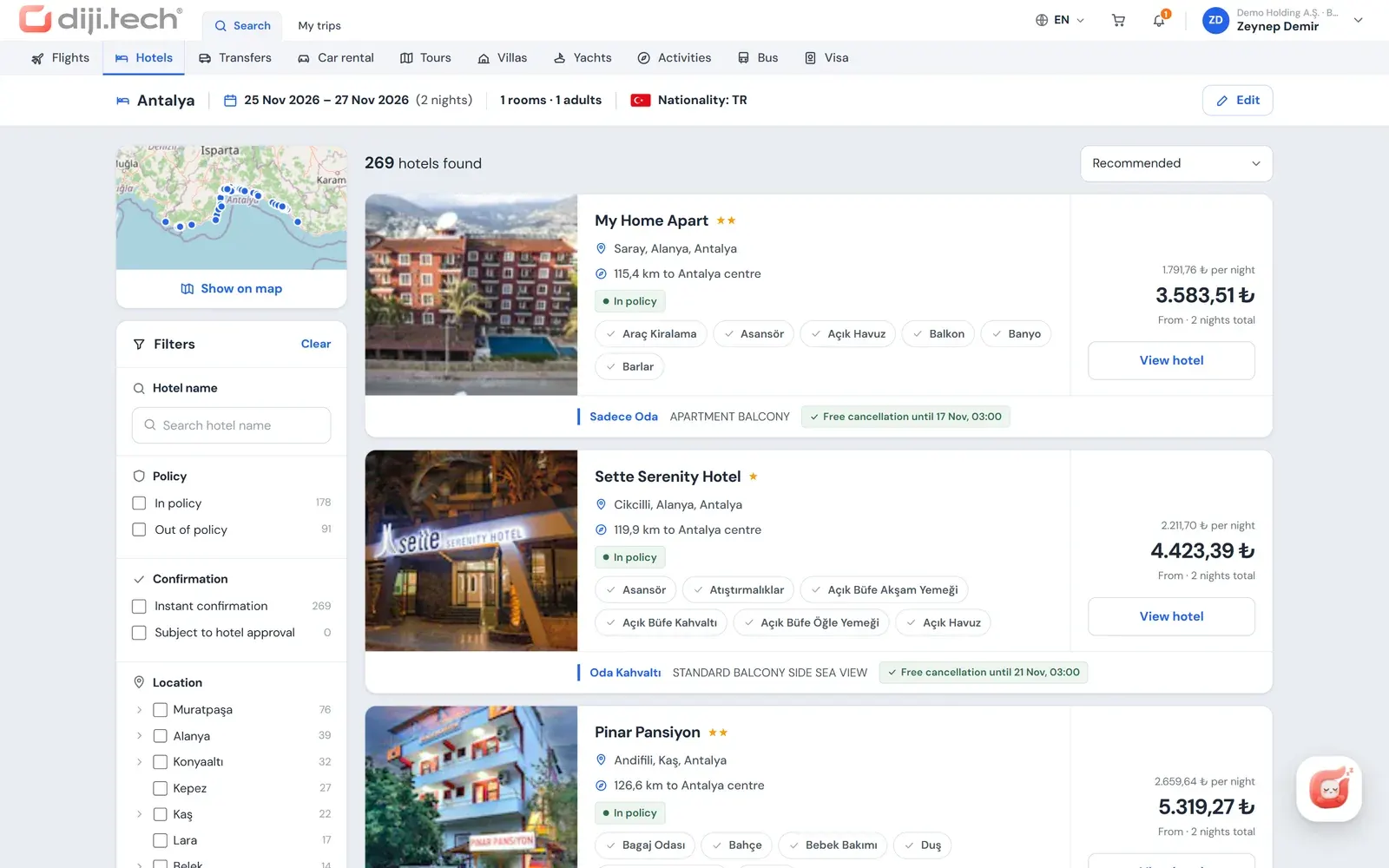
The search takes the destination, check-in and check-out dates, 1 to 6 rooms, and the number of adults and children for each room; ages are entered for children. Nationality is part of the search too: since hotel prices and availability can differ by nationality, this information is sent with the search. Domestic and international scope are separated.
The result list offers these filters and sorting options:
| Filter | What it does |
|---|---|
| Hotel name | Finds a specific hotel directly |
| Policy | Separates in-policy and out-of-policy hotels |
| Instant confirmation / on request | Separates bookings confirmed at once from those confirmed after the hotel replies |
| Location tree | Narrows by city, district or area |
| Nightly price | Sets the price range |
| Stars and board type | Filters by hotel class and meal plan |
| Penalty-free cancellation | Shows refundable options |
| Map | Shows results in a map preview and in a full-screen map |
How is the policy decision shown on the hotel detail page?
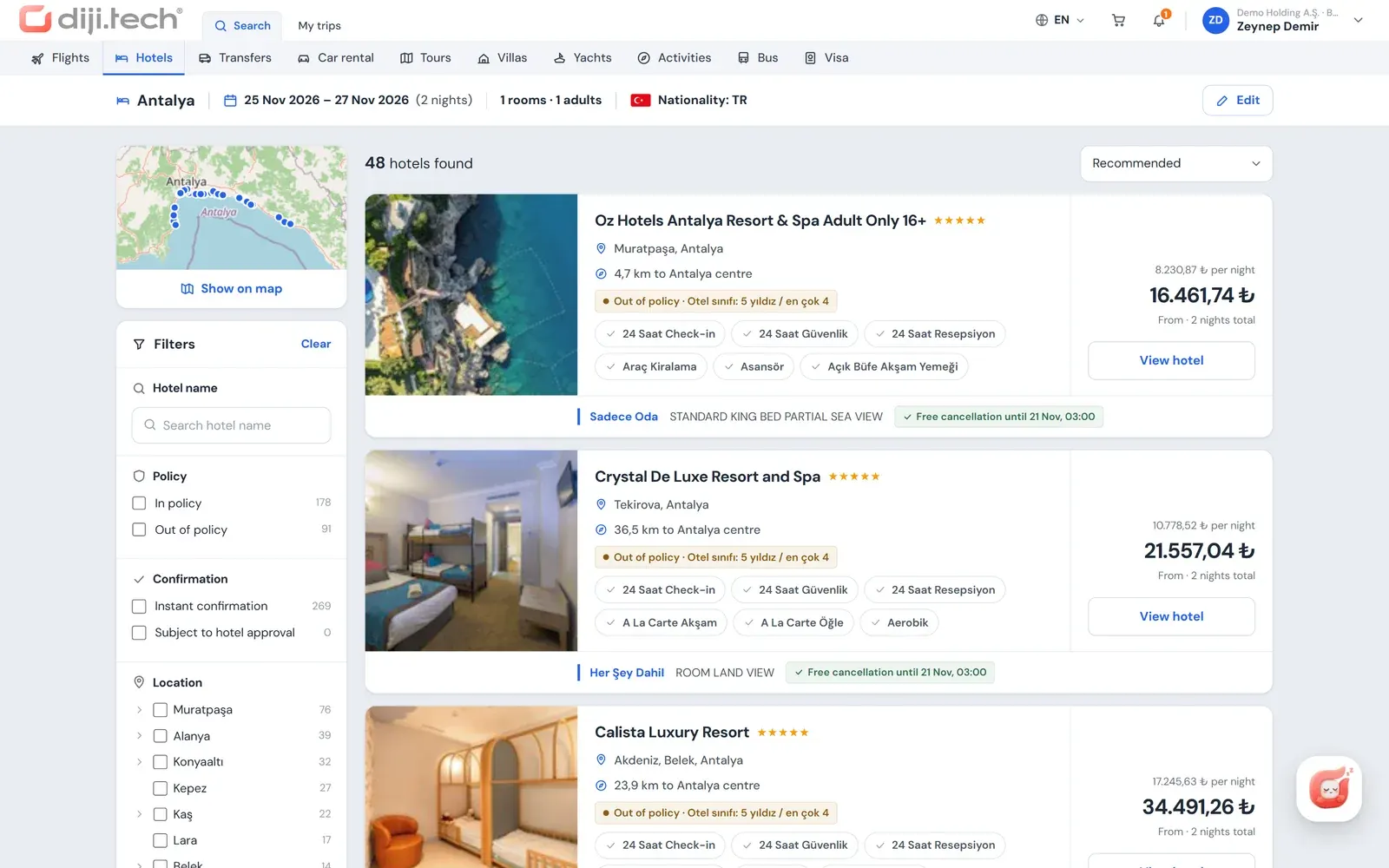
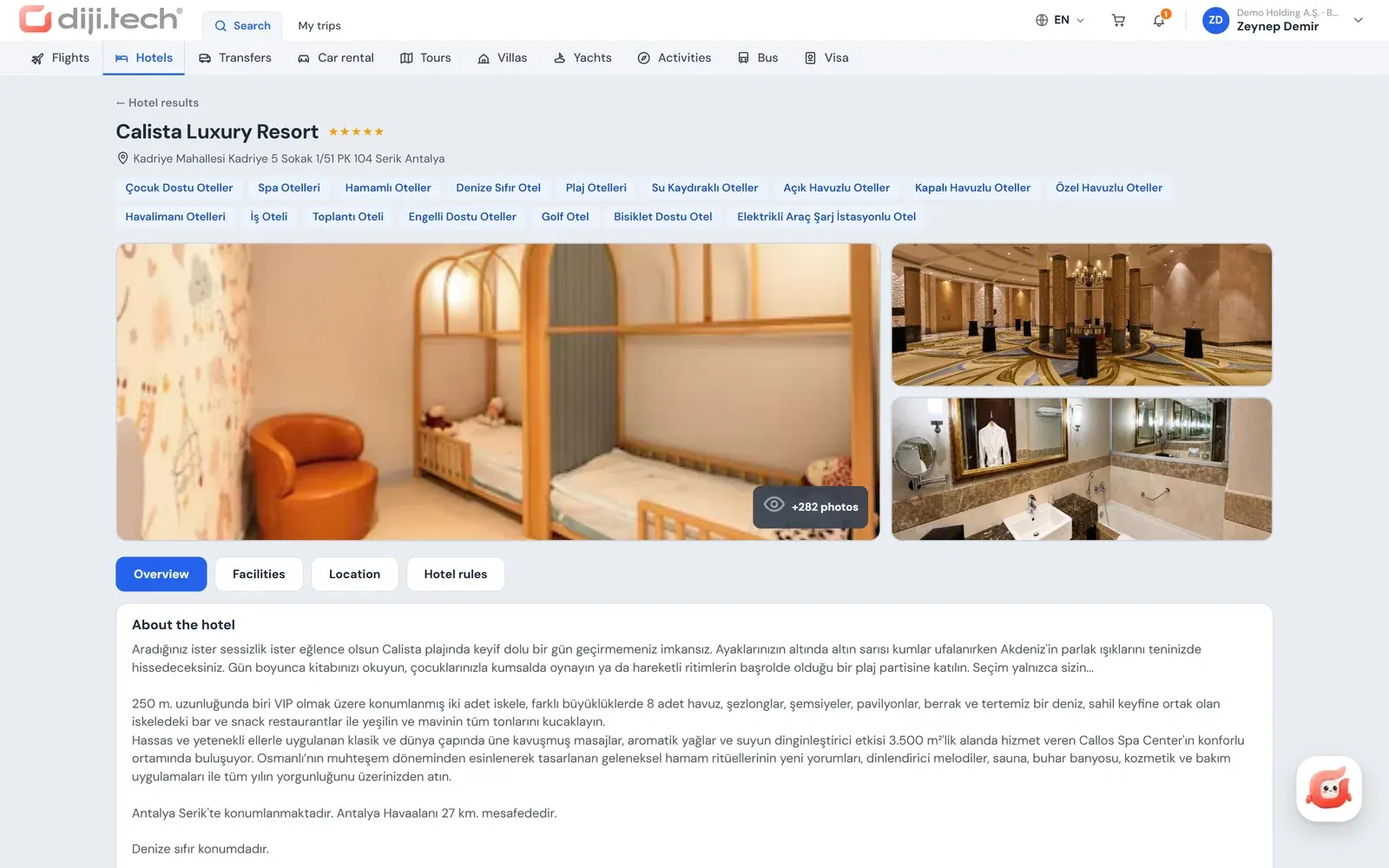
The hotel detail page opens with live room and price information and shows a separate policy decision on each room option: In policy, Out of policy (with the reason) or Blocked. In the same hotel the standard room may be within policy while a higher category exceeds the cap; the employee sees this difference on the room row and chooses accordingly.
The detail page also contains:
- Gallery, amenities and location information.
- Hotel rules and the cancellation conditions of each room.
- Taxes payable separately at the hotel (when the supplier sends them).
- Multi-room selection, with the price and decision of each room shown separately.
If the employee chooses an out-of-policy room, the system stores the best in-policy room at the same hotel as an alternative. When alternative selection is enabled in the approval flow (it is on by default), the approver can approve with this alternative, and the person who opened the request is notified.
Which policy rules apply to hotels?
Hotel rules are defined by the client administrator in the portal's policy screen and apply to the guest who will stay, not to the person who makes the booking. Two rules are specific to accommodation: the city-based nightly cap and the maximum star rating. The outcome of each rule is to block, to require approval on violation, to require approval every time, or to inform only.
| Rule | Use for hotels |
|---|---|
| Unit price limit | Nightly amount; separate rows for cities such as Istanbul and Ankara and an "other cities" row |
| Hotel stars | A maximum between 1 and 5 stars |
| Maximum % difference from the best option | Allowed gap to the cheapest room in the same search |
| Approval on every request | Approval for every stay, regardless of the rules |
The per-person and total amount, minimum days before purchase and risky-country rules work for hotels as well; these general rules are described on the travel policy software page. Limits can be defined in TRY, USD, EUR or GBP. If more than one policy matches the same traveler, the conflict rule the company has chosen (the most specific policy or the strictest rule) applies.
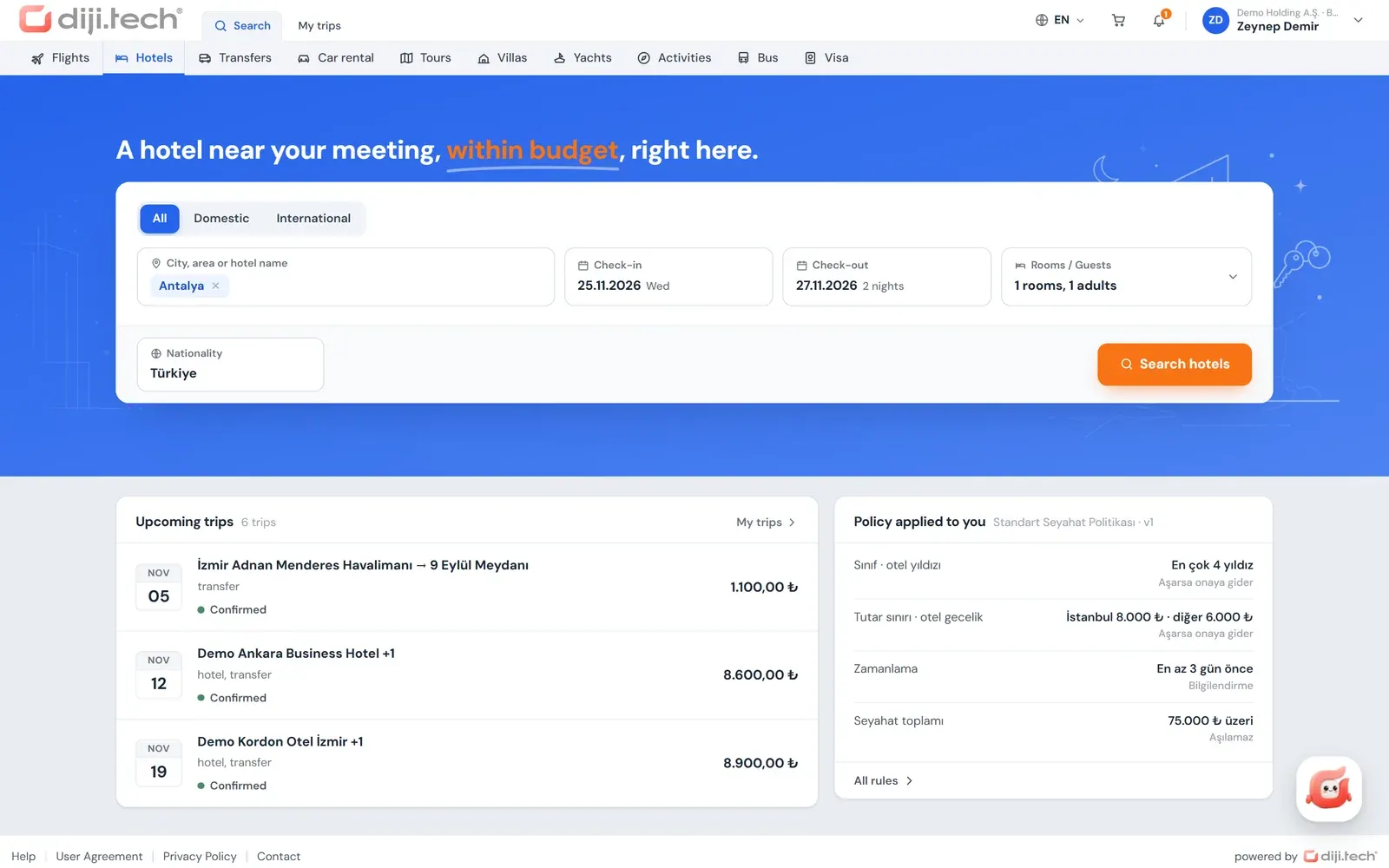
Employees can also see which limit applies to them before they search. The "Policy applied to you" card on the portal home page lists, in plain text, the rules of the policy that applies to the person, with their limits and what happens when a limit is exceeded. If a city-based nightly cap is defined, the employee learns before starting the hotel search what amount applies to, say, Izmir, and whether a room above it will be blocked or sent to approval. Together with the badges in the result list, this card answers "why did it go to approval?" before a request is opened, so the client administrator does not have to answer the same question one by one.
How do on-request hotels work?
An on-request hotel is confirmed only after the hotel replies. Employees can separate these hotels with a filter; when an on-request hotel is purchased, the result screen shows "request received". For instant-confirmation hotels the purchase result is a confirmed booking at once. The policy decision, the approval flow and the invoice profile work the same way for both types.
This distinction lets employees favour instant-confirmation hotels on last-minute trips and consider on-request options on planned trips. A short definition of the term is on the on-request booking glossary page.
Can client-specific rates be offered on your agency's own hotels?
Yes. On the hotels in its own inventory (DMC hotels), your agency selects the client in the room price screen of the panel and sets a room rate for that client alone. In the portal the hotel price scope is pinned on the server to the employee's company, so one client's rate never appears to another client's employees and employees cannot change that scope. No separate system is needed to manage negotiated rates.
Beyond that, the client price form lets you define separate domestic and international service fees, hidden markup and commission for hotels. The service fee rule can work per night, per room or per booking. Kurumsal.pro has no screen for uploading a company's negotiated hotel rate sheets (RFPs) as files; client-specific rates are given in this way on the agency's own hotels.
Can a confirmed stay be changed?
At hotels in your agency's own inventory, yes. Staff with booking permission select a new date, room, board type or guest name for a confirmed stay; the portal shows the price difference and the change service fee on separate lines together with the total. An accepted request goes straight to the hotel without your agency's operations team having to step in.
- If the hotel approves, the difference is credited automatically to the wallet that paid for the sale.
- The hotel's reply arrives as a portal notification and by e-mail.
- The number of rooms must stay the same as in the booking.
- The form is locked while another change request is open on the same booking.
- If the difference or the service fee is recalculated at submission and changes, the portal shows the new offer.
The client's approval policy is not applied to this direct change. For hotels of other suppliers, a cancellation request is opened with a penalty and refund preview and a change request with a typed description; both drop into the agency's operations desk as requests, and the agency carries out the actual operation.
Can hotels be booked on behalf of others and for guests?
Yes. A user with the booker or administrator role opens a cart for employees within their scope and reserves the hotel; the policy applies to the guest who will stay, not to the booker. A user with guest-traveler permission can also add up to 9 guests from outside the company to the same cart. A user with only the Traveler role cannot complete a multi-person room.
For a guest the portal asks for first name, last name, gender, date of birth, nationality and ID number or passport details. Which fields are mandatory is decided by the booking rules of the products in the cart, and they differ for Turkish and foreign nationals. This way the stay of people visiting for a client meeting, training or audit also sits in the company's trip cart and invoice profile.
Employees can keep preferences such as bed type and a non-smoking room in their profile. These preferences are stored in the profile; they are not passed to the hotel automatically with the booking.
How do approval, payment and invoicing proceed?
A stay that is out of policy or over budget goes to approval as a single request with the rest of the cart. Because hotel prices can change during approval, the flow has a hotel-specific price tolerance: the default is 5 percent, and the company sets it between 0 and 50. A purchase from the company wallet fetches the price again at final approval; if the difference exceeds the tolerance, the stay returns to the approver.
- Payment: the company wallet for stays without approval; if the agency has opened the card route, a single-installment card payment with 3D Secure can also be chosen, and card data is not kept in the portal.
- Invoice: issued to the legal entity on the invoice profile selected in the cart (company name, tax number and office, address, invoice e-mail).
- Documents: the voucher, trip plan and invoice are available as PDFs in the trip file, and they carry your agency's branding.
- Hotel letter: the copy sent to the hotel includes the client, the requester and the department.
- Representative matching: in hotel sales, the agency representative assigned by the hotel's country takes part in the correspondence with the hotel.
Payment routes and invoice profiles are covered on the corporate travel payments and invoicing page, and approval levels on the travel approval workflow page.
How does accommodation data appear in reports?
Hotel spend lands in the sales breakdown with the number of nights and the hotel name; the same record can be read by unit, department and person. In its spend, policy compliance, savings and budget reports the client tracks the hotel as a separate product from flights. In the carbon report, an estimated value calculated from nights and a country factor is shown for hotels.
The "who is where" report lists which employees are staying in which city, based on confirmed trip records; this is not location tracking. All reports are described on the corporate travel reporting page.
Which hotel suppliers can be connected?
Hotel search combines the bed banks open in your agency's panel with your own hotel inventory; no separate supplier connection is set up for the corporate portal. The code has Hotelbeds, RateHawk, WebBeds (DOTW), GoGlobal, Juniper, TBO, TravelRobot and Paximum, and your agency's own hotel inventory appears in the same search. Which supplier is open in your tenant is decided at setup.
The portal does not show the supplier name, the net price or the profit fields to employees; they see only the price sold to them. DIJI.TECH states that its infrastructure holds 3.5M+ hotels. The full supplier list is on the integrations page.
The hotel module is one of the core parts of the portal you offer your corporate clients. To see how the city-based nightly cap, the room-level policy decision and the client-specific room rate work with your own hotel inventory, you can request a demo; quotes are tailored to each customer.
Screens
1 / 4
2 / 4
3 / 4
4 / 4
Screens are taken from the DIJI.TECH corporate portal and agency panel and show sample data.
Frequently asked questions
What does corporate hotel mean?
A corporate hotel booking is a business stay by company staff that is invoiced to the company. It is made under the company's travel policy, approval flow and invoice details. Kurumsal.pro runs this process in the portal your agency gives its corporate clients.
Can employees book more than one room?
Yes. The hotel search takes 1 to 6 rooms, and the number of adults and children and the children's ages are entered for each room. Multi-room selection is made on the hotel detail page, and the policy decision of each room is shown separately. Additional travelers are completed in the cart with their personal details. Adding extra travelers or guests requires the booker or guest-traveler permission; a user with only the Traveler role cannot complete a multi-person room.
Can different nightly hotel limits be set for different cities?
Yes. In the unit price limit rule you enter nightly amounts per city and an "other cities" row for cities that are not listed. Limits can be set in TRY, USD, EUR or GBP. The outcome of the rule can be to block, to send to approval on violation, to require approval every time, or to inform only.
Are on-request hotels sold in the portal?
Yes. Employees can filter results by instant-confirmation or on-request hotels. When an on-request hotel is purchased, the result shows "request received", and the booking is confirmed when the hotel replies. For instant-confirmation hotels the result is a confirmed booking straight away.
Can an agency offer a corporate client a special hotel rate?
Yes, on hotels in the agency's own inventory (DMC hotels). In the room price screen of the agency panel the agency selects the client and sets a rate for that client alone; the rate scope is pinned on the server to the employee's company. In the client price form the agency also sets separate domestic and international service fees and markups for hotels.
Can the dates of a confirmed hotel booking be changed?
At hotels in the agency's own inventory, yes. Authorized staff select a new date, room, board type or guest name, and the portal shows the price difference and the change service fee on separate lines. An accepted request goes straight to the hotel, and when the hotel confirms, the difference is reflected in the wallet. At other hotels the change is passed to the agency as a request.
Is the hotel invoice issued to the company?
For stays made through the portal, the employee selects one of their company's invoice profiles in the cart, and the invoice is issued to the legal entity with the profile's company name, tax details, address and invoice e-mail. For the tax treatment of hotel stays in Turkey, the advice of your accountant and the sources of the Turkish Revenue Administration (GİB) should be followed.
Are taxes payable at the hotel shown in the portal?
Yes. On the hotel detail page, taxes payable separately at the hotel are shown next to the cancellation conditions when the supplier sends this information. Employees and approvers can therefore see, before purchasing, the items that are not included in the booking amount and are paid at the hotel during the stay.
How many hotels can be searched in the portal?
The hotels that can be searched depend on the hotel suppliers open in your agency's tenant and on your agency's own inventory. DIJI.TECH states that its infrastructure holds 3.5M+ hotels; the corporate portal uses these suppliers through the same search infrastructure as the agency panel.
Related pages
Last updated: