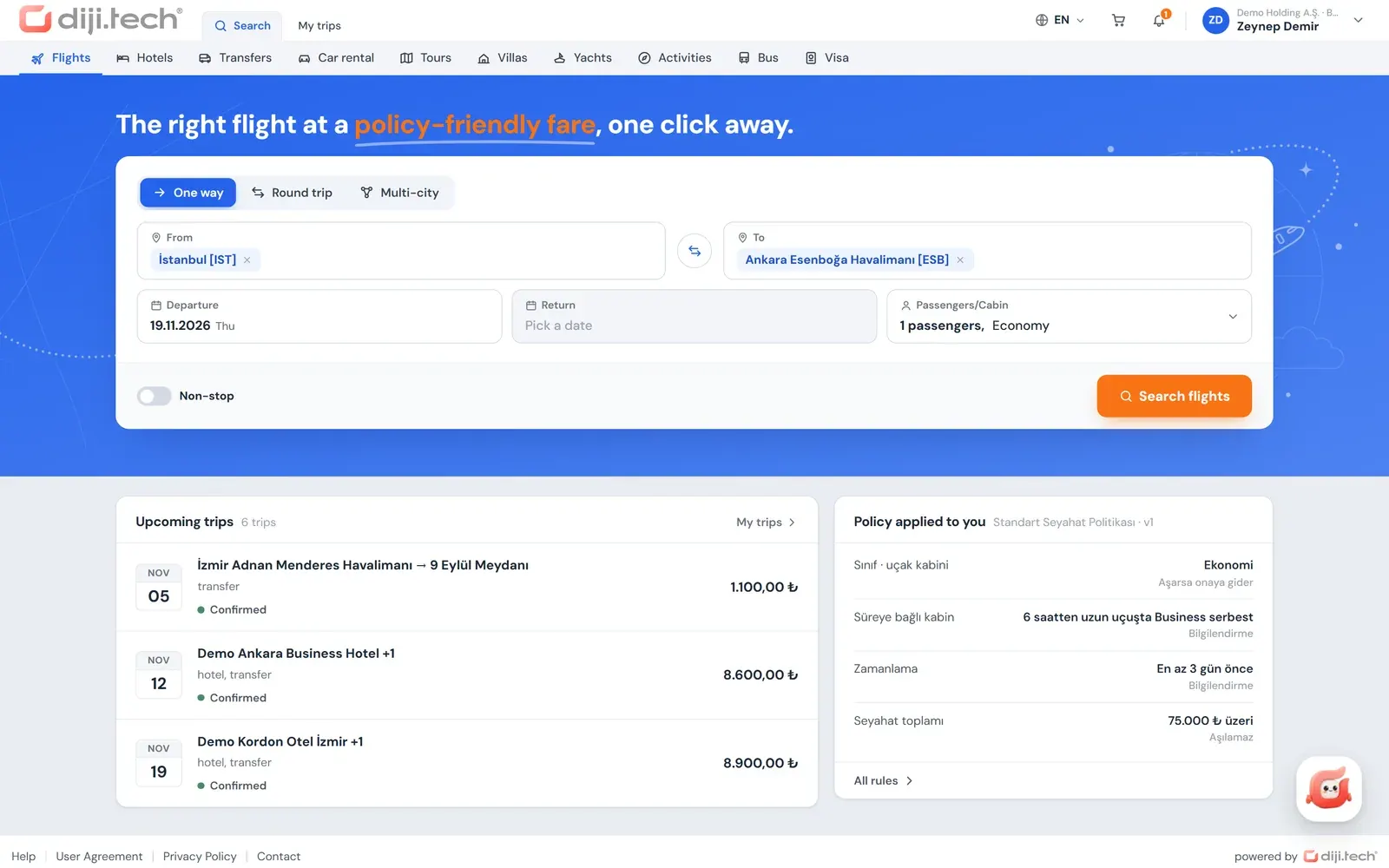
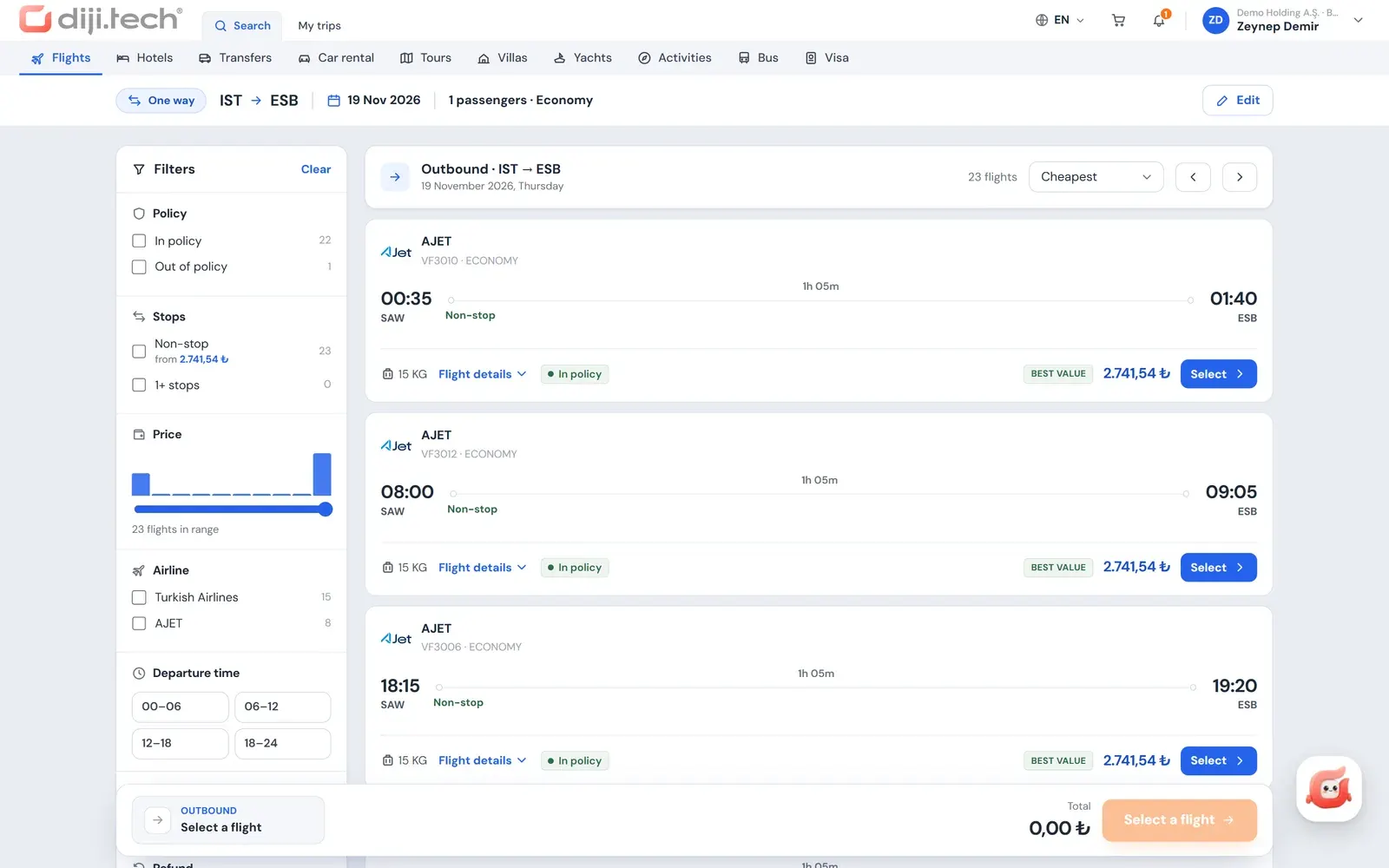
Policy on every row
Each search result shows an in-policy, out-of-policy or blocked decision together with its reason.
One trip, one cart
Flights, hotels, transfers and other items are gathered in the same cart and assessed together.
Automatic route
If the rules require it the cart goes to approval; if not, it is bought directly.
Profile data ready
Traveler details come from the profile, and the Miles&Smiles number is added to the flight booking automatically.
A travel process in which people email for tickets, wait for quotes to come back and chase approval in a separate thread wears out both the employee and the agency. The corporate booking portal of Kurumsal.pro combines these steps on one screen: the employee searches for the trip, sees the company's rules inside the results, and when the cart is submitted the portal routes the request the right way, either to approval or to purchase. The portal runs under your agency's brand and domain, on DIJI.TECH infrastructure.
What is a corporate booking portal (self booking tool)?
A corporate booking portal is the web screen where company employees search for, compare and book their own business trips. The industry also calls it an online booking tool (OBT) or self booking tool. The portal applies the company's travel policy during search, passes requests that need approval to the approver and produces the documents of the purchased trip.
In Kurumsal.pro the agency gives the portal to its corporate client; staff accounts are opened by the company administrator or by the agency. The OBT concept and the cost of manual travel planning are covered in the post what is an online booking tool (OBT), and the balance between employee freedom and company control in self-booking tools for company employees.
How do employees sign in to the portal?
Employees come to the portal by invitation: the link sent by the company administrator or the agency is valid for 7 days by default. The invited person ticks the KVKK consent box (KVKK is Turkey's personal data protection law), sets a password and opens the account. Later sign-ins use email and password, two-factor authentication, or a passwordless passkey.
- Password rule: at least 10 characters, with an uppercase letter, a lowercase letter and a digit.
- Two-factor authentication (TOTP): a 6-digit code from an authenticator app; the company can make it mandatory for certain roles.
- Passkey: passwordless sign-in with the device lock, that is, fingerprint or face recognition; keys are added and removed from the profile.
- Password reset: the "Forgot password" link renews the password, and when the password changes all open sessions are closed.
There is no self-registration in the portal, so only people the company recognizes can sign in. Security details are on the security page.
What does the profile screen store?
The profile screen (called "My profile" in the portal) gathers the information an employee uses when travelling in seven tabs. The traveler card at booking comes from this profile and is shown read-only, so name, contact and document details are not retyped each time. The home page warns the employee if the passport expires within six months.
| Tab | Content |
|---|---|
| Identity and contact | ID number (masked), work email (read-only), date of birth, gender, mobile number with country code |
| Passport and documents | Passport, ID card and visa records; "expired" and "expires in N months" badges |
| Loyalty cards | Airline and other loyalty numbers; the Turkish Airlines Miles&Smiles number is added to flight bookings automatically |
| Preferences | Seat, meal, bed and non-smoking room preference; stored in the profile, not forwarded to the supplier |
| Emergency contact | Person to reach during a trip |
| Security | Two-factor authentication, passkeys, last sign-in details |
| KVKK and data requests | KVKK privacy notice |
For employees with foreign nationality, the passport number and nationality in the profile are not transferred automatically to the flight booking; these travelers' details should be confirmed with the agency at booking.
What steps does a booking go through?
Every booking in the portal goes through a single four-step flow: Selection, Trip details, Approval or Payment, Result. The employee selects products and adds them to the cart, completes the trip details, the portal routes to approval or payment according to the rules, and the result screen shows the status of the request.
- Selection: the employee searches and adds products to the cart. With "Add a product to this trip" in the cart drawer, a hotel, transfer or car is added to a flight; all items of a trip stay in a single cart.
- Trip details: the traveler card comes from the profile; additional travelers, a justification for out-of-policy items, the billing profile and a note to the approver are entered. The cart is re-evaluated against policy at every change, and a warning appears if the price changes or the cart expires.
- Approval or Payment: if the cart has an out-of-policy item or a budget overrun, the submit button reads "Send for approval"; if neither, it reads "Buy". If the price has changed, nothing is bought until the employee explicitly accepts the new price.
- Result: the screen shows that the request was sent for approval, processed, confirmed, received (for on-request hotels), partially completed or failed. In a partially completed sale, the amount of the item that could not be booked is refunded automatically.
Purchase is paid from the company wallet or, if the agency allows it, by card with 3D Secure; card details are not stored and a single charge is applied. The payment structure is described on the corporate travel payments and invoicing page.
How does travel policy appear in the search results?
The portal applies the policy to the traveler, not to the person making the booking, and shows the decision inside the search results. Each row carries an "In policy" badge, or an "Out of policy" or "Blocked" badge with its reason, and results can be filtered by policy status. For hotels the decision is made per room.
The "Policy that applies to you" card on the home page summarizes the rules the employee works under. If the policy version requires a justification and the cart is out of policy, the request cannot be sent without a travel justification; if the company runs the policy in "Inform only" mode, that requirement falls away. Rule types are covered on the travel policy software page and the out-of-policy concept in the out-of-policy booking entry.
Which products can be booked in the portal?
The portal lists the intersection of the modules the agency has enabled and the products the company makes visible to its staff. By default the products are flights, hotels, transfers, car rental, tours, villas, yachts, activities and bus; the visa module is off by default and the agency switches it on per company. All use the same cart, policy and approval flow.
| Product | In the portal |
|---|---|
| Flights | One-way, round-trip and multi-city with 2 to 6 legs; 6-month price calendar; fare packages; ancillary services offered by the airline: seat selection from the seat map, extra baggage, meal selection |
| Hotels | 1 to 6 rooms; instant-confirmation and on-request filter; map; policy decision per room; cancellation terms |
| Transfers | One-way or round trip, coordinate-based place selection, vehicle class filter |
| Car rental | Pick-up and drop-off office, driver age, class and transmission filters; selection and comparison of the coverage packages the supplier offers |
| Bus | Trip search, seat map, seat selection and purchase |
| Tours, villas, yachts, activities | Search, detail and cart; the agency's own tours for tours |
| Visa | Country visa regime table, package search, document upload in the cart, application tracking |
The product pages give the detail: corporate flight booking, corporate hotel booking, corporate bus tickets and corporate visa management.
How do you book on behalf of someone else or for a guest traveler?
A person with booking permission can open a cart for staff within their role's scope; for example, an executive assistant can book a flight for their manager. Policy is always applied to the traveler, and the approval flow follows the traveler's own steps. For people with no staff record, a guest traveler is used.
Adding guest travelers is a separate permission, and up to 9 guests can be added to a cart. Which of first name, last name, gender, date of birth, nationality, ID or passport number and passport expiry are mandatory is derived from the booking rules of the products in the cart, and it is applied separately for Turkish and foreign nationals. How permissions are distributed across roles is described on the company admin panel page.
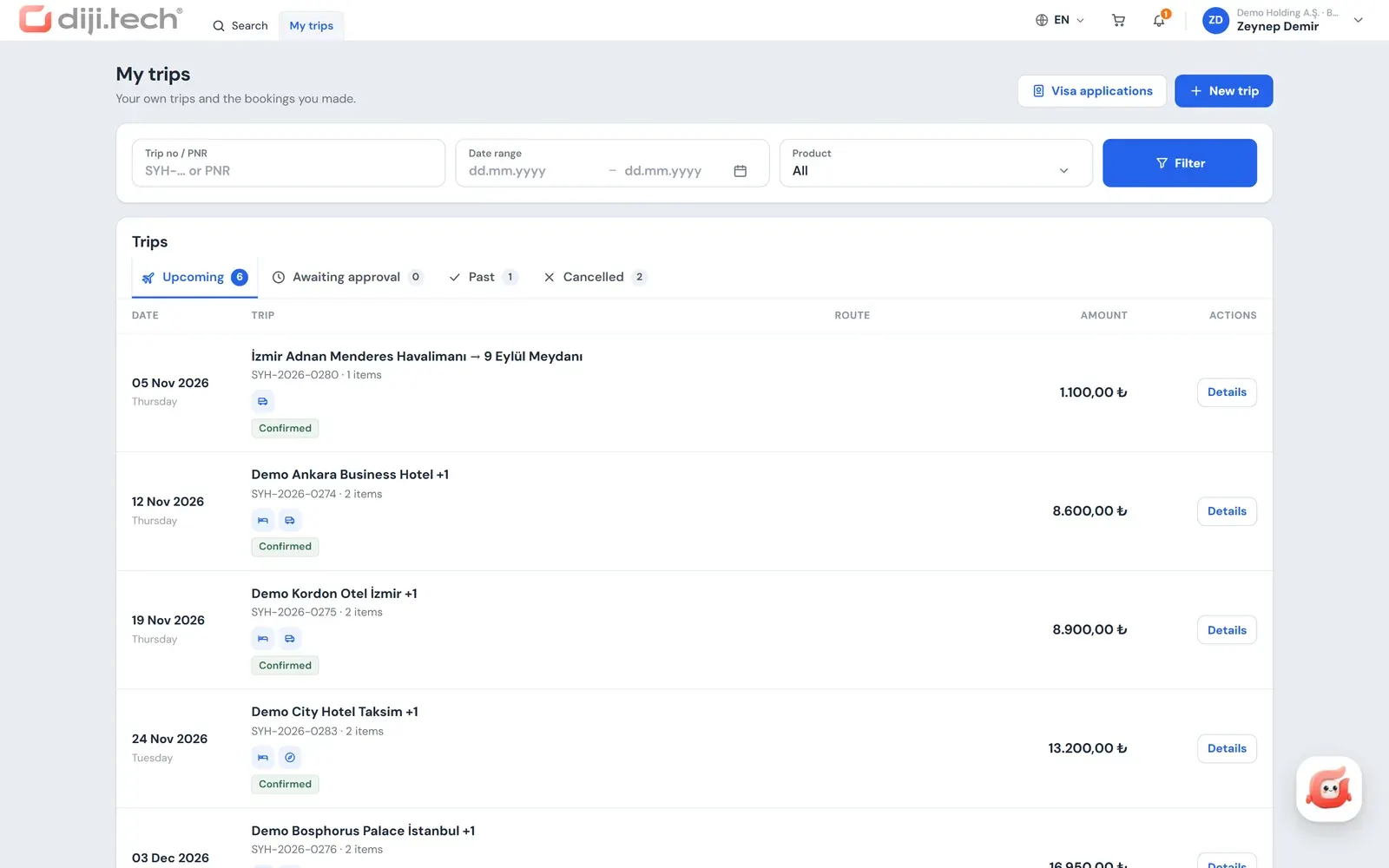
What can be tracked on the Trips screen?
The Trips screen (called "My trips" in the staff view) shows an employee's own trips and the requests they opened in four tabs: Upcoming, Awaiting approval, Past and Cancelled. You can search by file number, title or PNR, and apply date range and product filters. For wide-scope roles the same screen is called "Trips" and lists the files of everyone in scope.
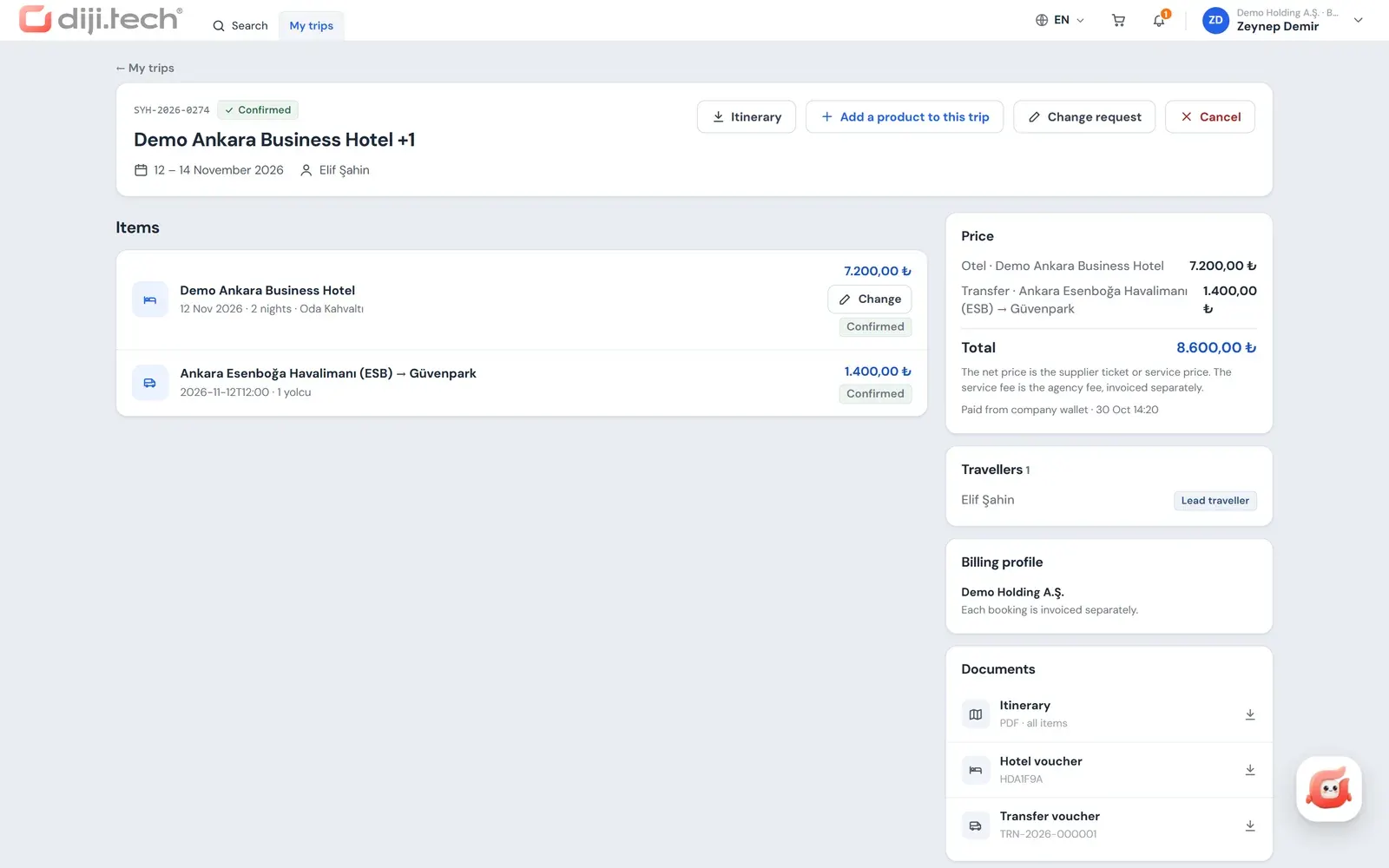
The trip file contains the items and their statuses, approval history, policy check, price breakdown with payment note, travelers, billing profile, documents and request history. The status of a request sent for approval is tracked on its own screen: pending, approved, rejected with a reason, approver chose an alternative, price tolerance exceeded, expired or availability gone.
Four PDF documents are available from the file: travel plan, e-ticket for flights, voucher for the other items, and invoice. The documents carry the agency's brand.
How are cancellations and changes requested?
The employee opens the cancellation in the portal as a request: for the whole file or selected items, the screen shows a penalty and refund preview based on the cancellation terms, the agency's cancellation service fee and a reason field. The request lands on the agency's operations desk and the agency carries out the real cancellation; the portal does not cancel instantly.
Requests such as date, time or passenger name corrections go to the agency as a free-text change request. For hotels in the agency's own inventory, an authorized employee can choose a new date, room, board type or guest name on a confirmed stay; the portal shows the price difference and the change service fee on separate lines, the accepted request goes straight to the hotel, and the hotel's answer arrives as a notification and an email.
Does the portal work on mobile?
Yes, the portal is designed as a responsive web app and works in the mobile browser. On a phone the menu turns into a drawer, and the search, cart and trips screens are usable on a small display. Approvers can also approve or reject from their phone with the single-use link in the email, without signing in.
There is no native iOS or Android app for the corporate portal; employees reach it from the phone's browser and use the same account as on the desktop. The company-side view of mobile use is covered in the post on mobile-compatible corporate travel management, and the steps that reduce booking errors in error-free flight and hotel booking.
Which languages does the portal support and how do notifications arrive?
The portal interface is in Turkish and English, and the corporate email templates are sent in both languages under the agency's brand. Inside the application there is a notification bell with an unread count and a notifications page. Events such as an approval request, an approval, a rejection and an approver choosing an alternative are also notified by email.
The portal also contains Diji, an AI assistant that works within the employee's own permissions and does not apply changes without your approval. Details are on the AI travel assistant page.
How do you offer the portal to your corporate clients?
When DIJI.TECH's corporate travel management software is set up, the corporate booking portal opens with your agency's brand, colours and domain. DIJI.TECH carries out the setup; according to the company, setup takes about one week on average and activating an additional module takes one business day. The selling agency must hold a TÜRSAB (Association of Turkish Travel Agencies) licence.
Setting up the branded portal is described on the white label corporate booking tool page, and the sales agency staff make from the panel on behalf of a company on the agent-assisted corporate booking page. To see the staff screens with a sample company you can request a demo.
Screens
1 / 4
2 / 4
3 / 4
4 / 4
Screens are taken from the DIJI.TECH corporate portal and agency panel and show sample data.
Frequently asked questions
What is the corporate booking portal?
It is the web screen where company employees search for and book flights, hotels and other products for business trips themselves. The portal applies the company's travel policy on every search result, sends requests to approval when needed and produces the documents of the purchased trip.
Is a self booking tool the same as an online booking tool (OBT)?
In practice the terms are used interchangeably. An online booking tool (OBT) is software in which employees book their own trips under policy rules, and self booking describes that way of using it. In Kurumsal.pro the tool is the corporate portal offered under the agency's own brand.
Which products can employees book in the portal?
The modules the agency has enabled and the company has made visible are listed: flights, hotels, transfers, car rental, bus, tours, villas, yachts and activities. The visa module is off by default and the agency switches it on per company. For tours, the agency's own tours are listed.
Are seat selection and extra baggage available for flights?
Yes. The ancillary services the airline offers, meaning seat selection from the seat map, extra baggage and meal selection, are available in the portal. Fare packages (branded fares) are shown separately with the baggage, refund and change rules included in the package.
Is the price locked while a request waits for approval?
No. No pre-booking is made with the supplier when a request is sent to approval. At final approval the price is fetched again; if the change is outside the price tolerance the company has set, the request returns to approval. If the price changes at purchase, nothing is bought until the traveler explicitly accepts the new price.
Can someone book on behalf of another employee?
Yes, a person with booking permission can open a cart for staff within their scope. A user with permission to add guest travelers can also add up to 9 guest travelers who have no staff record; the required fields are determined by the booking rules of the products in the cart.
Is cancellation done from the portal?
Employees open a cancellation request in the portal and see a penalty and refund preview based on the stored cancellation terms. The request goes to the agency's operations desk and the agency carries out the actual cancellation; the portal does not cancel instantly. For the agency's own hotels, a date, room or board change can be sent directly to the hotel.
Does the portal have a mobile app?
No, there is no native iOS or Android app. The portal is built as a responsive web app and works in the mobile browser; search, cart and trips screens are used from the phone. Approvers can approve or reject from their phone with the one-click link in the email.
Are the preferences in the profile passed on to the airline or hotel?
No. Seat, meal, bed and non-smoking room preferences are stored in the profile but are not forwarded to the supplier automatically. The detail added automatically to a flight booking is the Turkish Airlines Miles&Smiles number.
Which languages does the portal support?
The portal interface is in Turkish and English, and the corporate email templates are sent in both languages under the agency's brand. Users change the language from the portal's top bar.
Related pages
Last updated: