- Out-of-policy booking
- An out-of-policy booking is a business trip choice that breaks a rule in the company travel policy (price cap, cabin, hotel star level, advance purchase, banned airline, high-risk country) and is therefore treated as non-compliant.
- Also known as: policy violation, out-of-policy travel, out-of-policy, non-compliant booking, policy breach, travel policy exception
An out-of-policy booking is a business trip choice that goes beyond a rule in the company's travel policy: a price cap, an allowed cabin class, a hotel star level, a minimum number of days before departure, a banned airline or a high-risk country. A choice in this state is called "out of policy". A violation is not a ban by itself; what happens is decided by the outcome the policy attaches to that rule.
How does a policy violation arise?
A violation arises when the flight, hotel, car or other service a traveler picks crosses the limit of a rule in the policy. Rules are defined through amounts, classes, timing or location. As soon as a choice conflicts with one of those limits it counts as out of policy, even if nothing has been purchased yet.
Common violation types are:
- Amount: a nightly hotel rate above the city cap, or a per-person or per-trip total above its limit.
- Class: a cabin higher than allowed on a short flight, a hotel with more stars than the policy permits, a vehicle outside the allowed category.
- Timing: purchase closer to departure than the policy's minimum advance period.
- Gap: a choice that costs more than a set percentage above the cheapest option found for the same journey.
- Place and supplier: travel to a country treated as high risk, or selection of a banned airline.
What happens after a violation?
The outcome is set per rule in the policy and is usually one of four: the choice is blocked, it goes to approval only if it violates, it always goes to approval, or it is only recorded for information. Within one policy, one rule can block while another only informs.
| Outcome | What the traveler sees | When it is preferred |
|---|---|---|
| Block | The choice cannot be purchased | Hard rules such as banned airlines or high-risk countries |
| Send for approval if violated | A reason is requested and the request goes to the approver | Price and class limits |
| Always send for approval | Approval is needed even when in policy | Visa or high-value products |
| Inform only | A warning appears and purchase continues | The first months of a policy, pilot periods |
Why does the reason matter?
The reason records why an out-of-policy choice was made and lets the approver decide on facts. Legitimate causes, such as the only flight that reaches a meeting or no in-policy rooms during a trade fair week, look like ordinary violations when no reason is attached.
In good practice the reason is collected from a ready list of causes, with a short note when needed, rather than as free text. Because the listed causes can be grouped in reports, seeing "client meeting time" often in one department can show that the policy needs a review for that department.
Catch it before purchase or after?
Catching the violation at search time, before purchase, is the cheapest method. In a post-trip audit the ticket is already issued and the hotel paid, so disputes, refunds and awkward conversations follow. A violation shown during search lets the traveler pick the in-policy alternative instead.
| Criterion | Check before purchase | Audit after the trip |
|---|---|---|
| Effect on the traveler | Warning or block at the moment of choice | Questions after the trip |
| Cost effect | The expensive choice is prevented | The money is already spent |
| Record | Reason and approval tied to the request | Reason often missing |
Out-of-policy bookings in Kurumsal.pro
In the Kurumsal.pro portal that your agency offers its corporate clients, the policy is applied to the traveler and violations are visible before purchase. Each search result row carries an "In policy", "Out of policy · reason" or "Blocked" badge, and results can be filtered by policy. In hotel details the decision is made per room.
- The cart runs a policy pre-check on every change; the result is stored permanently on submission.
- If the rule's outcome requires approval, or if budget overrun is set to send for approval, the portal picks the path itself: "Send for approval" replaces "Buy".
- The reason setting is chosen per policy version as required, optional or not requested; when required, nothing can be submitted without a reason.
- In "inform only" mode no rule blocks or routes to approval; violations are only shown.
- The approval detail shows violations, the reason and the gap to the cheapest option to the approver.
- The manager dashboard lists the latest violations, and the policy compliance report can be exported as Excel, CSV and PDF.
- When agency staff book on behalf of a client company, the policy is evaluated, the violation is recorded and it appears as a separate channel in the compliance report.
For the full set of rule types and policy versions see travel policy software; to draft the policy text itself see the travel policy creation guide. The process a violation follows into approval is explained under approval workflow.
Screens
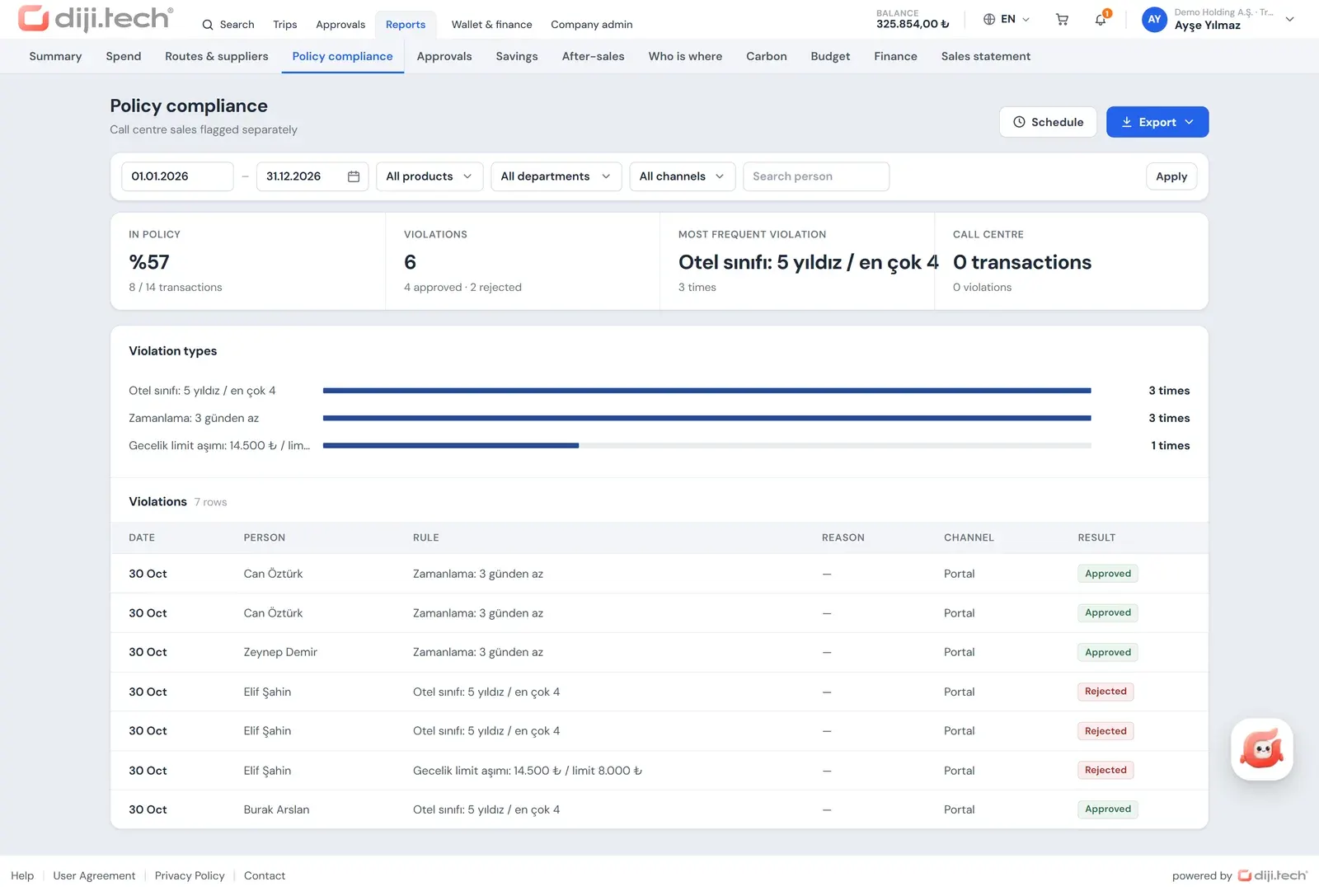
Screens are taken from the DIJI.TECH corporate portal and agency panel and show sample data.
Frequently asked questions
What does out-of-policy mean in business travel?
Out-of-policy means a booking choice goes beyond a rule in the written travel policy. Choosing business class when the policy allows economy, or a hotel above the nightly cap set for the city, are typical examples.
Is an out-of-policy booking always forbidden?
No. A company can set a different outcome for each rule: some violations are blocked outright, some go to a manager for approval and some are only logged. An out-of-policy choice can still be approved if the reason is accepted.
Why do companies ask for a reason on a policy violation?
A reason lets the approver decide with facts in hand. A single flight that fits the meeting time but costs more, or a city with no in-policy rooms during a trade show, becomes visible through the reason and stays on record for later audits.
How are policy violations reported?
Violations are usually collected in a policy compliance report by rule type, department and person. This shows which rule is broken most often and whether the policy itself is realistic.
Where does a policy violation show up in Kurumsal.pro?
It appears in search results, per room in hotel details, in the cart pre-check, in the approval detail and in reports. The manager dashboard also lists the latest policy violations.
Related pages
Last updated: