




The company is the buyer
The document is issued to the legal entity, with the title, tax number and address in the company billing profile.
Your existing accounting line
Corporate sales pass through the Paraşüt, Luca, Logo Netsis, Arkman or SYS line the agency is connected to.
No duplicate documents
Documents are idempotent per line; a missing-document scanner and automatic retries are in place.
Lines follow the contract
In the hidden margin model the service fee is folded into the price and the invoice lines merge into one.
Corporate travel accounting integration decides with which document, and in whose name, a sale made through the portal enters the agency's accounting. Kurumsal.pro does not set up a separate accounting line: corporate sales pass through the Paraşüt, Luca, Logo Netsis, Arkman or SYS connection the agency is already linked to. The difference is the buyer of the document, which is always the company itself.
How does a corporate sale reach the accounting?
A sale made from the corporate portal, or from the agency's "Work on behalf of a company" screen, passes through the same accounting document line as the agency's other sales. The document is issued to the legal entity, using the information in the company's billing profile, and the sales note written during the sale is carried to the invoice note of the document.
This approach brings no new program or second recording routine to the agency's accounting team. The corporate sale goes through the line of the document provider you already use, with the company's billing profile; for an agency that uses SYS, the sale is additionally posted to that company's account under the company's accounting code.
How is the buyer of the document determined?
The buyer is chosen from the company's billing profiles in a fixed order: first the billing profile staff select in the cart during booking; if there is no selection, the company's default profile; and if there is none, the root company's default profile. A profile carries the title, tax number and tax office, address and invoice email.
Billing profiles are defined per company and branch, and each one has an e-Invoice or e-Archive type. In this way the different companies of a holding can be invoiced under their own titles, and the branches of a company at their own addresses. A short definition is in the billing profile entry.
Which accounting and e-document connections exist?
The platform code has five accounting connections: Paraşüt, Luca and Logo Netsis generate e-Invoice and e-Archive documents, Arkman transfers accounts and tickets, and SYS is a sales feed.
| Connection | What it does | For a corporate sale |
|---|---|---|
| Paraşüt | e-Invoice and e-Archive document generation | The buyer is the company billing profile |
| Luca | e-Invoice and e-Archive document generation | The buyer is the company billing profile |
| Logo Netsis | e-Invoice and e-Archive document generation | The buyer is the company billing profile |
| Arkman | Account and ticket transfer; does not generate e-documents | Transfer to the general ledger |
| SYS | Sales feed to travel accounting | The sale is posted to the company's account under its accounting code |
The "Logo" connection covers only Logo Netsis; there is no ready-made connection for Logo Tiger, Logo GO, Mikro, Uyumsoft, Nilvera, İzibiz or Foriba. The logo of each connection is in the list on this page. How SYS behaves in a corporate sale is described in detail on the SYS accounting integration page.
How are e-Invoice and e-Archive delivered to the tax authority?
In Turkey, e-Invoice and e-Archive are among the electronic document applications of the Revenue Administration (GİB), Turkey's tax authority. Delivery runs through the document provider the agency is connected to; the platform itself is not an integrator for GİB. The platform creates the document in a connected provider such as Paraşüt, Luca or Logo Netsis, and eligibility, registration and delivery conditions follow the rules of that provider and of GİB. GİB lists the services on its e-Document applications portal (the pages are in Turkish).
Whether a document is an e-Invoice or an e-Archive is decided in the connected document provider. The difference between the two and their place in travel sales are explained in the e-Invoice and e-Archive in Turkey entry and the post on e-invoicing for travel sales. This site does not claim an e-invoice standard outside Turkey.
Can documents be duplicated or lost?
Documents are recorded idempotently per line, so a second document is not produced for the same line. A missing-document scanner finds documents that should have been created but were not. If the document provider has a temporary error, the document is retried automatically up to 8 times. These three rules help keep the accounting record complete and unique, including in busy periods.
How does the contract model affect the invoice?
The contract model between the agency and the company decides the line structure of the document. In the transparent model, the service fee appears on the invoice as a separate "Service Fee" line. In the hidden margin model, the service fee is folded into the line price and the invoice lines merge into a single line. A hidden markup is not visible on the documents in either model. The definition of the price layers is in the service fee entry.
What is prepared on the accounting side at setup?
Preparing the accounting side has three parts. First, the details of the document provider the agency uses (Paraşüt, Luca or Logo Netsis), or of the Arkman and SYS account, are defined on the platform. Then billing profiles are opened for each company: title, tax number and tax office, address, invoice email and document type (e-Invoice or e-Archive). Finally, the accounting codes of the companies are entered; in the SYS feed this code is used as the account code.
An agency that works with many companies does not have to enter these details one by one. The bulk company import template in Excel or CSV carries columns for company name, tax office and number, accounting code, person type, accounting contact, invoice title, invoice email and invoice type. The file is previewed before anything is written; companies are created or updated by matching on tax number or accounting code.
What should you check before you choose a connection?
Start from the document you need. If your agency must issue e-Invoice and e-Archive documents for corporate sales, use one of the three document generators: Paraşüt, Luca or Logo Netsis. If your agency keeps its books in SYS, the feed posts each corporate sale to the company's account under its accounting code. If it works with Arkman, the connection transfers accounts and tickets but does not generate e-documents, so the e-document side must come from elsewhere.
Then check the company side: every company needs a billing profile with its title, tax number, tax office and address, and, for SYS, an accounting code. Staff can pick the profile in the cart, which matters for a holding whose companies are invoiced under different titles. If your accounting software is not in the table above, this site does not claim a ready-made connection for it.
Where does the agency follow company invoices?
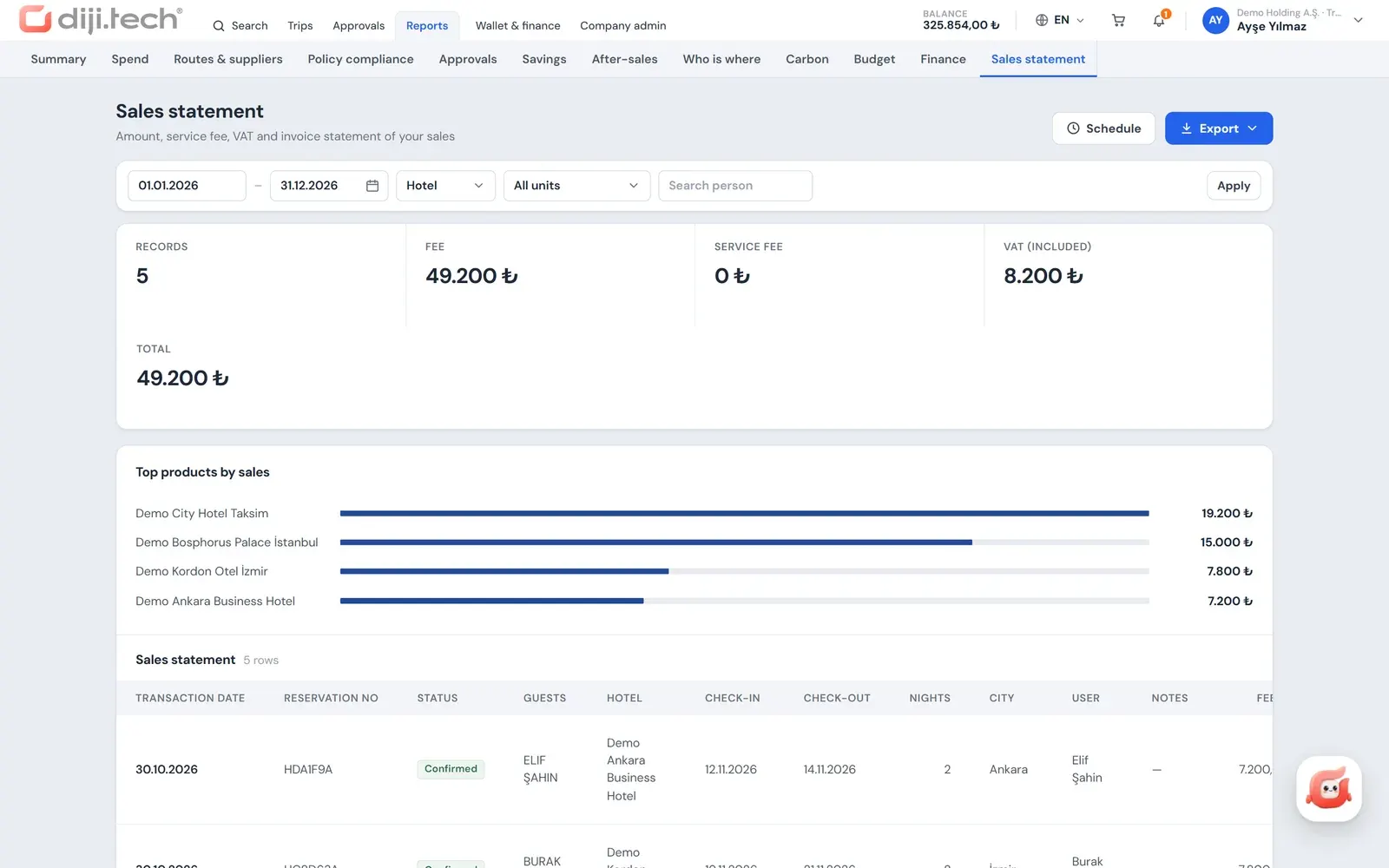
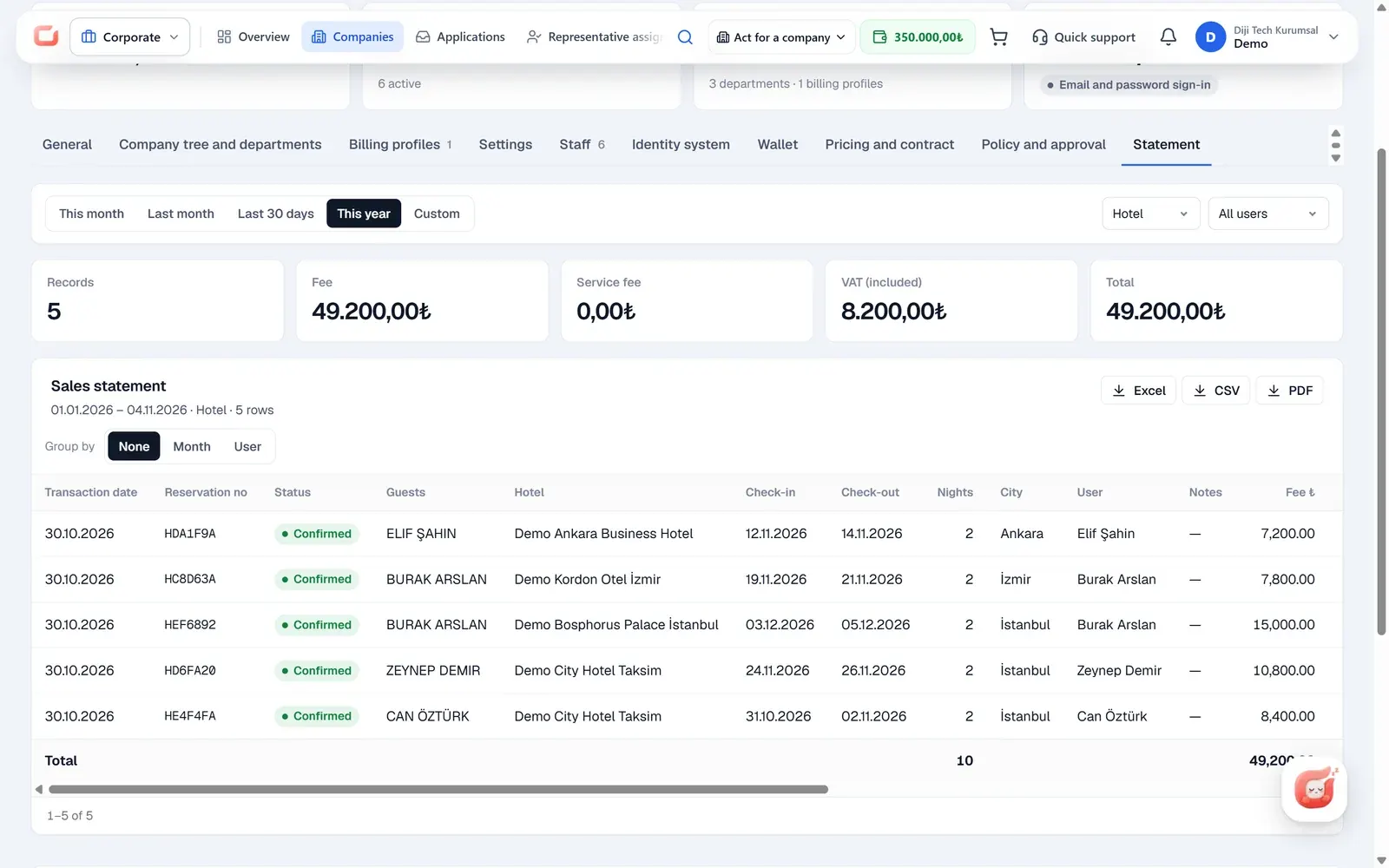
The company invoices screen in the agency panel works with period, company, billing profile and status filters (Issued, Pending, Failed, Cancellation invoice). The list can be exported to Excel for up to 10,000 rows, and the invoice PDF is downloaded in the brand of the corporate site and in the selected language. The company sales statement is available as xlsx, csv or pdf and can be sent by scheduled email, weekly or monthly, to the company's accounting contact address.
On the company side, the company administrator and the finance role download PDFs from the invoices list in the portal. The whole payment and invoice flow is on the corporate travel payments and invoicing page, and the choice of accounting program for an agency is discussed in the post on accounting integration for travel agencies. To see how it works with your own accounting line, you can request a demo.
Screens
1 / 2
2 / 2
Screens are taken from the DIJI.TECH corporate portal and agency panel and show sample data.
Frequently asked questions
Who is the invoice for a corporate sale issued to?
The invoice is always issued to the company itself, as a legal entity. The billing profile staff select at booking is used first; if there is no selection, the company's default profile applies, and otherwise the root company's default profile. A profile carries the title, tax number and tax office, address and invoice email.
Which accounting programs are integrated?
The platform code has Paraşüt, Luca and Logo Netsis as e-Invoice and e-Archive document generators, Arkman for account and ticket transfer, and SYS as a sales feed. Which one is used is decided at setup, according to the agency's own accounting choice.
Are Logo Tiger or Logo GO supported?
No. On the Logo side there is only a Logo Netsis connection. There is no ready-made connection for Logo Tiger, Logo GO, Mikro, Uyumsoft, Nilvera, İzibiz or Foriba.
How are e-Invoice and e-Archive documents delivered to the tax authority?
Delivery runs through the document provider the agency is connected to. The platform itself is not an integrator for the Turkish tax authority (GİB); it creates the document in a connected provider such as Paraşüt, Luca or Logo Netsis.
Can two invoices be created for the same sale?
Documents are recorded idempotently per line, so a second document is not produced for the same line. Documents that should exist but do not are found by a scanner, and if there is a temporary error a document is retried automatically up to 8 times.
How does the service fee appear on the invoice?
It depends on the contract model with the company. In the transparent model the service fee is a separate line. In the hidden margin model the service fee is folded into the line price and the invoice lines merge into one line.
Is there a transfer to the company's SAP or ERP system?
No, there is no ready-made integration with a company's ERP system. The accounting connections work for the agency's own accounting; the company side downloads invoices as PDF and exports reports as Excel or CSV.
Can the agency follow company invoices from the panel?
Yes. The company invoices screen works with period, company, billing profile and status filters; the list can be exported to Excel for up to 10,000 rows, and the invoice PDF is downloaded in the brand of the corporate site and in the selected language.
Related pages
Last updated: