Your brand
Logo, colours, typeface, favicon, support contacts, TÜRSAB number and email sender name belong to your agency.
Your own domain
Multiple domains, a primary domain choice, and a portal that does not open until the domain is verified.
Hidden profit model
The client sees the price and the outcome; supplier, net price and markup are not sent to the portal.
From application to client
The application form on the portal's landing page becomes a pre-filled client wizard in the panel.
A white label corporate booking tool is a travel portal that a travel agency or TMC offers its corporate clients under its own brand and domain. Your client's staff search, build carts and buy within their company's policy and approval rules in this portal, while the supplier, net price and profit behind each sale stay invisible to the client. Kurumsal.pro delivers this white label portal on DIJI.TECH infrastructure.
What does a white label corporate portal give the agency?
A white label corporate portal keeps the client relationship and the brand with the agency. The company's employees book on your domain with your logo; emails, travel documents and invoices go out in your agency's name. Building the software and running the infrastructure stay with DIJI.TECH, while sales, pricing and the client relationship stay with you. Your client's staff search, send for approval and download their documents at a single address, and your agency sees the same sales in the panel from the price, wallet and invoice side.
This channel works as an agency, then client company, then employee chain, which the industry calls B2B2E. For the general definition of white label and its cost items, see what is a white label travel portal; for how the portal works day to day, see how a white label corporate travel platform works.
Which brand settings can be configured in the portal?
Brand settings cover every visible surface of the portal: interface colours and typeface, logos, support contacts, legal name and email sender details. The typeface is picked from the platform's approved font catalogue, not through an arbitrary file upload.
| Setting | Where it is used |
|---|---|
| Primary and secondary colour | Portal interface |
| Typeface (from the approved catalogue) | Portal interface |
| Light and dark background logos, logo letter or text | Portal interface |
| Favicon | Browser tab |
| Support phone and email | Portal and client communication |
| Legal name and TÜRSAB number | Portal |
| Email sender name and reply address | Corporate emails |
On top of these, itinerary, e-ticket, voucher and invoice PDFs are produced under the agency's brand. Corporate emails such as approval requests, approval outcomes, staff invitations and scheduled reports are sent with Turkish and English templates under the site's brand.
How is the portal set up, and how long does it take?
A DIJI.TECH platform admin opens the corporate portal with a 7-step setup wizard; the agency does not create a new portal from its own panel. DIJI.TECH states that setup takes one week on average and that activating a module added later takes one business day. The wizard steps are:
- Tenant: the platform tenant the portal will be attached to is selected.
- Corporate agency: a new corporate agency is created or an existing one is selected; agency code, trade name, TÜRSAB number, tax number and office, address, support phone and email are entered.
- First admin: the first admin account of the corporate agency is defined.
- Domain: the domain the portal will open on is added.
- Brand: colours, typeface, logos, favicon and contact details are entered.
- Modules: the products to be sold in the portal are selected.
- Review: all settings are confirmed and the setup is started.
The setup runs as a single operation: if one of the steps fails, whatever was done in the earlier steps is rolled back. Each tenant has at most one live corporate agency.
How are domains and languages set up?
A corporate site can run on several domains, and one is selected as the primary domain. The portal does not open until the domain is verified, and a domain registered to another site cannot be taken over. If the primary domain is removed, the oldest of the remaining domains becomes primary.
The portal's languages are Turkish and English, and the default language is chosen from that list. The KVKK notice (Turkey's personal data protection law), the privacy policy, the terms of use and the cookie policy are entered separately for each language and published in the portal. After setup, the platform admin can update the site's name, status, languages, brand, legal texts, modules and domains.
How is the portal's status managed?
Every corporate site has three states: live, maintenance and suspended. In maintenance mode, staff see a maintenance page instead of the portal. Deleting a site that has linked clients is blocked, so a portal that holds client data cannot be removed by accident.
How does a new corporate client come to the portal?
The portal's landing page carries a corporate account application form. The form collects company name, full name, work email, phone, job title, a note, the services of interest and the KVKK consent. The application lands in the "Applications" list in the agency panel with the status New.
When the agency converts an application into a client, the new client wizard opens pre-filled with the application details; a reason is mandatory when rejecting. There is no self-registration in the portal: staff accounts are created by the client's admin or by the agency. What happens after the client exists, such as pricing, wallet and representatives, is covered on the corporate travel agency software page.
What does the agency do after an application is converted?
In the pre-filled wizard the agency checks the details, sets the client's contract model (Hidden margin or Transparent) and the email domains from which staff may be invited, and then enters the person who will manage the portal. When the wizard finishes, that person receives an invitation email. Before the client is ready to use, the agency usually completes three more tasks: it sets the client's pricing, distributes balance to the company wallet, and selects which products appear in the portal.
How are supplier and profit data hidden from the client?
The portal uses the search, cart and payment infrastructure that the agency uses in the panel, under the corporate agency's service identity, and does not show supplier names. Supplier, net price, markup, commission, cost, profit and margin fields are stripped from responses sent to the portal. A response from which these fields cannot be parsed is never sent to the portal; when in doubt, the system closes the information rather than opening it.
Portal sales are priced in a separate sales channel, and the price's customer is the traveler's company and its parent companies. This way every client sees prices using the price tier the agency defined for that client. The supplier integrations on the platform are listed on the integrations page, and which of them are on is decided at setup; DIJI.TECH states that the platform has 100+ API integrations.
How secure is the portal and what infrastructure does it run on?
Each tenant's company and staff data is kept in its own database. The portal's browser interface does not connect to the backend directly; requests pass through the portal server and service keys never reach the browser. A request is not tied to any tenant until the domain in the request matches an active, verified domain record on the platform. The token the portal server uses to reach the platform is produced with a separate signing key, is short-lived and is valid only on the portal API; the agency panel's session token is not accepted on the portal API.
Staff sign-in uses a password of at least 10 characters, two-factor authentication that can be made mandatory for the ready-made roles, and passkeys; ID numbers come back masked in responses. DIJI.TECH states that the platform runs on AWS and Cloudflare and that the payment infrastructure is PCI DSS compliant. Details: security.
How does the portal work on mobile devices?
The corporate portal is a responsive web application: on a phone or tablet browser it opens with a drawer menu and pages that fit the screen. There is no separate iOS or Android app; staff use the same domain and the same account on desktop and on the phone. The information side of mobile use is covered in the post on mobile-compatible corporate travel management.
How is a corporate portal different from a B2B agency site?
A B2B agency site is opened for selling to sub-agencies and resellers; a corporate portal is opened for a company's own employees, under that company's policy, approval and budget rules. In the corporate portal the price's customer is the employee's company, payment is made from the company wallet or by a card the agency allows, and a sale goes through the approval flow when needed. The corporate agency is opened as a separate corporate-type agency inside the platform tenant and works with its own branded portal. Sub-agency and reseller sales are outside the scope of Kurumsal.pro; that topic is covered on the sister site ucakbiletiyazilimi.com. The difference is explained in detail in B2B travel platform vs corporate booking tool.
What does your client do in the portal?
Your client's company admin defines the organization, staff, roles, travel policy, approval flow and budgets in the portal. Travelers collect flights, hotels, transfers, car rental, tours, villas, yachts, activities, buses and visas in one trip cart; on a flight they choose the seat selection, extra baggage and meal services the airline offers, and on car rental the coverage packages offered by the supplier. If the cart is out of policy it goes to approval; if not, it is bought.
The finance role follows the wallet balance, the transaction ledger, the monthly statement and invoices; roles with reporting permission reach 11 reports. The screens of all roles are gathered on the corporate travel management software features page.
Which modules are opened?
Three settings together decide which product appears in a client's portal: the modules opened for the tenant on the platform, the modules of the corporate site, and the visible products the agency selects for that client. The visa product is off by default for a new company, and the agency turns it on per client.
That way one client can use only flights and hotels in the same portal while another also uses transfers, car rental and buses. For a module added later, DIJI.TECH states a one-business-day activation time.
Module selection decides which products are sold, not the price. For every product that is on, the price a client sees comes from the Service Fee, Hidden markup and Commission settings the agency defined for that client, so the same product may appear at different prices for two clients. When visas are opened, staff use the country visa regime table, package details and document upload steps in the portal.
How is the platform licensed and priced?
DIJI.TECH offers its corporate travel management software as a rental or as a source code purchase, and gives the price only through a tailored quote. The cost items are explained on the pricing page. To sell travel to clients through the portal, the agency must hold a TÜRSAB licence.
DIJI.TECH states it has been the technology partner of 50+ brands since 2019; among the corporate-labelled projects in its reference list are B2btravel.tr and Polsanturizm.com (see customers). To see the portal with your own agency structure, you can request a demo.
Screens
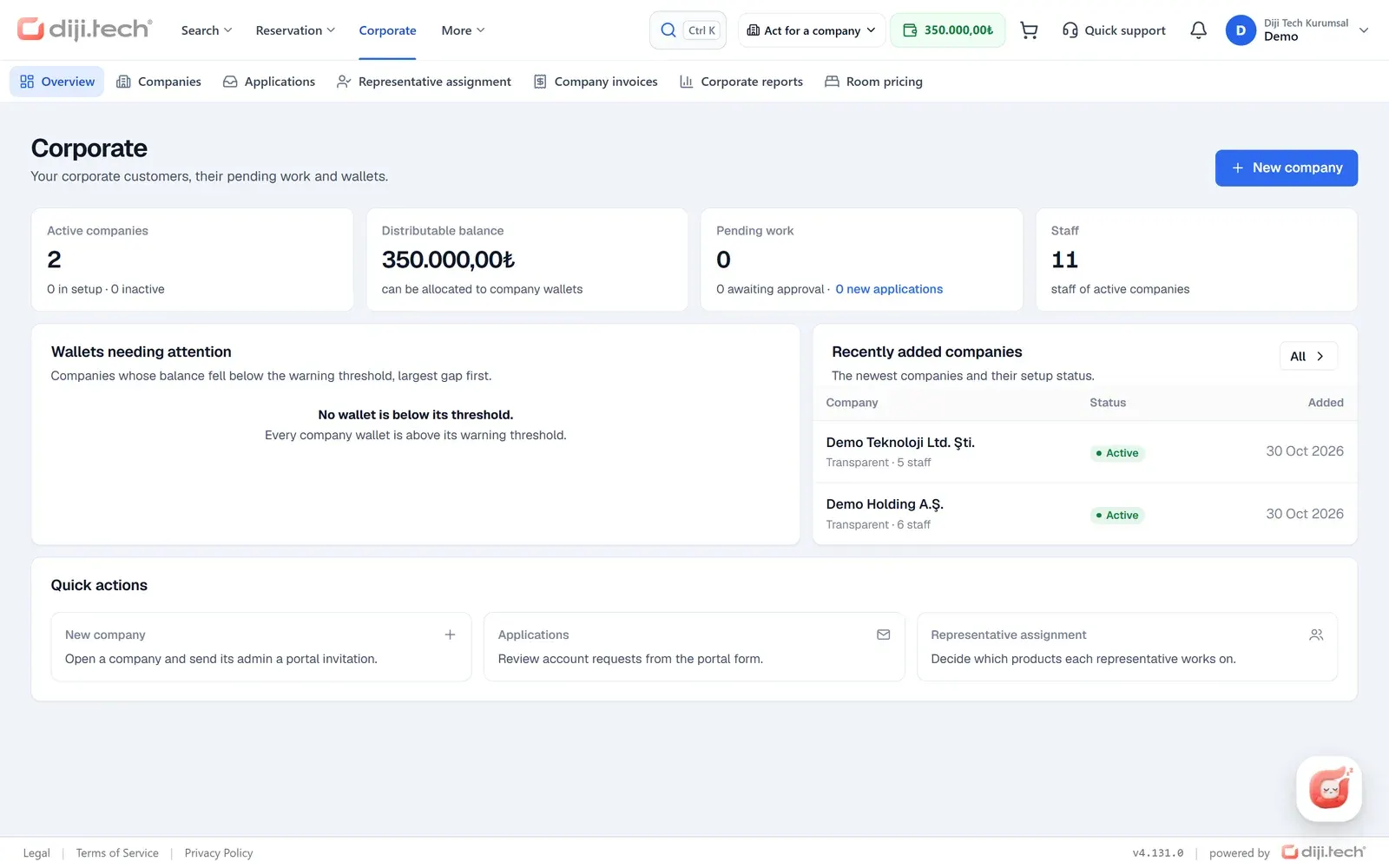
1 / 3
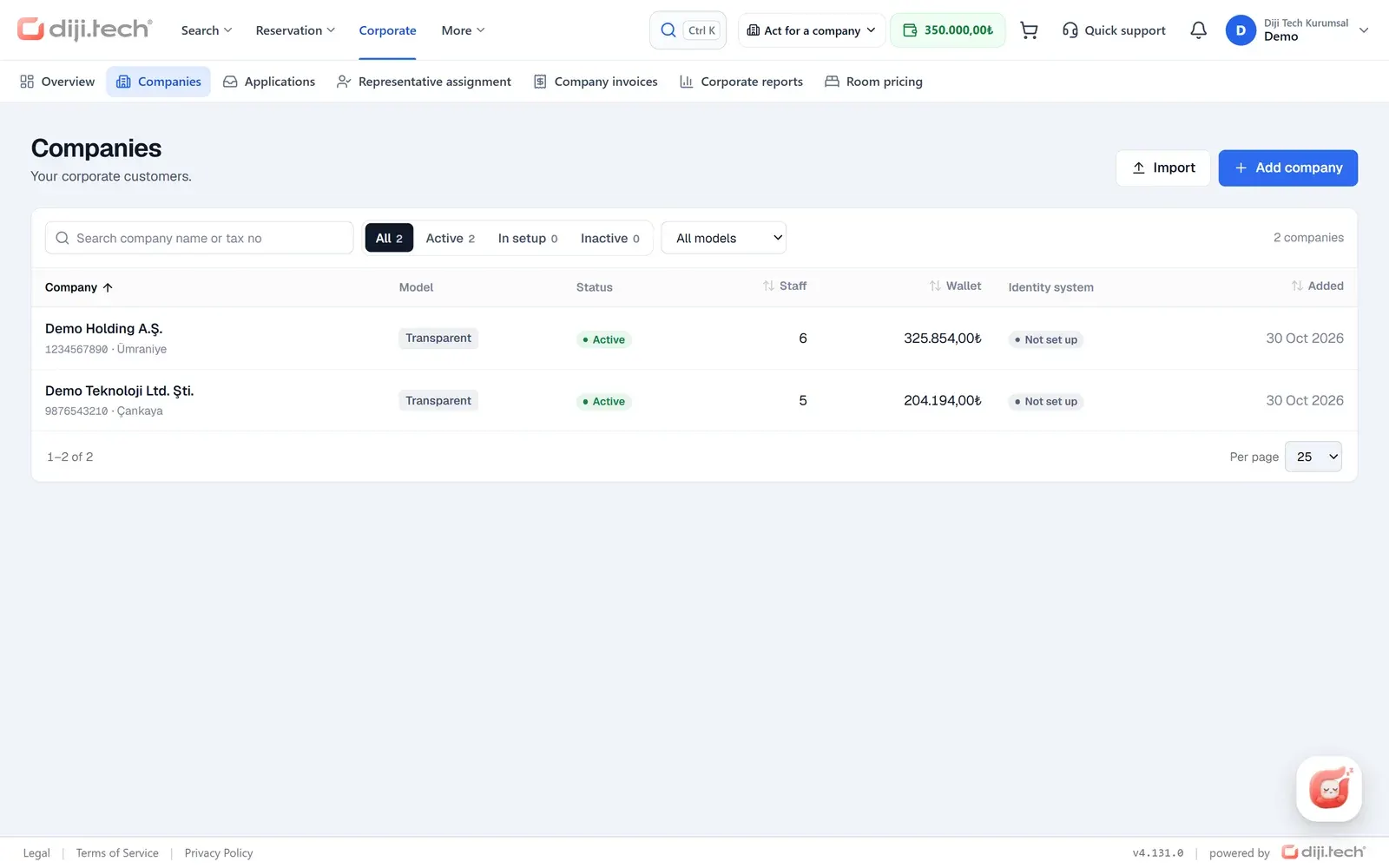
2 / 3
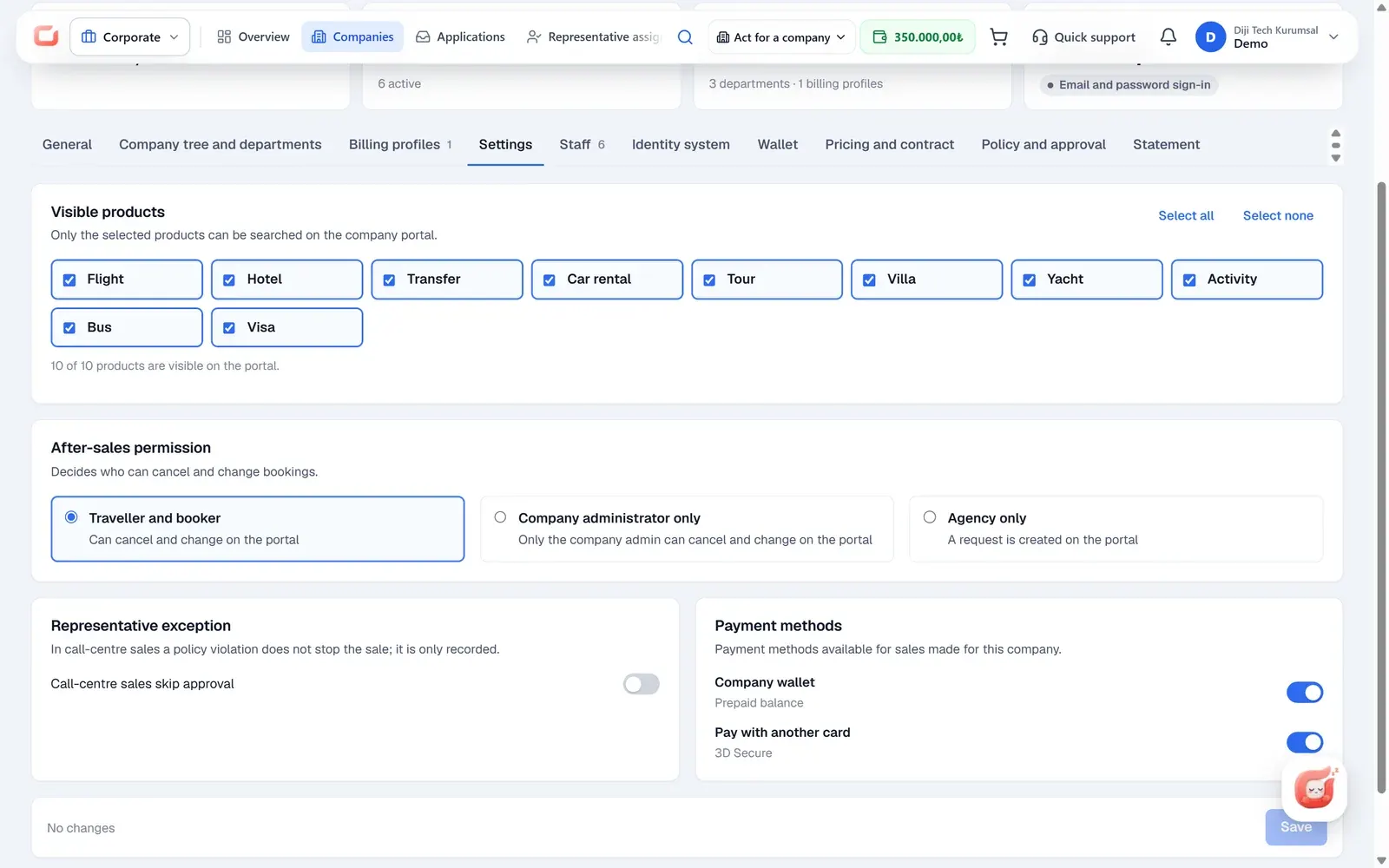
3 / 3
Screens are taken from the DIJI.TECH corporate portal and agency panel and show sample data.
Frequently asked questions
What is a white label corporate travel portal?
A white label corporate travel portal is software built by an infrastructure provider and offered to corporate clients under the agency's own brand and domain. In Kurumsal.pro, DIJI.TECH provides the infrastructure, while the logo, colours, contact details and documents your client sees belong to your agency.
On which domain does the portal run?
The portal runs on the domain your agency chooses. A site can have several domains, and one of them is set as primary. The portal does not open until the domain is verified, and a domain registered to another site cannot be taken over.
Who does the setup, and how long does it take?
A DIJI.TECH platform admin does the setup with a 7-step wizard; the agency does not open a new portal from its own panel. DIJI.TECH states that setup takes one week on average and that activating an extra module takes one business day.
Can a corporate client see the supplier or the profit margin?
No. The portal does not show supplier names; supplier, net price, markup, commission, cost, profit and margin fields are stripped from portal responses. A response from which these fields cannot be parsed is never sent to the portal.
Which languages does the portal support?
The corporate portal works in Turkish and English. The data protection (KVKK), privacy, terms of use and cookie texts are entered separately for each language, and corporate email templates also go out in both languages under the site's brand.
How does a new corporate client apply through the portal?
The portal's landing page has a corporate account application form. It collects company name, full name, work email, phone, job title, a note, the services of interest and the KVKK consent; the application lands in the Applications list in the agency panel.
Whose brand do emails and PDF documents carry?
Corporate emails are sent with the site's sender name, reply address and brand. Itinerary, e-ticket, voucher and invoice PDFs are also produced under the agency's brand.
Which products can be sold in the portal?
Flights, hotels, transfers, car rental, tours, villas, yachts, activities, buses and visas. On flights, seat selection, extra baggage and meals are chosen; on buses, seat selection and purchase; on car rental, coverage package selection. The agency decides per client which products are on.
Is a TÜRSAB licence needed to sell through the corporate portal?
Yes. To sell travel in Turkey, an agency must hold a licence from TÜRSAB, the Association of Turkish Travel Agencies. The agency's TÜRSAB number is entered during setup and shown in the portal.
Can the platform be rented, or can the source code be purchased?
DIJI.TECH offers the platform as a rental or as a source code purchase. Pricing is set only through a tailored quote; no prices are published on the site.
Related pages
Last updated: