Written by the DIJI.TECH team.
A corporate travel budget is the spending ceiling a company sets for business trips over a given period. A well-built budget answers four questions: for which period, for which units, how much, and what happens when the ceiling is exceeded. Once these are answered, the budget stops being a spreadsheet and becomes a rule that is checked on every travel request. Below you will find the steps, a sample template, and how the budget is tracked in travel software.
What is a travel budget, and why plan it separately?
A travel budget is an approved, period-limited spending ceiling for business trips. It is planned separately so that it does not disappear inside the general expense budget, because travel spend changes quickly with headcount, season and price swings, and the decisions are made one by one by individual employees.
A separate travel budget brings three benefits. First, ownership is clear: whichever unit holds the budget, its manager answers for the spend. Second, deviation shows early: if most of the budget is gone by mid-period, management can revisit the travel plan. Third, it works together with the travel policy: the policy draws the limit of a single trip, the budget draws the limit of the total. The difference between the two tools is also covered on the travel budget control page.
Which period should a travel budget cover?
The budget period is chosen by how often spending will be reviewed; the usual options are month, quarter and fiscal year. An annual ceiling is generally approved for the fiscal year, but when it is tracked by quarter or month, deviation is visible without waiting for year-end.
| Period | When it suits | What to watch |
|---|---|---|
| Month | Frequent, regular travel, such as sales teams | Trips at the end and start of a month can be split across two periods |
| Quarter | Seasonal peaks such as trade fairs and congresses | The busy quarter needs a larger share |
| Fiscal year | Infrequent, planned travel | Watch for the risk of spending too fast early in the year |
A practical approach is to approve the annual amount and divide it into quarterly or monthly budgets. Management then approves a single annual figure while each unit sees its own period ceiling.
Which breakdown should the budget use?
The budget should be held in the unit that makes the spending decision. If a department decides its own trips, hold it in the department; if branches operate independently, in the branch; in a holding structure where companies are invoiced separately, in the company. The finer the breakdown, the tighter the control and the heavier the management load.
These questions help you choose:
- Who approves? The owner of the budget and the manager in the approval chain should be in the same unit.
- Who is invoiced? If invoices are issued per company or branch, the budget should be tracked at that level.
- Which products count? Do all products, such as flights, hotels, transfers, car rental and visas, draw on the budget, or only some of them?
- How will reports be read? Build the budget in the same breakdown in which management wants to see spend.
In multi-company structures the budget breakdown generally follows the organization tree. How companies and branches are separated inside a holding is covered in online travel reservation for holdings.
What is a cost centre?
A cost centre is an organizational unit in which costs are collected and tracked in accounting. It can be the same as a department, but a service shared by several departments, a production line or a project can also be defined as a separate cost centre. A cost centre is an accounting concept, whereas a travel budget is a spending ceiling.
A cost centre is not required when setting up a travel budget. A department breakdown is enough for most companies; a cost centre breakdown makes sense when your chart of accounts demands it. A short definition is in the cost center glossary entry.
To be clear about it: the Kurumsal.pro portal has no cost centre field and no cost centre report, and it has no concept of a project or project code. Budgets and reports in the portal work by department, company and branch. If your company tracks spend by cost centre, you need to keep the mapping between department and cost centre on the accounting side.
How do you estimate the travel budget amount?
The budget amount is estimated by looking at past spend and planned trips together. Simply raising last year's figure by a percentage is easy but misleading; if team size, new markets and price changes are ignored, the budget either runs out early or goes unused.
You can follow this order:
- Break down past spend. Extract the last period's spend by unit, product and month, and flag large one-off trips separately.
- List planned trips. For each unit, write down the trade fairs, client visits, training and project trips planned for the coming period, with the number of travelers.
- Convert to amounts per product. Estimate transport, number of hotel nights and local transport separately for each trip. For accommodation, the nightly limit in your policy is a good upper bound.
- Add a price margin. Flight and hotel prices change with the time of booking, so add a fluctuation allowance. Its size should come from your company's own history.
- Set a reserve. Set aside a separate reserve for unplanned but unavoidable trips and write down whose approval is needed to use it.
Early booking and policy rules affect the budget directly. Ways to cut spend are covered in how to reduce corporate travel costs.
What does a travel budget template look like?
A budget template is made of unit, period, owner, covered products, estimates per product, price margin, reserve, ceiling and overrun rule. The template below is set up for one unit and one period. Open a separate group of rows for each unit and fill the bracketed fields with your own data.
| Field | Description | Value |
|---|---|---|
| Unit | Department, company or branch name | [ ] |
| Period | Month, quarter or fiscal year | [ ] |
| Budget owner | Manager responsible for the spend | [ ] |
| Covered products | All or selected products | [Flights, hotels, transfers, car rental, visas …] |
| Previous period spend | For comparison | [Amount] |
| Planned trips | Number and travelers | [ ] |
| Transport estimate | Flights, bus, car | [Amount] |
| Accommodation estimate | Nights × nightly limit | [Amount] |
| Local transport estimate | Transfers, car rental | [Amount] |
| Price margin | For fluctuation | [Amount] |
| Reserve | Unplanned trips | [Amount] |
| Budget ceiling | Total | [Amount] |
| Overrun rule | Inform / Ask for reason / Send for approval / Block | [ ] |
Use a second table to track it through the period:
| Date | Ceiling | Commitment (pending approval) | Actual (purchased) | Remaining |
|---|---|---|---|---|
| [ ] | [ ] | [ ] | [ ] | [Ceiling − commitment − actual] |
When should a request awaiting approval be deducted from the budget?
A request awaiting approval should be deducted from the budget as a commitment at the moment it is sent for approval. It is not recorded as actual spend, but it reduces the remaining amount. That way the same remaining amount does not look "sufficient" to several approvers separately, and the budget is not quietly exceeded at period end.
The commitment logic works through these movements:
| Event | Effect on the budget |
|---|---|
| Request sent for approval | The amount is set aside as a commitment |
| Request rejected, expired or cancelled | The commitment is released |
| Purchase completed | The amount moves to actual |
| Sold service refunded | The refund returns to the budget |
In budgets tracked in spreadsheets these movements are mostly entered by hand and skipped, which is why the commitment column is often never kept. The concept is explained in the budget commitment entry.
What should happen when the budget is exceeded?
What happens on an overrun should be written down before one occurs. There are four common approaches, each representing a different level of control. The choice depends on how tightly the budget is meant to be held and how unavoidable the unit's trips are.
| Option | What happens | When it suits |
|---|---|---|
| Inform | The overrun is shown and the trip continues | A pilot period in which the budget is new |
| Ask for a reason | The employee writes why the budget is exceeded | When recording the overrun is enough |
| Send for approval | The request goes to the approver | A balanced choice for most companies |
| Block | The purchase cannot be made | Cases where the ceiling is firm |
A hard block can also stop an essential client visit. Companies that choose to block should therefore also write down whose approval releases the reserve.
How is the budget tracked through the period?
A budget should be reviewed at least monthly, with the ceiling, commitment, actual and remaining amount. Looking only at actual spend hides large requests that are waiting for approval. The review meeting should discuss which unit is straining the budget in which products, and why.
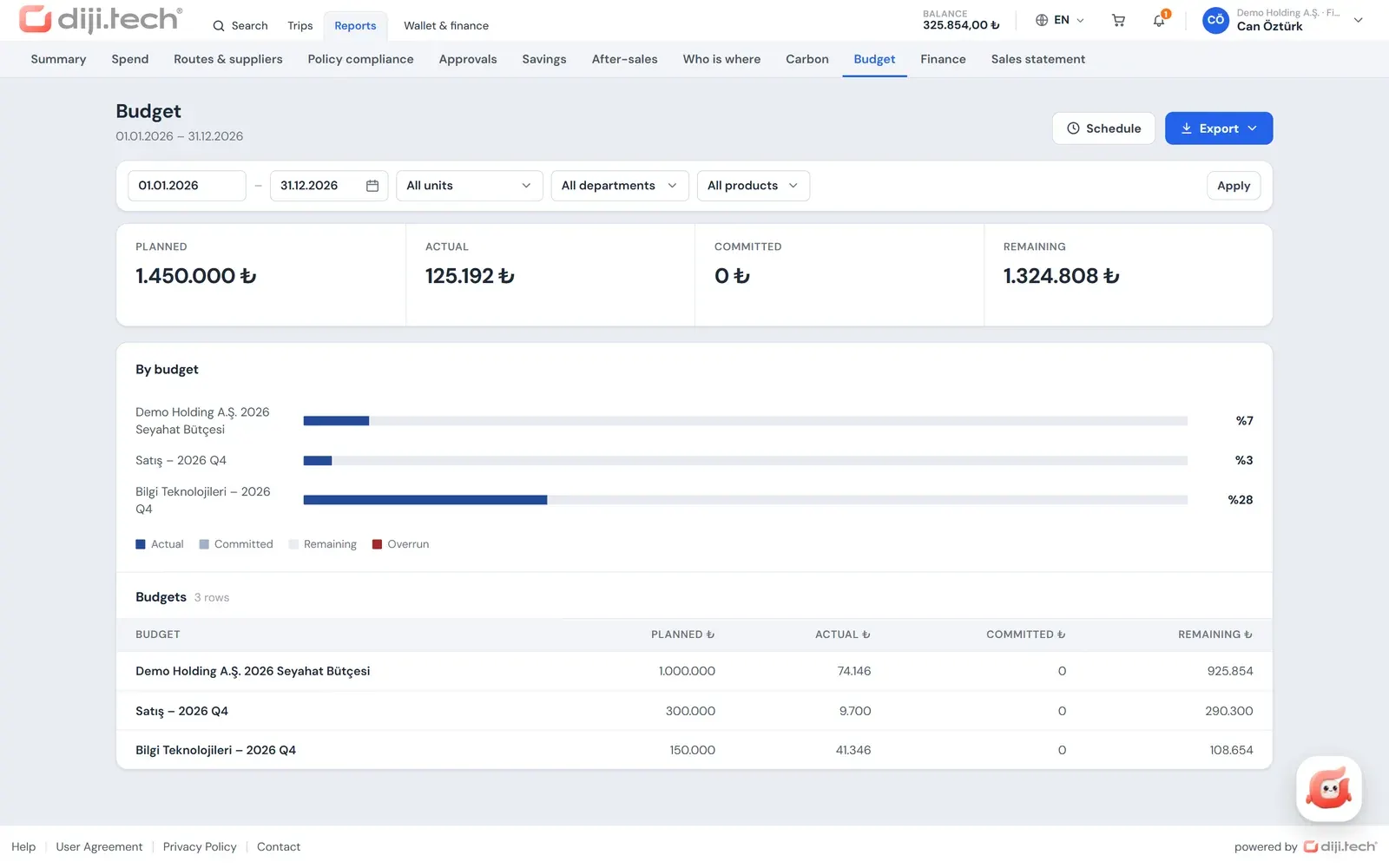
In the Kurumsal.pro portal tracking happens in three places. Budget usage bars appear on the dashboard of the company admin and finance roles. The approver sees the planned, committed, actual and remaining amounts of the budget a request affects in the request detail before deciding. The budget report in the Reports section shows the whole period and can be exported as Excel, CSV or PDF; reports can also be emailed monthly or weekly. The report options are listed on the corporate travel reporting page.
How is a travel budget set up in a corporate portal?
In the Kurumsal.pro portal, which an agency opens to its corporate clients, the company administrator defines the budget. The fields of the template above map directly to settings in the portal.
- For whom: department, company or branch.
- Period: month, quarter or fiscal year.
- Products: all products or selected products.
- Action on overrun: Inform, Ask for a reason, Send for approval or Block.
- Ledger: an amount sent for approval is deducted as a commitment; it is released on rejection, expiry or cancellation; it moves to actual on purchase; a refund returns to the budget.
The budget check runs when the request is submitted. If the cart exceeds the budget, the employee's button may read "Submit for approval" instead of "Buy", and whatever the chosen overrun rule requires is applied. Budgets are not deleted; they are archived when needed.
There are limits you should know about too: there is no currency choice for budgets in the interface, and budgets are held in Turkish lira. No automatic warning email is sent when budget thresholds are approached; tracking happens through the dashboard, the approval detail and the reports. There is no cost centre or project code breakdown. The whole budget feature is described on the travel budget control page.
How do budget and travel policy work together?
Travel policy sets the limit of a single trip, and the budget sets the limit of a unit's total for the period. The policy says "this hotel exceeds the nightly limit", and the budget says "the amount this department set aside for this quarter is running down". Working together, they also make visible the trips that each stay within policy yet exceed the ceiling in total.
So when preparing a budget, use the limits in the policy as inputs to the estimate, and when you update the policy, account for its effect on the budget. How policy rules are defined is on the travel policy software page. To see how the unit and period structure of your template maps onto the portal with your own example, request a demo session.
Frequently asked questions
What period should a travel budget cover?
Most companies approve an annual budget for the fiscal year and track it by quarter or month. For companies whose travel peaks seasonally, splitting the annual ceiling into quarters prevents the money running out early in the year.
Should a travel budget be held per department or per company?
Hold it in the unit that makes the spending decision. A department budget is common for heavy travelers such as sales and project teams; a company or branch budget is common in multi-company structures. In the Kurumsal.pro portal a budget can be defined for a department, company or branch.
What is a cost centre, and is it needed for a travel budget?
A cost centre is an organizational unit in which costs are collected in accounting; it may be the same as a department but does not have to be. It is not required for a travel budget, and many companies are content with a department breakdown. The Kurumsal.pro portal has no cost centre field and no cost centre report; budgets and reports work by department, company or branch.
Should a request awaiting approval be deducted from the budget?
Yes, but as a commitment, not as actual spending. If pending requests are not set aside as commitments, the same remaining amount can lead to several requests being approved at once. When a request is rejected, expires or is cancelled, the commitment is released.
If the budget is exceeded, can travel not go ahead?
That is the company's decision. An overrun can be shown for information only, a reason can be requested, the request can be sent for approval, or the purchase can be blocked. In the Kurumsal.pro portal these four options are defined per budget and the check runs when the request is submitted.
How is budget usage tracked?
In the Kurumsal.pro portal the manager dashboard shows budget usage bars, the approval detail shows the planned, committed, actual and remaining amounts of the budget a request affects, and the reports include a separate budget report. Reports can be exported as Excel, CSV or PDF.