- Corporate airline code
- A corporate airline code identifies a company's airline agreement in a flight search. In Kurumsal.pro a company-specific THY corporate code is added to flight searches, and branches inherit the parent company's code.
- Also known as: corporate code, corporate deal code, airline agreement code, THY corporate code, corporate fare code, corporate discount code
A corporate airline code is the code that tells a reservation system about a company's corporate agreement with an airline. When it is added to a flight search, the airline knows that the person searching belongs to a company with an agreement and can offer the fares or benefits the agreement covers. The airline alone decides which benefit the code provides and under what conditions it applies.
How is a corporate airline code obtained?
A corporate code comes from the company's agreement with the airline or from joining the airline's corporate programme. Applications, eligibility conditions, and the fares and benefits provided depend on the airline's own programme rules and can change over time. It is therefore always best to learn the current terms from the airline's official corporate programme page or its corporate sales team.
The travel agency's role in this process is to use the code the company holds in the right booking channel. If the code is entered in the wrong place, or not at all, the traveller searches at standard prices even though an agreement exists.
How does a corporate code work in Kurumsal.pro?
In Kurumsal.pro the agency enters each company's THY corporate code on the General information tab of the company detail. Once entered, it is added automatically to the flight searches that company's staff make in the portal. Branches in the company tree inherit the parent company's code, so a separate entry for each branch is not needed.
| Topic | How it works in Kurumsal.pro |
|---|---|
| Supported airline | Turkish Airlines (TK) only |
| Connection used | Turkish Airlines NDC connection |
| Who enters the code | The agency, on the company record |
| Branches | Inherit the parent company's code |
| Searches it applies to | Staff searches in the portal and agency searches on behalf of the company |
The code is added to a search only through the Turkish Airlines connection. It is not applied to THY results that arrive through a GDS or a consolidator, and the corporate codes of other airlines are not supported today. The details of the connection are on the Turkish Airlines NDC integration page, and the concept of NDC is explained in the NDC entry.
Is the code used when the agency sells on behalf of a company?
Yes. When agency staff select a company in the top bar of the panel and make a sale on behalf of the company, the search runs with that company's price layer and its THY corporate code. The result an employee finds in the portal and the result an agency representative finds for the same company therefore rest on the same agreement.
What is the difference between a corporate code and a loyalty number?
The corporate code identifies the company's agreement, while the loyalty number identifies the traveller's personal membership. One is added to the search and the other to the booking. In Kurumsal.pro both work automatically: the code comes into the search from the company record, and the THY Miles&Smiles number in the employee's profile is sent with the flight booking.
Other loyalty cards can also be stored in an employee's profile; automatic sending is done today for the Miles&Smiles number. A company administrator can flag specific airlines as banned in the travel policy, but there is no separate "preferred airline" policy rule.
What should an agency check when entering a corporate code?
When the code is entered at the right company and the right level, it works for all units in one step. Checking the following points during setup reduces price complaints later:
- Confirm with the company, and with the airline if needed, that the code is valid and which company name it was issued to.
- Enter the code at the top level of the company tree, on the company that owns the agreement; branches inherit it from that record.
- Check that the Miles&Smiles number is filled in on the employee's profile; the number reaches the booking from there.
- Update the company record when the scope of the agreement changes or the code is renewed.
Does a corporate code always lower the price?
No, there is no guarantee. The effect of the code depends on the corporate fare the airline defines for that route, date and class. In some searches the agreement fare may be below the standard price, and in others there may be no difference. Kurumsal.pro only adds the code to the search through the right connection; the fare is determined by the airline. For the whole flight flow, see the corporate flight booking page.
Screens
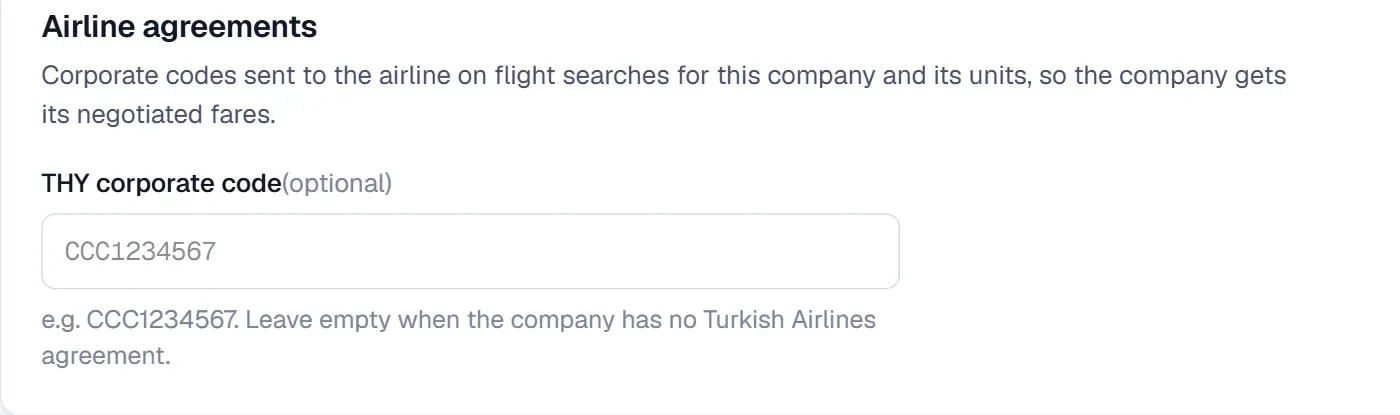
Screens are taken from the DIJI.TECH corporate portal and agency panel and show sample data.
Frequently asked questions
What is a corporate airline code for?
The code tells the airline that the person searching belongs to a company with an agreement. The airline can then offer the fares or benefits covered by the agreement in that search. Which benefit is provided depends on the airline's programme terms.
Which airlines' corporate codes does Kurumsal.pro support?
Only the Turkish Airlines (TK) corporate code is supported today. The code is added to a search through the Turkish Airlines connection; the corporate codes of other airlines are not supported today.
Do branches need a separate code?
No. When the code is entered on the parent company's record, branches inherit it. This way the staff of every unit under the same agreement search with the same code.
Who enters the corporate code?
The agency enters the corporate airline code on the General information tab of the company detail. The code itself comes from the company's agreement with the airline; Kurumsal.pro does not generate codes or make agreements with airlines.
Is a corporate code the same as a Miles&Smiles number?
No. The corporate code identifies the company's agreement, while the Miles&Smiles number identifies the traveller's personal loyalty membership. In Kurumsal.pro the corporate code is added to the search, and the Miles&Smiles number in the employee's profile is added to the flight booking automatically.
Related pages
Last updated: