- Traveler locator report
- A traveler locator report lists, from confirmed bookings, the employees currently travelling, their city, accommodation and return date. It does not use device location or GPS tracking.
- Also known as: traveler locator, traveller locator report, who is where report, travelers on the road report, employee travel location report
A traveler locator report lists, from a company's confirmed travel bookings, which employees are travelling at a given moment, which city they are staying in and when they return. In Turkish it is called "kim nerede raporu" ("who is where report"). The source of the report is reservations; it does not take location information from an employee's phone or from a tracking device.
What does a traveler locator report show?
The report shows who is travelling and where they should be, according to bookings. In Kurumsal.pro the top of the report has summary indicators, and below them a person-level table.
| Section | Content |
|---|---|
| Summary indicators | Number of employees currently travelling, abroad and flying today, and the distribution by city |
| Person row | Full name, department, city, accommodation, return date, phone |
This information gives a fast first answer to "who do we have there?" when an incident occurs in a city. The phone column shows the contact person on the same row.
Is a traveler locator report location tracking?
No, a traveler locator report is not location tracking. The information comes only from confirmed bookings. The report does not show an employee's live location, GPS data or the real-time status of a flight. If an employee changes plans outside the booking, for example by leaving the hotel early or moving to another city, that change does not show up in the report.
This limit does not reduce the report's value, but it defines how it should be used. The report answers "where was each person planned to be"; for "where are they now", direct contact with the employee is needed.
Who sees the report in Kurumsal.pro?
The traveler locator report is one of the 11 reports in the portal your agency offers its corporate clients. Roles with report viewing permission open it; only a role with finance permission alone does not see this report. The report is always narrowed to the scope of the person opening it.
- A manager scoped to a department sees only that department's trips.
- A manager scoped to the whole company or the whole organisation sees a wider list.
- The report is exported as Excel, CSV or PDF, and a period of up to 370 days can be selected.
- A scheduled report email can send it to recipients monthly or weekly, each with their own scope.
All the reports and the permission split are on the corporate travel reporting page, and scheduled delivery is covered in the article on automated travel reporting.
How is the report used in an emergency?
When an incident affects transport or safety in a city, the report is the starting point of the first checklist. A suggested order of use:
- Open the report and look at the "currently travelling", "abroad" and city indicators.
- From the person rows, identify the employees whose accommodation shows in the affected city.
- Reach these people on the number in the phone column and confirm their actual situation.
- If needed, export the list as Excel or PDF and share it with the relevant teams.
Because the information in the report rests on bookings, the third step, direct confirmation with the employee, should not be skipped.
What other information supports the report?
The report becomes more useful together with two other records in the portal. The first is the emergency contact in the employee's profile, which the employee maintains on the My Profile screen. The second is the risky-country rule in the travel policy: the company administrator can flag certain countries, and a travel request to those countries is blocked, sent to approval or only flagged as out of policy, depending on the outcome set for the rule. The settings for the rule are on the travel policy software page.
What is the difference between this report and duty of care?
A traveler locator report is a list of reservations, while duty of care is the whole of an employer's obligations toward an employee on a trip. The report is not presented as a tool for fulfilling that obligation and is not duty of care (employee safety) software. The employer's obligations are assessed under a separate legal framework. The general framework is covered in the article on duty of care in business travel.
Screens
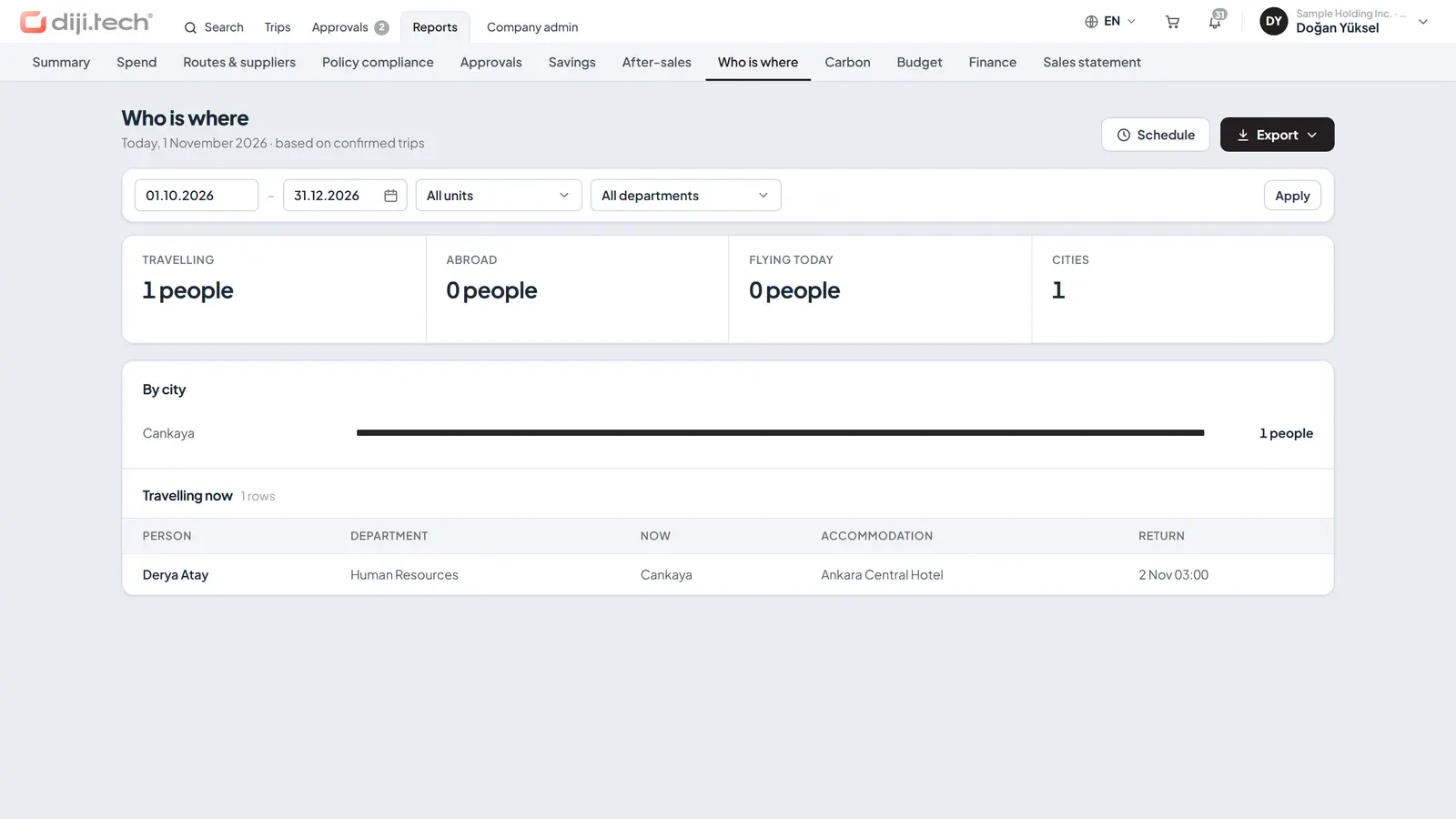
Screens are taken from the DIJI.TECH corporate portal and agency panel and show sample data.
Frequently asked questions
What is a traveler locator report for?
The report helps you quickly see which employees are travelling at a given moment and where they are staying. When an incident occurs in a city, it is the starting point for identifying employees who have bookings there.
Does the report show an employee's live location?
No. The report takes its information from confirmed bookings. It does not monitor the employee's phone location, GPS data or live flight status. A change made outside the booking does not show up in the report.
Who can see the traveler locator report?
Roles with report viewing permission open the report. Each user sees only the employees within their own role scope; for example, a manager scoped to a department lists only that department's trips.
Is the traveler locator report a duty of care tool?
No. The report is a list based on confirmed trips and is not duty of care software. The employer's obligations toward an employee on a trip are assessed in a separate framework; the topic is covered in the employee safety article on the blog.
Related pages
Last updated: